What's New in Diagrid Catalyst: MCP Server Governance, Workflow History Archiving, and a Redesigned Console
Diagrid Catalyst now controls which MCP servers and tools each agent can reach, and separates archiving from purging so you keep required workflow history and still reclaim database space.

Tony Graham
Director, Product Marketing
As agents connect to more tools and workflows run at higher volume, the hard questions move from being about capability and start being about control. Which agents have access to which tools on an MCP server. How much execution history you carry, and for how long. And how to have a UI that works well for developers as well as operators.
A running agent can now reach systems like GitHub and Slack through MCP, so someone has to decide which servers and which tools each agent is allowed to use. A busy workflow deployment writes a large amount of execution history, so someone has to decide how long to keep it and how to reclaim database space without losing records the business is required to hold. And the UI console has to do two jobs at once: build agents, MCP Server and workflows, and govern them.
This month's update covers these. Let's dive in.
Govern which MCP servers and tools your agents can reach
Agents are only as useful as the tools they can reach. MCP has become the common way to connect an agent to those tools, and the set of available servers keeps growing, from GitHub and Slack to many others. Broad access makes agents more capable and also it also widens what can go wrong. An agent that can read a repository can often write to it. An agent that can post to Slack can often post far more widely than intended. Without central control, each project configures its own servers and its own credentials, and no one can answer a basic question: which agents can reach which tools.
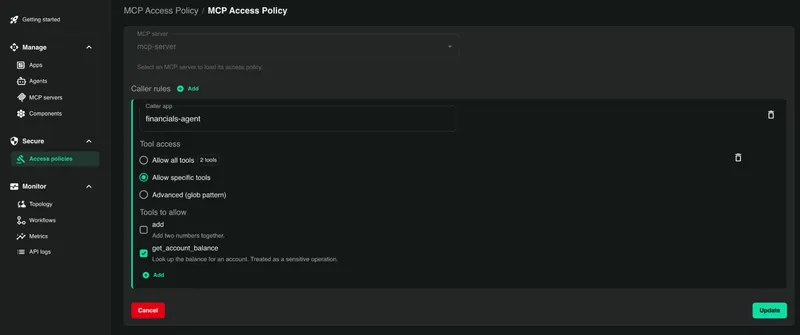
Diagrid Catalyst now closes that gap. Platform teams manage the MCP servers their agents can use and apply granular access policies to control which agent can talk to which MCP server and tool. Agents connect through Catalyst using any standard MCP client, so there is no custom SDK to adopt, and the credentials for each server are held as managed secrets rather than living in application code or environment files.
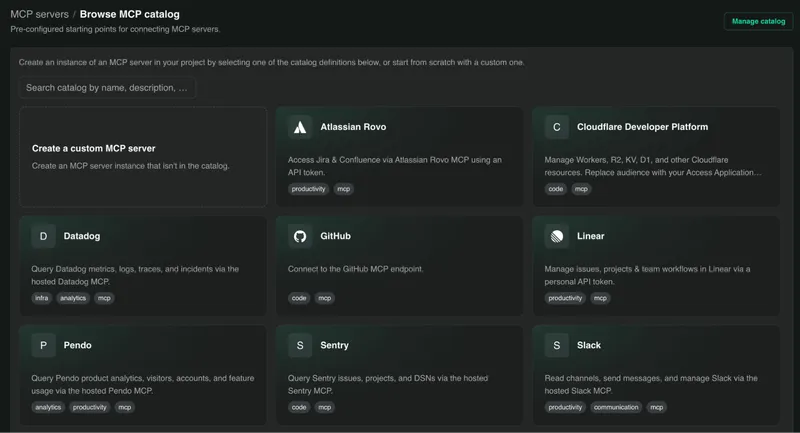
An org-wide catalog holds pre-configured servers such as GitHub and Slack, ready for projects to use. You can leave the catalog open, or restrict a project to approved entries only, so a team cannot point an agent at a server that has not been vetted. Authorization goes down to the level of the individual tool call. An agent can be allowed some tools on a server and denied others, so a GitHub agent might read issues and comment on them while being blocked from deleting a branch. All of this is managed from a central location using UI and a CLI, so governance is enabled for a person reviewing a screen as well as in a scripted, repeatable process.
Read our latest post Who Can Reach Your MCP Servers? Governing MCP Access Across the Enterprise for a deeper dive.
Archive workflow history and reclaim database space safely
A workflow that runs thousands of times a day leaves a long record behind it. Every execution stores its history so it can be inspected, resumed, and audited, and that history is what makes durable execution reliable. Over months, at high volume, it also becomes a large and growing store that costs money to keep and eventually weighs on the database.
The tension is between retention and space. Compliance and audit rules require keeping records for a defined period. Cost and performance push toward clearing old data. Deleting history by hand to reclaim space risks removing something the business was required to keep.
Catalyst now separates the two actions so you can do both safely. You can export execution history to long-term storage by workflow type or by time range, with an integrity check that confirms the archive is complete and readable before anything else happens. This is done with a single CLI command for any workflow application referenced by its identity.
diagrid app create <my-appid> --archive-binding-name <my-binding> --archive-binding-type <my-archive-binding-type>Reclaiming database space is a second, deliberate step, and it is guarded: Catalyst only purges data that has already been archived successfully. History that has not been safely stored cannot be deleted, so a purge cannot quietly remove records you still need. When you need archived data again, you can import it back.
A console rebuilt around the work
The Catalyst console has been redesigned. Two personas spend their day in Catalyst with different goals. Developers are building agents and workflows and want to move quickly from idea to running code. Platform teams are managing access and governance across many projects and want to see and control what is deployed. The previous UI asked both groups to work through the same generic screens. The new one is shaped around what each is trying to do.
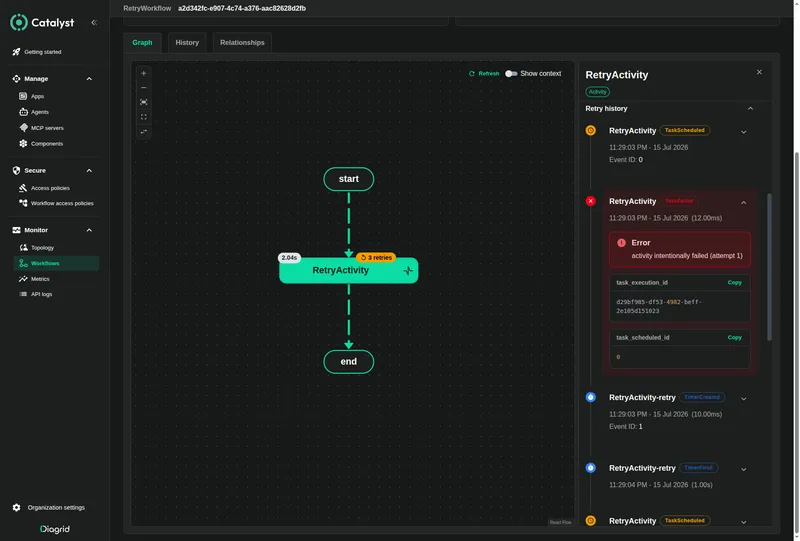
Navigation and the creation forms are simpler, and they lead with named resources. The console now starts from Agents, MCP Servers, and Apps. Workflow graphs are cleaner too. When an activity was retried, the graph used to show every attempt as its own node, which made a heavily retried workflow hard to read. Retried activities now collapse into a single node that shows the final status along with the retry details, so the shape of the run is easy to read and the full history is still available when you want it.
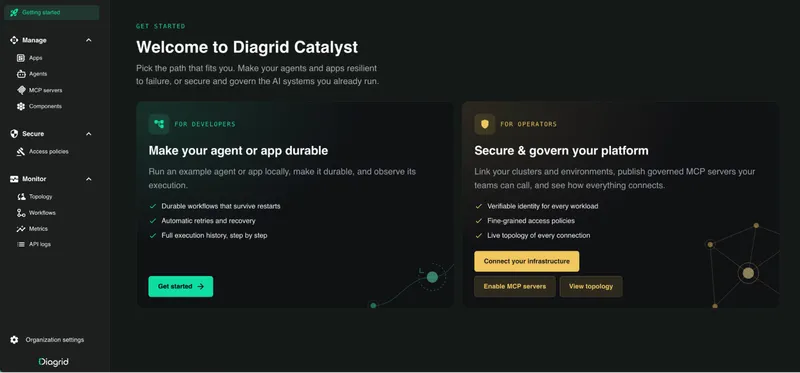
A new dark theme is available, and onboarding now follows the user, so a developer starting a first agent and a platform owner setting up governance each see a route suited to their work.
See it in action
You can govern which MCP servers and tools your agents reach, archive workflow history to long-term storage, and reclaim database space with a purge that only touches data already safely archived, all from a console built for both building and governing.
Try Diagrid Catalyst Cloud for free with our workflow quickstart, or talk to us about governance and retention for high-volume deployments.