Who Can Reach Your MCP Servers? Governing MCP Access Across the Enterprise
Enterprises rarely know which agents reach their MCP servers or what they can do. See how Diagrid Catalyst governs MCP access with per-tool, default-deny authorization.

Casper Nielsen
Software Engineering Team Lead
A developer on your payments team wants their agent to file issues in GitHub. They copy an MCP server URL from a README, paste in a personal access token, and ship it. It works.
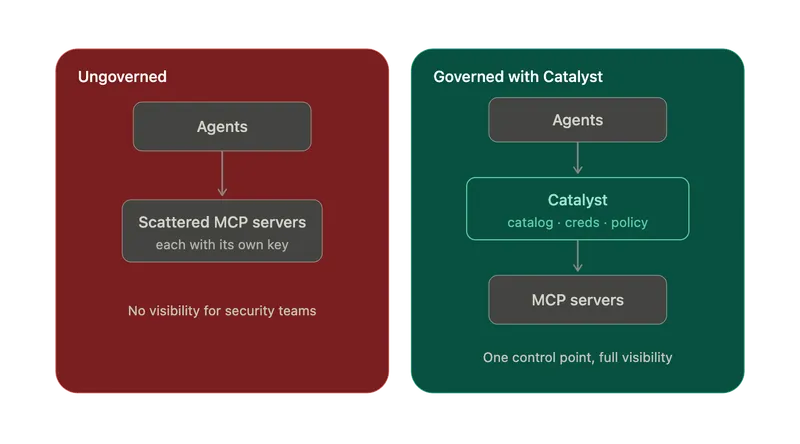
Now multiply that by every team running agents. You have dozens of MCP endpoints scattered across projects, each with its own hardcoded URL, transport choice, and long-lived credential. None of it is visible to the security department or platform teams.
This isn't hypothetical. As of April 2026, Censys counted more than 12,500 MCP servers reachable on the public internet, a figure that climbed past 21,000 within two weeks. A separate analysis found that roughly 40% of remote MCP servers expose their tools with no authentication at all. And GitGuardian's State of Secrets Sprawl 2026 report found 24,008 secrets sitting in MCP configuration files on public GitHub. This is a direct consequence of quickstarts that tell you to paste an API key into a config file. When an auditor asks "which agents can reach production systems, and what exactly are they allowed to do?", most organizations can't answer it.
This is the gap Diagrid Catalyst's MCP server governance closes. Operators get a single curated catalog, credentials that developers never touch, and authorization enforced down to the individual tool call. Developers keep pointing standard MCP clients at an endpoint and calling tools. The control moves to where it belongs, at the operational level, and the developer experience doesn't change.
MCP won. That's why it needs governing.
A year ago MCP was Anthropic's protocol. Today it's shared industry infrastructure: Anthropic donated MCP to the Linux Foundation's new Agentic AI Foundation in December 2025, with endorsement from OpenAI, Block, Google, Microsoft, AWS, and Cloudflare. Native MCP support now ships in OpenAI's Agents SDK, Google Cloud, AWS Bedrock AgentCore, and Microsoft Copilot. The public registry lists well over 10,000 servers.
Adoption ran ahead of security, and analysts are now naming the bill. Gartner expects task-specific AI agents in 40% of enterprise applications by the end of 2026 (up from under 5% in 2025) and, in April 2026, singled out MCP as a driver of rising GenAI security incidents. Forrester's Top Cybersecurity Threats for 2026 lists "AI identity sprawl" and rogue agents among the top emerging risks, and says the quiet part out loud: legacy IAM was never designed for the provenance verification and agent-specific authorization that MCP deployments now require.
The gap the protocol leaves open
To its credit, the MCP spec has hardened fast. Since mid-2025 it classifies servers as OAuth 2.1 Resource Servers, requires audience-bound tokens (RFC 8707), and flatly prohibits token passthrough since a server must not accept a token that wasn't issued for it. The next revision, due at the end of July 2026, is the largest since launch, adding an extensions framework and further authorization hardening.
But two things remain true, and they're the whole reason a governance layer exists:
- Authorization in MCP is optional and connection-level. The protocol governs whether a client may connect to a server. It says nothing about which tools that agent may call once connected. Even MCP's own Enterprise-Managed Authorization extension, which is the official answer for enterprises, built on IdP-issued tokens, centralizes connection consent and explicitly does not authorize individual tool actions at runtime.
- Every server has to get it right on its own. One 2026 analysis of more than 5,000 servers found only 8.5% implemented OAuth 2.1 at all. The rest lean on static API keys or nothing.
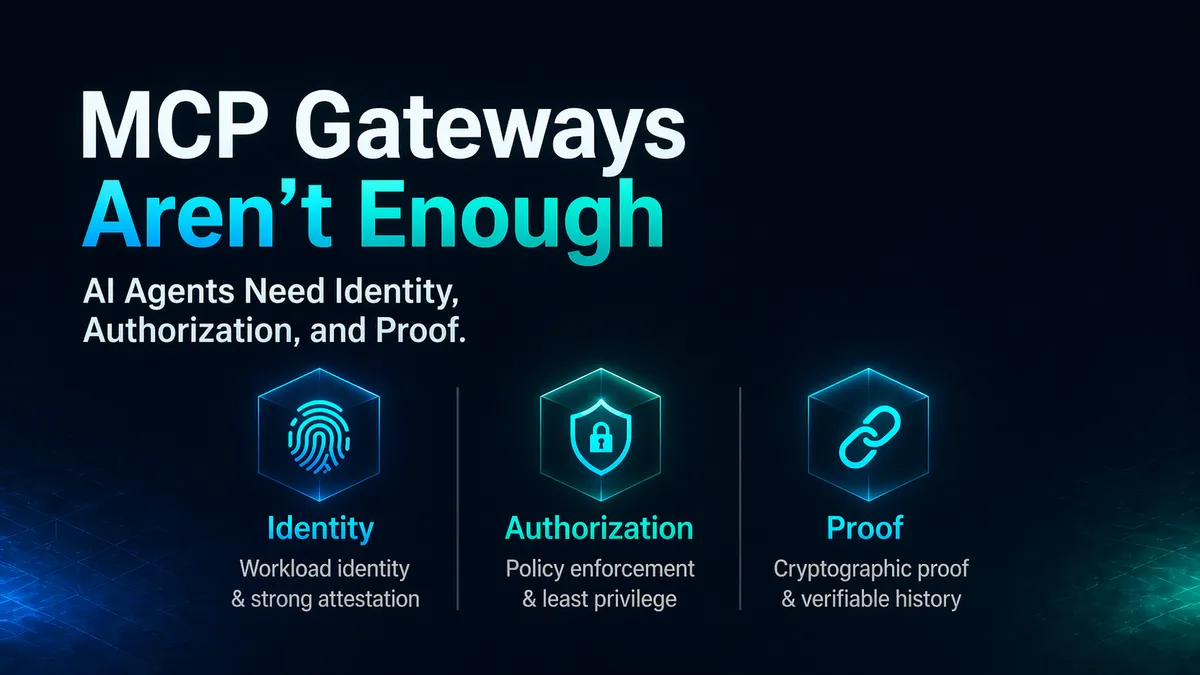
We argued earlier this year that MCP gateways aren't enough. Agents need identity, authorization, and proof, not just routing. The industry's own tooling now confirms the shape of the gap. MCP Server governance in Catalyst is how we close it.
A gateway answers one question: Can this agent reach the server? Governance answers the one that actually bounds the damage: What can it do once it's there?
What governance actually requires
For MCP in an enterprise, "governance" means five concrete things:
- A curated source of truth — one org-wide list of approved MCP servers, not per-team copy-paste.
- Separation of duties — operators decide what's available; developers consume it; roles enforce the line.
- Credential control — secrets managed centrally and never handled by application developers.
- Least privilege at the tool level — the ability to allow some tools on a server and deny the rest, per agent.
- Standard protocol — no bespoke SDK, existing agents and frameworks work unmodified and not forcing dependence on a particular vendor's SDK.
Let's dive in to understand how Catalyst delivers on each of these requirements.
The MCP catalog: one curated list, org-wide
The MCP catalog is an organization-wide list of pre-configured MCP server definitions that projects pull from. Catalyst ships with dozens of built-in entries for common servers. You'll find GitHub, Slack, and others, each pre-filled with its URL pattern, transport (Streamable HTTP or legacy SSE), and authentication method. Operators can add their own custom entries through the CLI.
# Browse and inspect what's approved for the org
diagrid mcpserver catalog list
diagrid mcpserver catalog get github-mcpserver

# Add a custom entry (interactively, or from a definition file)
diagrid mcpserver catalog add
diagrid mcpserver catalog add -f linear-mcpserver.yaml
One design decision matters here, and it's deliberate: the catalog is a list of definitions to pull from, not an org-level control plane. Instances, credentials, identity, and access policy all stay project-scoped. That keeps governance aligned with how teams already work in Catalyst where a project instantiates a catalog entry by supplying its own credentials, and Catalyst makes it available to the developers in that project.
Curating the catalog is an organization-level action. Only users with a global admin or global editor role can add, edit, or remove entries. Project-scoped users can browse and consume, but they cannot change what's approved. That's separation of duties, enforced by existing RBAC rather than a bolted-on approval workflow.
Authentication: supply a credential once, never again
Catalyst draws an explicit line between how a server authenticates and who gets to see the secret. Authentication is configured per instance, and it follows one of two paths:
- Bring your own IdP — federate to your existing identity provider (Google, Microsoft Entra, Auth0, and others) using OAuth 2.1 client credentials, in line with the spec's Resource Server model.
- Catalyst as IdP — Catalyst handles authentication and authorization with its native SPIFFE JWT Authentication, transparently under the hood.
In both cases, the operator supplies the credential value once, and Catalyst stores it securely. Developers never handle raw keys, and operators don't hand-assemble the underlying auth plumbing. Catalyst simply wires up the connection for them. Furthermore, teams that prefer to keep secrets in their own vault can still use explicit Catalyst secret-store references instead.
# Instantiate a catalog entry into a project, supplying this project's credential
diagrid mcpserver create github --from-catalog github-mcpserver \
  --header "Authorization:Bearer $GITHUB_TOKEN"
The token goes in at creation time and is never surfaced again. Rotation happens in one place. When someone leaves or a key leaks, there's a single control point, not a scavenger hunt across project repos, and not another entry in that 24,008-secret pile.
Authorization: per-tool, default-deny
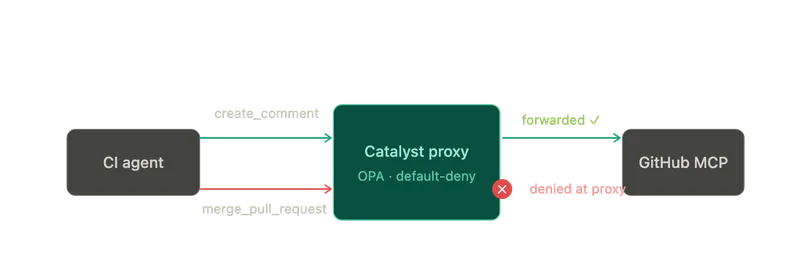
This is the part gateways and the protocol itself leave up to you. Routing traffic to an MCP server is not the same as controlling what an agent can do once it gets there. A GitHub MCP server exposes tools to read issues, comment, merge PRs, and manage repository settings. Your CI agent needs the first two. Hand it all four "just to be safe," and you've built a machine that a single poisoned issue title can turn against you: one prompt-injection in a comment it was only supposed to read, and the same agent force-pushes to main, disables branch protection, and rewrites the workflow that was supposed to catch it — no human in the loop, no alert, because every one of those calls was technically authorized. The tokens didn't leak. The agent just did exactly what it was allowed to do.
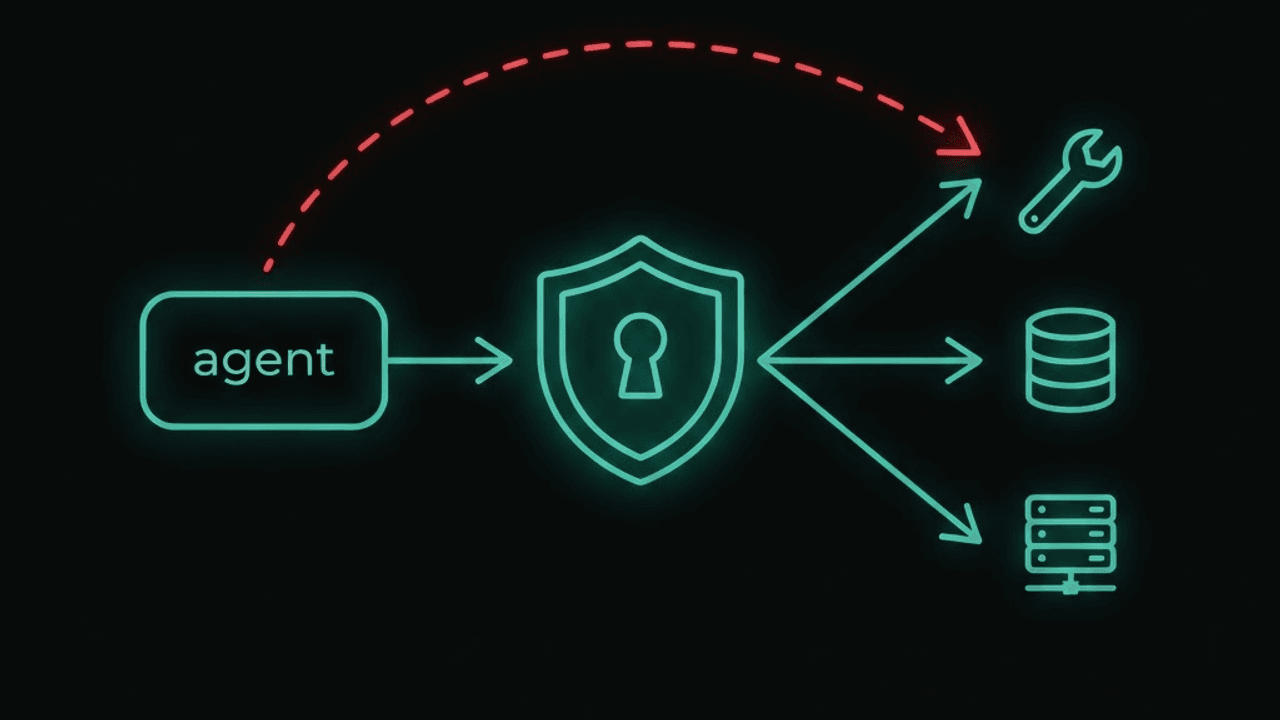
Coarse-grained ACLs can't express that, because the tool being called isn't part of the request URL and every call goes to the same endpoint. So Catalyst enforces authorization with OPA middleware that inspects the request and applies per-tool rules. The policy is compiled and enforced in-process with no separate OPA instance to run. Catalyst applies it as a transparent proxy before forwarding to the upstream server. Importantly, the agent's MCP client code is unchanged.
Policies are simple declarative files or set via CLI and are default-deny. Operators grant specific tools access to specific agents, and can test a decision before deploying it in production:
# See what tools the server actually exposes
diagrid mcpserver tools list github

# Grant the CI agent read + comment, nothing else
diagrid mcpserver access set github --appid ci-agent \
  --allow-tools ['list_issues','get_issue','create_comment']

# Keep everything else denied by default
diagrid mcpserver access set github --default deny

# Verify before you trust it
diagrid mcpserver access test github --appid ci-agent --tool merge_pull_request
# -> denied

diagrid mcpserver access get github    # human-readable review of the policy
This is the layer MCP's own enterprise auth extension explicitly doesn't cover, and it's where the real blast radius lives. Per-tool, default-deny authorization turns "this agent can reach GitHub" into "this agent can read and comment, and nothing it does can merge, delete, or reconfigure." Least privilege stops being aspirational. It's the default, it's granular, and it's testable.
What happens under the hood
When you create an MCP server, Catalyst wires up the runtime and access-control plumbing for you automatically: the server gets its own isolated, policy-enforced proxy endpoint with a default-deny policy attached. In other words, Diagrid Catalyst puts a proxy endpoint in front of every Model Context Protocol (MCP) server. You edit the policy to control which agents may call the server. Everything else is managed for you, and it isn't something you configure by hand or can accidentally delete.
The runtime path today builds on Catalyst's Dapr service invocation: when an agent calls the server, Catalyst matches the caller against the policy, and OPA middleware decides whether the call or the specific tool is allowed, before forwarding to the upstream server. A Catalyst-managed MCP endpoint speaks native MCP over HTTP, so from the client's perspective it's talking to a standards-compliant MCP server. On first launch, Catalyst requests the server's tools list and surfaces it in the UI and catalog, so operators can write policy against real tool names instead of guessing. In other words, Catalyst is running a full policy engine for you (OPA), which most MCP gateways do not provide. This means you can have much greater control over tool access with parameter-level injection. For example, saying "only call this tool if the amount is under $5k". This makes it very powerful for control by operators.
Standard protocol: two experiences, one platform
For developers, nothing exotic changes. Point any standard MCP client or agent framework at Catalyst instead of the upstream server, authenticate with its Catalyst API token, and call tools. No Catalyst-specific SDK, no routing details to memorize, no raw credentials to manage. Durable agents that model each tool call as a workflow activity are supported too, with the same governance applied whether the caller is a plain MCP client or a durable agent.
For operators, the whole surface exists in both the UI and the CLI, and it's declarative-friendly for GitOps:
diagrid mcpserver list                 # what's enabled in this project
diagrid mcpserver disable github       # cut access instantly, without deleting
diagrid apply -f mcpservers.yaml # manage it all as codeenable/disable is worth calling out for incident response: when the next MCP CVE lands, and 2026 has produced a steady stream of them, you can pull an agent's access to a server immediately in one command, without tearing down the resource or its policy, and restore it just as fast.
The big takeaway: choosing an MCP server governance tool
If your agents are reaching MCP servers today, three questions decide whether that's governed or just working:
- Is there one approved list, and who controls it? In Catalyst, it's the org-wide catalog, curated by admins only.
- Who can see the credentials? No one on the application side — supplied once, stored as a secret, rotated centrally.
- What can each agent actually do? Exactly the tools you granted, default-deny, testable before rollout, the per-tool authorization the protocol still leaves to you.
Ad-hoc MCP gets you the first demo. Governed MCP gets you to production in an enterprise.
Remember the developer from the top, the one who pasted a PAT and shipped it? Under governance, nothing about their workflow changes: they point an MCP client at an endpoint and call tools. Everything else does. The endpoint is a Catalyst proxy, they authenticate with a Catalyst token instead of a raw PAT, the real credential was set once by an operator and they never see it, and a merge_pull_request call is denied before it leaves the proxy. Same workflow, radically smaller blast radius.
Try it out
If you want to see this in action or try it out yourself, here is where you can go.
- Watch the Diagrid Catalyst MCP Access Controls explainer video
- Read: Model context protocol docs
- Try: A working example at github.com/diagridio/catalyst-quickstarts
Sources referenced
- Anthropic — Donating MCP to the Agentic AI Foundation (Dec 9, 2025)
- Censys — MCP Servers on the Internet (Apr 2026)
- GitGuardian — State of Secrets Sprawl 2026
- Gartner — GenAI security-incident predictions (Apr 9, 2026); task-specific agents forecast (Aug 26, 2025)
- Forrester — Top Cybersecurity Threats for 2026 (Jun 10, 2026)
- InfoQ — MCP Enterprise-Managed Authorization (Jul 6, 2026)
- Model Context Protocol — Authorization spec, revision 2025-11-25; 2026-07-28 release candidate
- Diagrid — Why MCP Gateways Are Not Enough (Apr 22, 2026)