Human-in-the-Loop Workflow Operations in Diagrid Catalyst
Find, inspect, and safely intervene on workflows that are running, failed, or waiting on an external event, using workflow operations in Diagrid Catalyst.

Bilgin Ibryam
Principal Product Manager
Find workflows that are still running, failed, running longer than expected, or waiting on an external event, then inspect where they are blocked and intervene safely.
When a workflow is still running after 30 minutes, is it healthy, slow, stuck, or waiting for someone to act? In production, those states can look too similar. A running workflow may be processing normally. It may be blocked on a failed activity. It may be waiting for an approval, callback, policy decision, or signal from another system. From the outside, all you may know is that the execution has not completed.
Diagrid Catalyst makes that operational state visible. You can find workflows that are still running, failed, running longer than expected, or waiting on an external event. From there, you can inspect exactly where each workflow is paused or failing, understand what is blocking progress, and intervene when the normal path does not move it forward.
In workflow applications, human-in-the-loop steps show up as operational decision points:
- Approvals: a large order, refund, payout, contract, or access request needs a reviewer to approve it.
- Policy and compliance checks: a regulated action needs sign-off before the workflow can continue.
- Sensitive or irreversible actions: legal, financial, medical, HR, production, or customer-facing actions need a person before they are committed.
- Escalations: high-value or ambiguous cases are routed to someone who can make the final decision.
- Production operations: a deploy, data repair, customer remediation, or account change needs an operator to confirm the next step.
The same pattern also appears in AI agents, with additional reasons to pause for human input:
- Goal clarification: the request is ambiguous, missing context, or conflicts with available data.
- Tool approval: an agent wants to call a tool that changes customer data, moves money, opens a ticket, deploys code, or touches production.
- Policy exceptions: the agent is outside its allowed policy, confidence threshold, or risk boundary.
- Exception handling: the agent is blocked, unsure, or needs a human to choose among recovery paths.
- Quality review: generated output needs to be checked before it is sent to a customer or committed to a system.
The pause-and-wait primitive is not the hard part for the workflow engines. Durable workflows can pause, persist their state, wait for an external event, survive restarts, and resume from the same step when the event arrives. The hard part is operating these workflows in production. A workflow waiting on a person or external system is still running. It has not failed, but it may still need attention. Across a production environment, the operator's question is not only "how do I raise an event?" It is:
- Which workflows are failed?
- Which workflows are running longer than expected?
- Which workflows are waiting on an external event?
- Where exactly is each workflow paused or failing?
- What event, timer, or activity is blocking progress?
- What is the safest intervention, and who is allowed to perform it?
That is the workflow operations problem Diagrid Catalyst addresses.
Workflow operations and troubleshooting
Once workflows are in production, the question becomes whether the team can manage that wait safely. A business process owner, developer, or SRE may need to understand why work is not moving forward. The workflow may have failed. It may still be running, but taking longer than expected. It may be paused on one or more external events. Or it may be waiting on a decision that should have arrived through another system.
The signal may come from a reviewer, another service, a callback, or an operations runbook. Operators do not always own that path, but they still need to see where workflows are waiting and decide whether the next action is to wait, notify the owner, raise an event, cancel, or rerun.
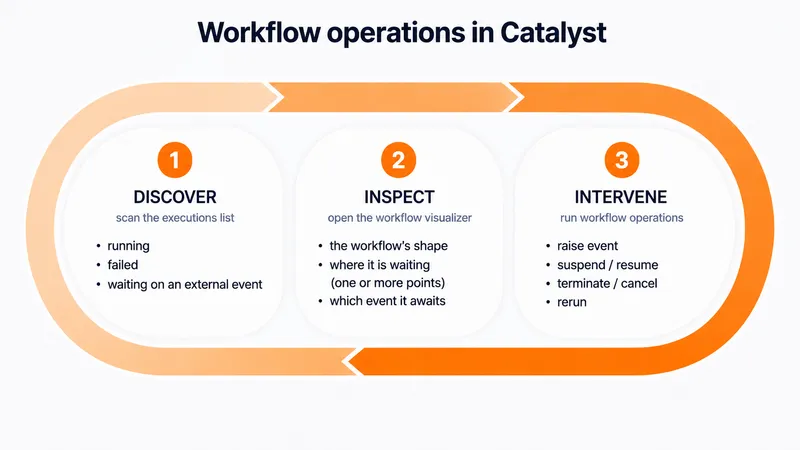
Diagrid Catalyst gives teams a troubleshooting loop for these cases:
- Discover workflows that need attention.
- Inspect the execution path and the current wait or failure point.
- Intervene with the least risky action, when the user has permission to do so.
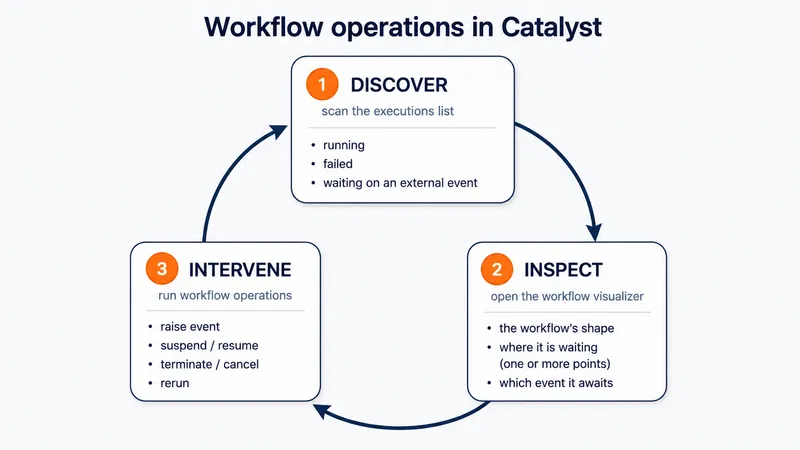
The goal is to make long-running workflow execution visible and actionable from the operational view, before teams have to reconstruct state from logs or trace the source of a missing signal.
Example: a workflow waiting for approval
Consider an order approval workflow. It records the order, then branches on the amount. Small orders continue automatically. Orders above a threshold pause and wait for a manager decision. The wait is bounded by a timer so the workflow can escalate instead of waiting forever.
A workflow like this spends almost all of its life idle. Waiting two days for a human is the same problem Unix solved for sockets — efficient waiting, not busy polling — except the wait now outlasts any process that could hold it in memory.
from dataclasses import dataclass
from datetime import timedelta
import dapr.ext.workflow as wf


@dataclass
class Order:
    id: str
    amount: float


def order_approval(ctx: wf.DaprWorkflowContext, order: Order):
    yield ctx.call_activity(record_order, input=order)

    if order.amount <= 500:
        yield ctx.call_activity(process_order, input=order)
        return "auto-approved"

    yield ctx.call_activity(request_manager_approval, input=order)

    approval_event = ctx.wait_for_external_event("manager_decision")
    timeout_event = ctx.create_timer(timedelta(minutes=30))
    winner = yield wf.when_any([approval_event, timeout_event])

    if winner == timeout_event:
        yield ctx.call_activity(escalate_order, input=order)
        return "escalated"

    decision = approval_event.get_result()
    if decision.get("approved"):
        yield ctx.call_activity(process_order, input=order)
        return "approved"

    yield ctx.call_activity(cancel_order, input=order)
    return "rejected"
The workflow waits on the manager_decision event and a timer at the same time. If the event arrives first, the workflow branches based on the payload. If the timer fires first, the workflow escalates.
In the expected path, the external system raises the event against a known workflow instance ID:
from dapr.clients import DaprClient

workflow_instance_id = "78c44622726e4f00b8fc3be6b7f2553"

with DaprClient() as client:
    client.raise_workflow_event(
        instance_id=workflow_instance_id,
        workflow_component="dapr",
        event_name="manager_decision",
        event_data={"approved": True, "by": "alice"},
    )
The same pattern applies to any process where a workflow needs an external signal before it can continue: refunds, access requests, deploy gates, compliance checks, customer responses, callback-driven integrations, and operational approvals.
The operational issue starts when that signal path does not complete. The expected event might not arrive. The workflow might be waiting in a child execution. More than one branch may be waiting on different events. Or the workflow might be doing exactly what it should do, but the team responsible for the next action does not know there is work waiting.
Catalyst helps operators find the affected execution, inspect its current state, and choose the right action.
Watch human-in-the-loop in action during our Dapr 1.18 release celebration.
1. Discover workflows that need attention
When you are troubleshooting workflows, the first job is to narrow the set.
Start from the executions list. Diagrid Catalyst lets you filter by operational signals such as app ID, workflow name, workflow version, status, duration, start time, end time, custom status, and whether the execution is awaiting external events. You can also investigate workflows by activity or node state when failures cluster inside a workflow.
This helps separate normal running workflows from workflows that may need attention:
- workflows that failed
- workflows that are running longer than expected
- workflows waiting on an external event
- workflows with activity-level failures or delays
- workflows scoped to a specific app, workflow type, or version
For external-event waits, Diagrid Catalyst makes waiting executions easy to isolate. An operator responsible for an environment can see every workflow instance currently awaiting an external event. A team that owns one workflow definition can scope the view to the executions that matter to them.
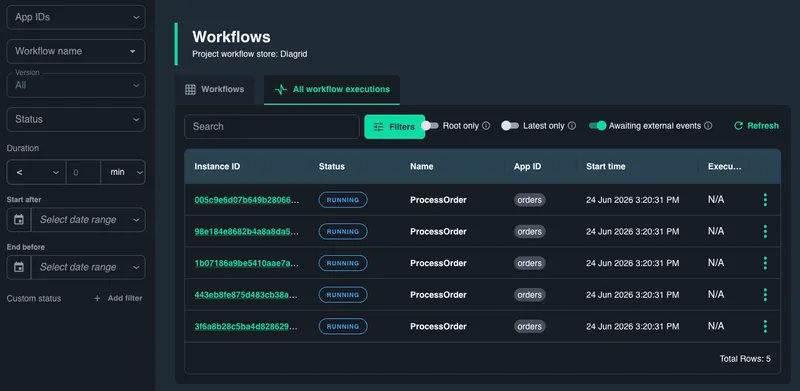
A waiting workflow is not necessarily broken. It may be doing exactly what the workflow code asked it to do. The operational question is whether the wait is expected, how long it has been waiting, and which event is needed to move it forward.
2. Inspect the workflow graph
After you find a waiting execution, open it in the Catalyst visualizer.
The graph shows the shape of the workflow, the path already taken, and the current state of individual nodes. Instead of treating the workflow as a flat status row, Diagrid Catalyst shows where execution is paused, which steps completed, which nodes failed, and how the workflow reached its current state.
This is the difference between knowing that a workflow is still running and knowing why it is still running.
From the graph, an operator can inspect:
- The exact node where the workflow is waiting.
- The external event name the node expects.
- Any timer or deadline associated with the wait.
- Whether the workflow is waiting on one event or multiple possible events.
- Failed nodes in the same execution, including error messages.
- Child workflows or branches where the actual wait may be happening.
This is useful beyond approvals. The same graph helps answer whether a workload failed because of an activity error, whether it is still progressing, or whether it has paused at a human decision point.
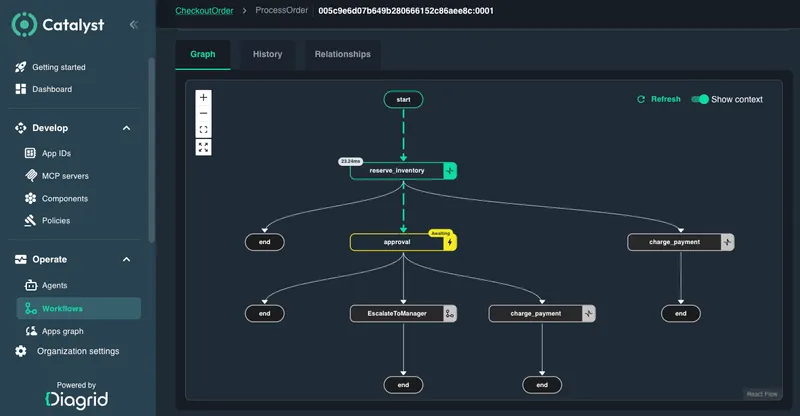
Once the operator understands the current state, the next step is deciding whether to act.
3. Intervene with permissions
Changing workflow state is an operational action. Viewing a workflow and modifying a workflow should not require the same access. Catalyst supports permissioned operations so teams can separate investigation from intervention.
The safest action depends on what the operator finds:
| What the operator finds | Possible action |
|---|---|
| The expected external event did not arrive, and the correct payload is known | Raise the external event directly from Catalyst |
| The request that triggers the external decision should be sent again | Rerun from the step that sends the request, when supported for that execution |
| The full process should be repeated from a clean state | Cancel or terminate the workflow, then rerun from the beginning |
| The workflow should not continue during an incident or investigation | Suspend the workflow, then resume it later |
| A dependency failed after earlier steps completed successfully | Fix the dependency, then rerun from the failed point |
Raising an event is useful when the operator has enough context to unblock the workflow manually. The operator selects the exact waiting execution, chooses the expected event, provides the payload the workflow code expects, and raises the event.
The workflow resumes from the waiting node. What happens next is still controlled by the workflow code. The workflow can continue, branch, compensate, escalate, or terminate based on the event data.
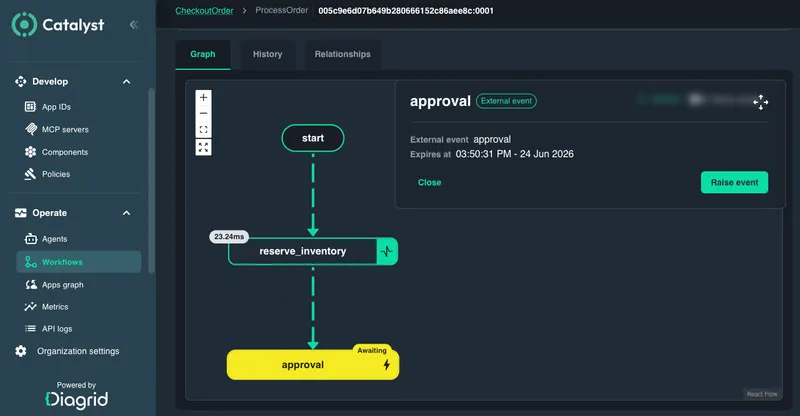
This turns intervention into a structured troubleshooting flow: find the waiting work, inspect the graph, then choose the least risky action.
Why this matters for Agents too
Dapr Agents are backed by durable workflows, so agent runs also produce workflow executions that operators can discover, inspect, and troubleshoot in Diagrid Catalyst.
That operational view becomes more important with LLM-driven agents. Agents can take execution paths that are hard to predict ahead of time. They may call different tools based on user input, pause for clarification, hit policy boundaries, wait for tool approval, or branch into exception handling.
A top-level status is not enough for that kind of workload. Operators need to see the actual execution path. Catalyst can show whether an agent-backed workflow is still making progress, waiting for a tool approval, blocked on a failed action, paused for review, or waiting on another system.
The same workflow operations loop applies: discover the run, inspect the graph, and intervene only when the normal path needs help.
Get started
- Workflow quickstart: run a workflow on Catalyst and inspect its execution.
- Recent Catalyst update: see the broader release context for workflow failure discovery, human-in-the-loop support, and self-hosted Catalyst.