What's New in Catalyst, Diagrid's AI Agent Platform: Agent Operations and Workflow Control
Catalyst now offers durable execution for 10 agent frameworks, an agent runtime registry, a live application graph, and workflow rerun, versioning, and search controls for production AI agents.

Bilgin Ibryam
Principal Product Manager
AI agent frameworks make it easy to prototype, but taking agents to production leaves failure recovery to your operations team. Catalyst shipped features to close that gap: durable execution for 10 agent frameworks, an agent runtime registry, a live application graph showing multi-agent communication, and major workflow operations controls. Together, these features let you discover running agents, inspect their execution, and manage long-running workflows in production.
Let's dive into the latest from Diagrid.
Discover, inspect and troubleshoot Agents
Agents are a core workload in Catalyst. This is where operators discover running agents, inspect their execution, and troubleshoot them in production.
Durable Execution for 10 Agent Frameworks
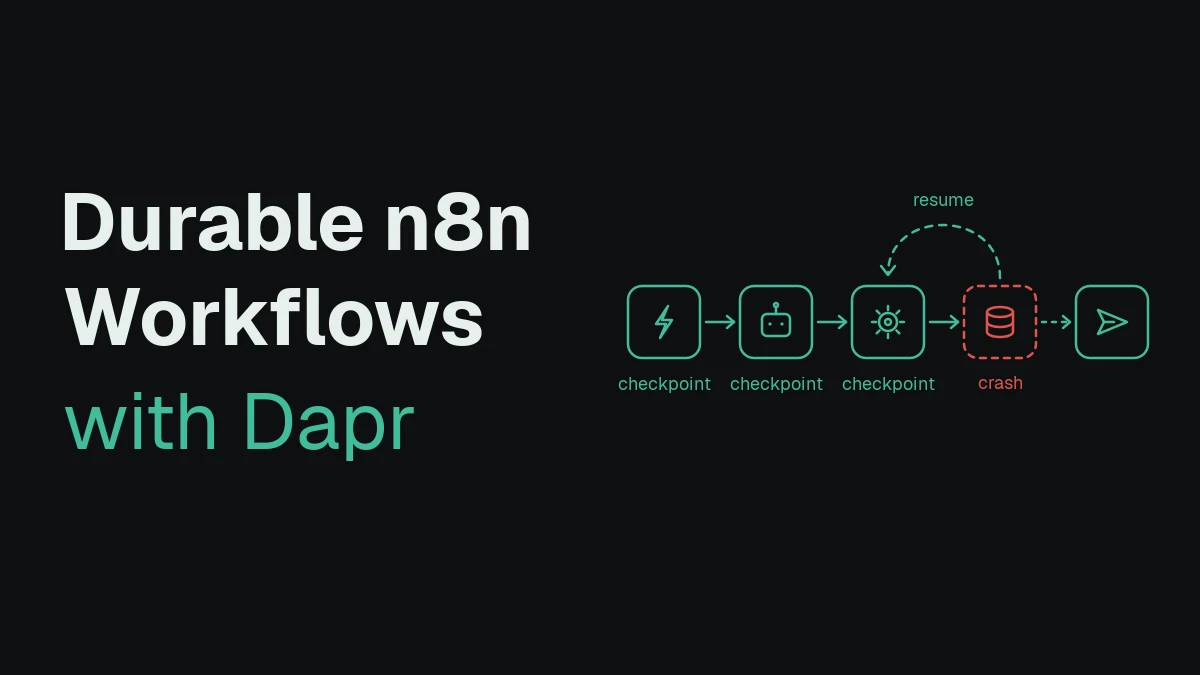
Most agent frameworks offer checkpointing, but checkpointing is not durable execution. Checkpoints save state and hand it back to you. You still have to detect failures, implement resumption logic, and protect against duplicate execution. The reliability burden stays with the developer.
The Durable Workflows for AI agents SDK extensions remove that burden entirely. Bring your existing agent framework code and get automatic failure detection, recovery from crashes, and state persistence across 10+ databases, in 5 lines of code or less. Your agent code stays the same. Catalyst handles the rest.
We released these integrations for 10 popular AI agent frameworks: LangGraph, Google ADK, Strands Agents, Microsoft Agent Framework, OpenAI Agents, CrewAI, Pydantic AI, Deep Agents, Deep Agents (Sub Agents), and Dapr Agents. Each tool call becomes a durable workflow activity. If your agent crashes mid-execution, it resumes exactly where it left off. Completed steps are not re-executed. This works for tool execution both inside and outside virtual sandboxes, which is particularly significant for the Deep Agents integration where the entire sandbox becomes durable. For the patterns this unlocks (durable tool calls, human-in-the-loop, long-running agents, fan-out/fan-in), see four durable agentic patterns.
Try the AI Agents quickstart →
Agent Runtime Registry
In multi-agent systems, discovery is a fundamental requirement: agents need to locate each other to collaborate, and operators need to find running agents to troubleshoot, inspect, or interact with them. Any agent using Dapr and the agent framework integrations automatically identifies and registers itself, making itself discoverable. This registry is exposed in Catalyst as the Agent Registry, giving you a live view of all running agents across your environment, with framework-specific icons so you can identify each agent's type at a glance.
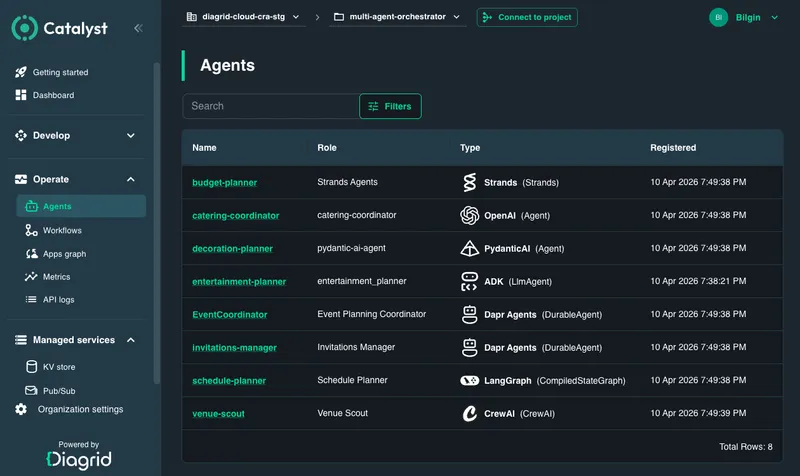
Select any agent to inspect its full runtime configuration:
- System prompt and model: see the prompt the agent is running and which model it is using
- Infrastructure: view the LLM connections, state stores, pub/sub components, and other Dapr building blocks the agent has access to
- Memory: inspect the agent's memory configuration
- Interaction: send prompts to the agent directly from the Catalyst console through Dapr's pub/sub integration, for testing and debugging without touching your code
- Execution graph: navigate into the agent's durable workflow executions and trace every reasoning step and tool call (see the Workflow Operations section below)
The registry gives you a runtime snapshot of every agent running in your environment and the ability to quickly inspect its configuration without adding any instrumentation to your code.
Apps Graph
As agents interact with each other, with services, and with infrastructure, often in ways that are not deterministic, understanding what is running and how it all connects becomes a challenge. The Apps Graph shows your application and agent interactions alongside their infrastructure dependencies in a single solution-level dynamically generated view.
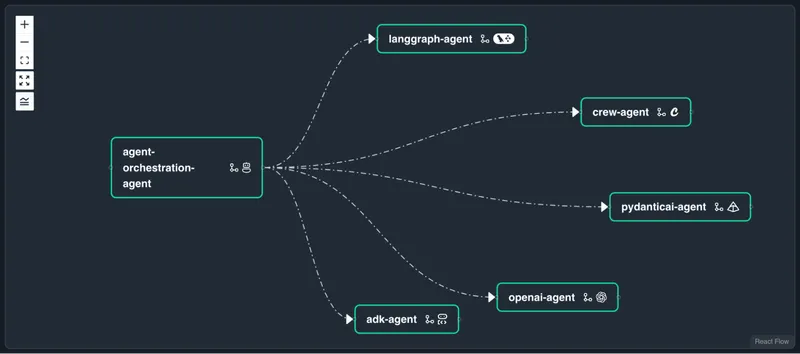
The graph shows how your applications and agents are connected to each other, whether through asynchronous pub/sub messaging (dashed lines), synchronous service invocation (solid lines), or durable workflow execution. Agents using the Dapr integrations are durable by default, and the graph renders how those durable agents call each other and invoke tools.
Select any application or agent to drill down into the next level of detail. For agents, you can see exactly what infrastructure they are using: memory stores, state stores, LLM providers, pub/sub brokers, and more. This makes it easy to understand not just the application topology, but the full infrastructure footprint of every agent running in your environment.
The graph is dynamically generated, built automatically from the actual running applications, agents, and infrastructure, and how they communicate with each other. It gives you a living architecture diagram of your solution as it actually runs, with no manual documentation required.
Workflow Operations
Workflows sit at the core of Catalyst, whether they power agentic systems or more traditional application flows. This is where operators monitor executions, intervene to recover from failures, troubleshoot issues, and manage long-running workloads in production.
Workflow Management
Workflows can fail. A database becomes unreachable, an external API is down, a credential expires, and the workflow stops at the step that depended on it. Historically, recovery meant starting the whole workflow over from the beginning and re-doing every step that had already succeeded. This is very painful since before restarting you would have to not only discover what has been done previously, but also apply the right compensation in order to restart from the beginning.
Catalyst provides workflow rerun, which is the ability to restart a workflow from a previous activity. You pick the point in the workflow to resume from (the failure step, the beginning, or any activity in between), optionally edit the input for that step, and the workflow continues from there. Completed steps before that point are preserved; only the remaining work gets executed.
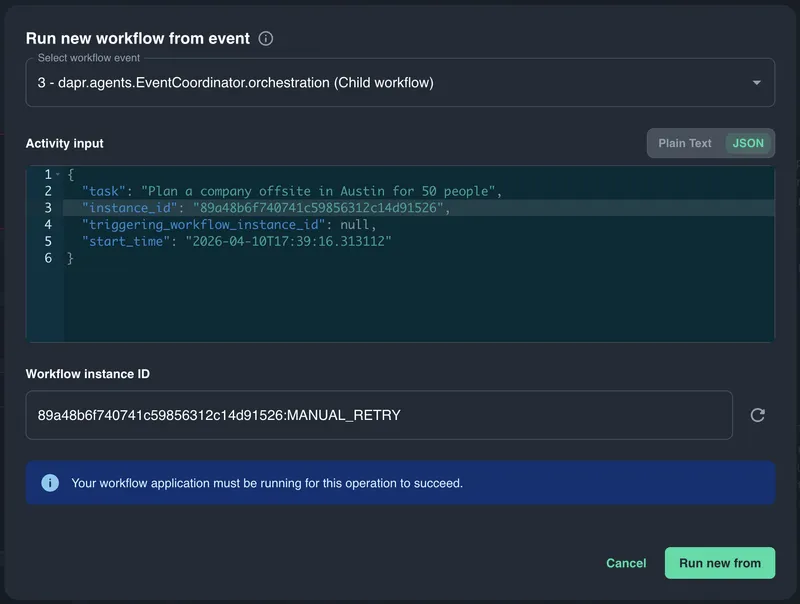
When a shared dependency goes down, it is rarely one workflow that fails. It's hundreds, all stuck on the same activity. Catalyst makes it easy to discover every workflow that failed at the same step and bulk-rerun all of them together, so recovery is a single action instead of hundreds of individual fixes.
Because every rerun creates a new workflow instance, Catalyst collapses reruns by default and surfaces only the latest run, with the full history a click away when you need it.
Alongside rerun, you can manage workflow executions directly from the Catalyst UI:
- Start new: kick off a fresh instance
- Suspend and Resume: pause and continue running workflows
- Terminate: stop a running workflow, with a recursive option that cascades to child workflows
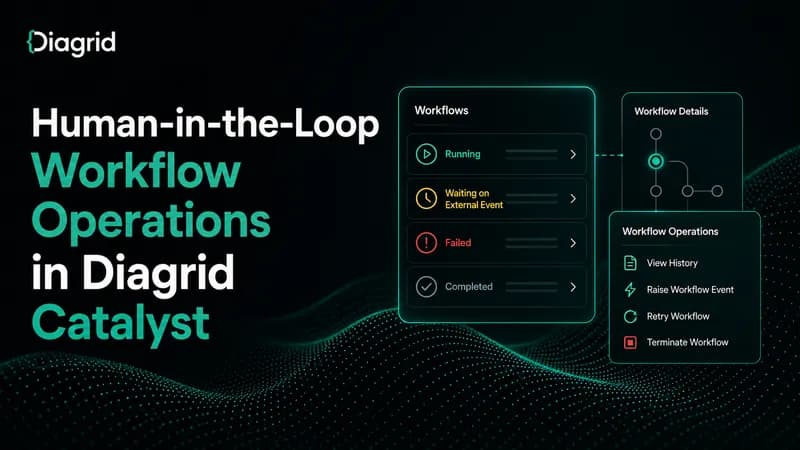
- Raise Event: send external events to a waiting workflow. This is how patterns like human approvals work: the workflow pauses until a human signs off, and Raise Event delivers that signal
Workflow Versioning
Workflows are deterministic by design. The same input replayed against the same code must always reach the same state. That is what lets them survive crashes and resume exactly where they left off. But code evolves. Bugs get fixed, features get added, and long-running workflows can run for hours or days. Changing the workflow definition while instances are still in flight would break replay and corrupt those executions.
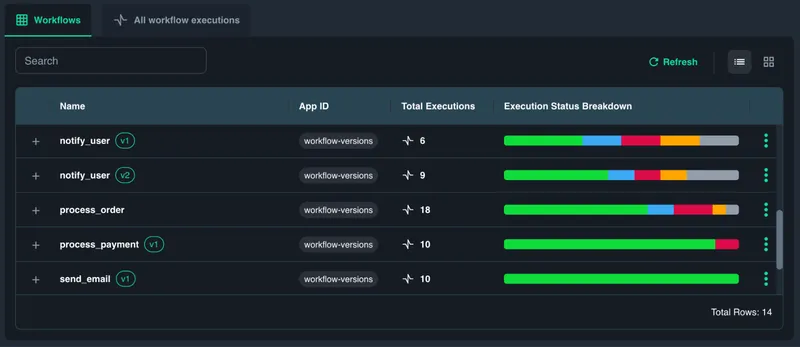
Catalyst solves this with workflow versioning. New workflow definitions can be deployed without disturbing in-flight instances; they stay pinned to the version they started on, while new invocations flow to the latest version under the same workflow name. Small edits can be shipped as additive patches; larger rewrites can be cut as named versions. Either way, callers keep invoking the workflow by its stable name and Dapr routes to the right version.
In Catalyst, every execution is tagged with the workflow version it is running. You can see which definition each execution is using, compare behavior across versions, and identify executions still running on older definitions during a rollout. If a workflow requires a version that is no longer deployed, Catalyst surfaces it as stalled rather than failed, so you can redeploy the missing code and let it resume.
Watch Your In-Flight Workflows Called and They Do Not Want Breaking Changes for a deeper dive into workflow versioning.
Workflow Search and Navigation
Finding the right execution across thousands of runs used to be painful. We made it incredibly easy to discover failing workloads, navigate parent/child hierarchies in complex multi-level workflows, and correlate executions with your own business context.
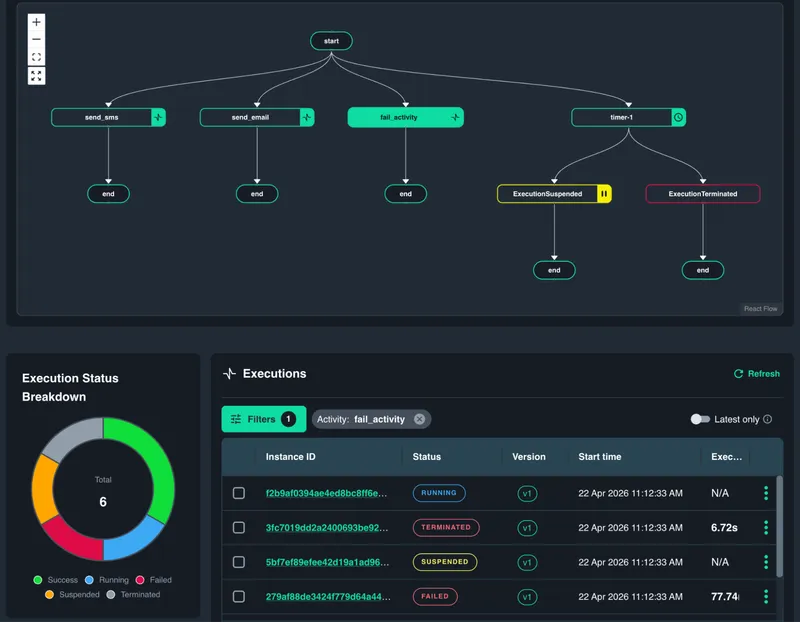
You can quickly find the workflow you are looking for by filtering:
- Root workflows only: filter out child workflows to focus on top-level orchestrations
- Filter by latest run: when reruns create multiple instances, surface the most recent execution and collapse the rest
- Activity, status, and date filters: drill down by activity type, status, custom status, or a specific time window
- Parent/child navigation: jump between parent and child executions across deeply nested workflows
- Custom fields: attach user-defined metadata to workflow executions (customer ID, tenant, order number, environment, or any domain-specific label) and search for them in Catalyst. When a customer reports an issue, you can find every workflow that touched their data in seconds
Discovering a failed workflow and tracking the reason is very easy.
Workflow Visualizer
Our focus on the workflow visualizer improvements has been focused on two things: making it faster to discover errors in a running workflow, and making it easier to navigate across complex, multi-level workflow hierarchies, both inside the graph and outside of it.
Inside the graph, parent and child workflows now live together in the same view. You can drill from a parent into its children directly, or expand children inline to keep the full execution hierarchy on screen at once. Errors are surfaced visually on the graph itself so failures are easy to spot without digging through history.
Outside the graph, a revamped execution history timeline highlights failed activities chronologically, a new relationships tab shows all children and reruns of an execution in one place, a stalled status distinguishes stuck workflows from running or failed ones, and full keyboard navigation lets you move through the graph without a mouse.
See it in action
Catalyst now gives you a clearer operational view of what is running, how agents and applications connect, and what to do when executions fail. With durable execution, runtime discovery, application topology, and hands-on workflow controls, these updates are focused on making production systems easier to understand and easier to manage.