What's New in Catalyst, Diagrid's AI Agent Platform: Workflow Failure Discovery, Human-in-the-Loop, and Catalyst in Your Environment
Catalyst now shows where workflows fail and reruns them in bulk from the failed step, finds workflows waiting on human input so you can unblock them, and runs in Catalyst Cloud or inside your own Kubernetes cluster.

Bilgin Ibryam
Principal Product Manager
Last month we shipped the operations layer for Catalyst with durable execution for agent frameworks, an agent registry, an apps graph, and per-workflow rerun. This month builds directly on it: discover where workflows are failing and rerun them in bulk, unblock the ones waiting on a human, and run the Catalyst data plane inside your own Kubernetes cluster. And we're looking ahead: Dapr 1.18 was just released with a focus on workflow and agent reliability and security, and those improvements will arrive in Catalyst next month.
Taking workflows to production changes what you need from your platform. Building a workflow is about expressing business logic. Running that workflow in production is about answering operational questions quickly: which workflows are failing, where failures are clustering, which workflows are waiting on someone, and where the workflow data is allowed to run.
This May update focuses on those questions. You can now discover failure hotspots across workflow steps, rerun failed instances in bulk from the point of failure, find workflows waiting on external events, raise the event that unblocks them, and deploy Catalyst into your own Kubernetes environment when data residency or network isolation requires it.
Let's dive into the latest from Diagrid.
Discover where workflows are failing, and rerun them in bulk
When a workflow fails in production, the first question is scope: is this one bad instance, or is the same failure happening across many instances?
The second case is common. A workflow calls an external API: a payments provider, a vendor service, an internal microservice, or a database. That dependency goes down. Every new workflow instance continues normally until it reaches the step that calls the dependency, then fails at the same point.
The workflow definition is fine. The earlier steps already succeeded. The failure is concentrated on one activity, but the operational impact can spread quickly across many workflow instances.
Recovery used to mean finding each failed instance, checking where it failed, and rerunning it one at a time. That does not work when dozens or hundreds of instances are failing at the same step.
Catalyst now makes both parts of that process easier: discovering the failure pattern and recovering the affected instances.
First, Catalyst surfaces the failure pattern. Open a workflow and the graph shows failure percentages on each activity step. If one activity has become the hotspot, it is visible immediately. You do not have to infer the pattern by scrolling through executions or comparing individual histories.
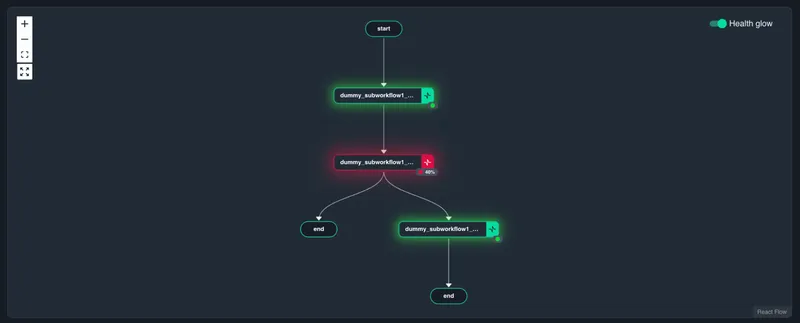
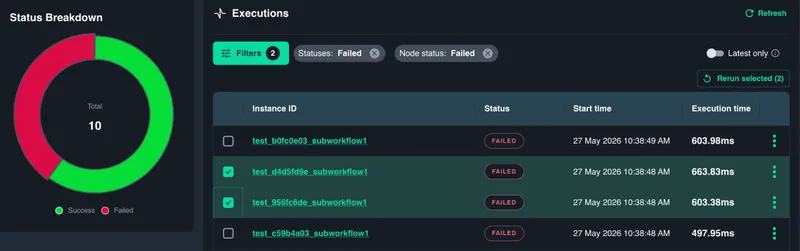
Click the failing activity and Catalyst shows the filtered list of workflow instances that failed at that step. That list becomes your recovery set.
Before rerunning, fix the shared dependency first. If the payments provider, vendor API, database, or internal service is still down, rerunning the workflows will only reproduce the same failure.
Once the underlying issue is resolved, select the affected workflow instances, confirm the starting step, and rerun them in bulk. Catalyst resumes each instance from the failed step, not from the beginning. Completed work stays completed. Successful steps are not executed again. This matters in real workflows. You do not want to charge a customer twice, send the same notification twice, re-run a data import, or repeat a business decision just because a later step failed. Durable execution gives you the recovery point. Bulk rerun makes that recovery operationally practical.
The operator loop becomes straightforward:
- Open the workflow and find the failure hotspot.
- Drill into the activity where failures are clustering.
- Review the affected workflow instances.
- Rerun the failed instances in bulk from the failed step.
- Review rerun results.
The result is not just faster recovery. It is safer recovery because you are restarting from the right point and preserving the work that already succeeded.
Unblock workflows waiting on human input
Not every workflow that stops has failed. Many workflows stop on purpose because they are waiting for something outside the workflow to happen.
Most often, that external signal is a person: an approval on a refund, a compliance sign-off, a manager reviewing a flagged transaction, or an operator confirming a production action. The same pattern also applies when the workflow is waiting on another system: a third-party job finishing, a webhook firing back, a payment clearing, or an external service sending a callback.
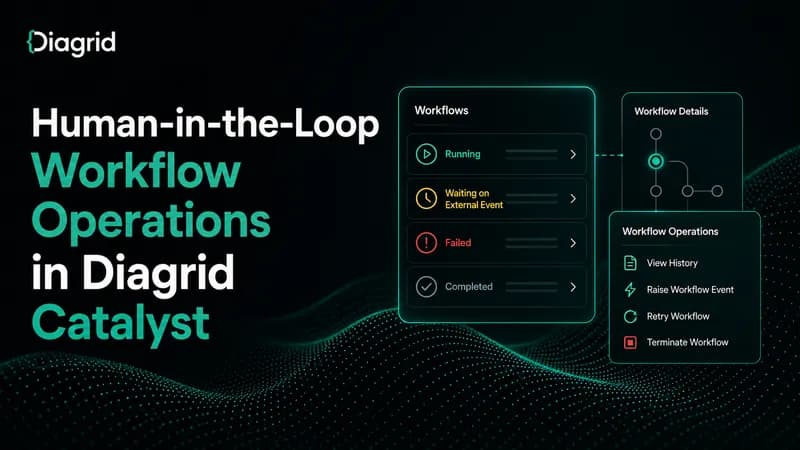
The important distinction is this: a workflow waiting on an external event is still running. It has not failed. It is not stuck. It is paused at a WaitForExternalEvent step and will resume as soon as the expected event arrives. A workflow can wait for minutes, hours, or days without losing its place or consuming active compute while it waits.
The operational gap was visibility. Until now, operators had to know which workflow instance they were looking for before they could raise the event that unblocked it. That works when you have the instance ID. It does not work when you are responsible for an environment full of long-running workflows and need to know which ones are waiting right now.
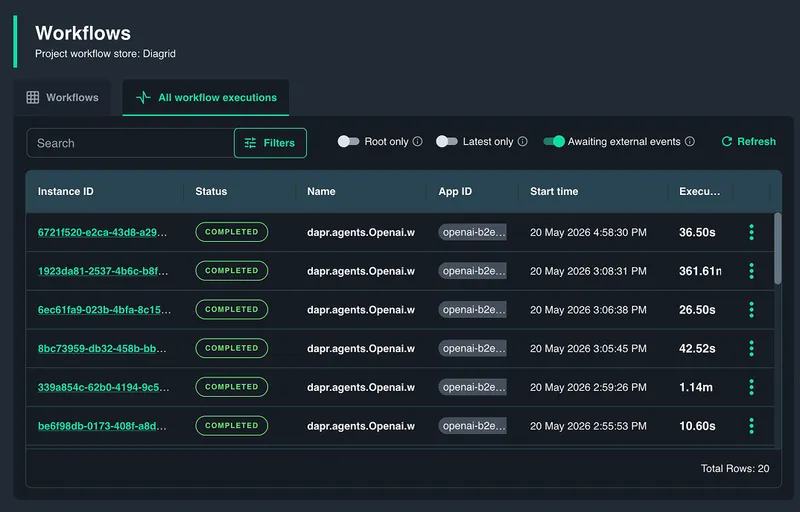
Catalyst now closes that gap with discovery for workflows waiting on external events.
You can discover waiting workflows in two ways:
- Across all workflows: Operators responsible for an environment can find every workflow instance currently waiting on an external event, regardless of which workflow definition it belongs to.
- Within a specific workflow: Teams that own a specific workflow type can scope the same view to a single workflow definition and see only the waiting instances that matter to them.
From there, the workflow is one click away. Select any waiting instance and open its execution view, and you can see exactly where in the workflow graph it is paused and the name of the external event it is waiting on. In normal operation, the event that unblocks it arrives from the system designed to send it: an approval app a reviewer uses, a webhook from a third-party service, an internal dashboard. Catalyst provides both visibility into what's pending and an operator intervention path for manual reconciliation when something goes wrong with the normal flow. If the approval tool is down, an upstream system failed to fire the signal, or an operator simply needs to override, you can raise the event directly from the Catalyst UI, optionally including payload data, and the workflow resumes from the waiting step. What happens next is still controlled by your workflow code: it can continue, branch, compensate, or terminate based on the event data.
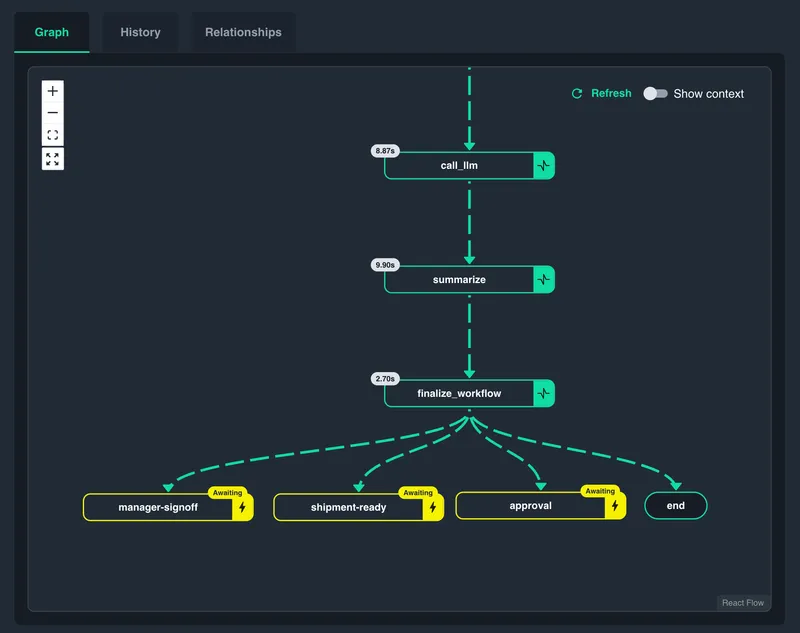
In this update, the operator still needs to know the expected payload shape if they are to continue the workflow. We will be updating this in a future release with payload schemas so workflows can declare the event shape they expect and Catalyst can validate input before the event is raised.
This turns human-in-the-loop operations from a workflow instanceID hunt into a normal operator workflow: find what is waiting, inspect what it is waiting for, inform the person that the workflow is waiting or raise the event, and move on.
Run Catalyst in your choice of environments
Most teams can start with Catalyst Cloud. It is the fastest path to building a reliable workflow or agent: Diagrid manages the control plane and data plane, and there is nothing to install, just connect this to your infrastructure services
But production requirements are not always that simple. Some teams need workflow execution and workflow data to stay inside their own infrastructure. Others need stricter isolation, private networking, or no outbound connectivity at all.
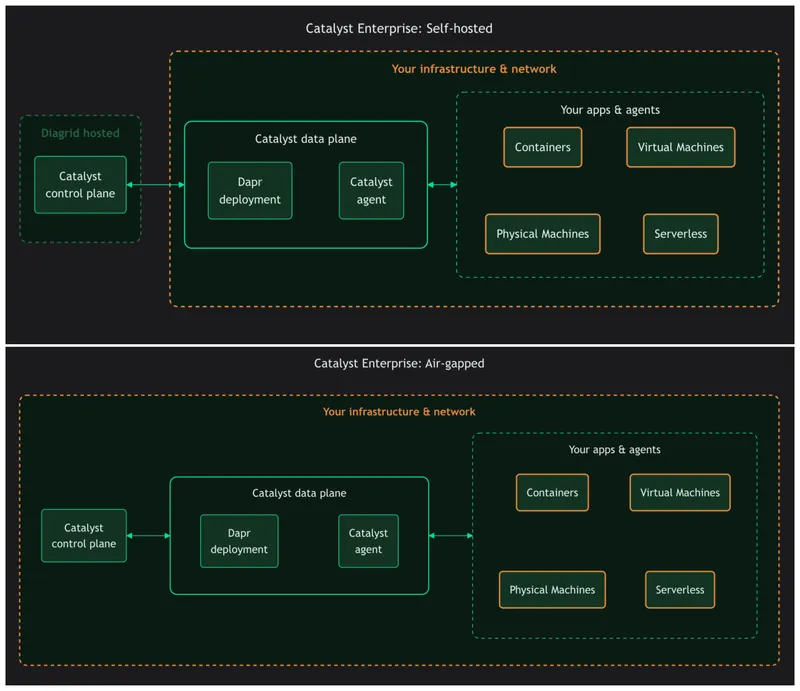
Catalyst Enterprise now supports a deployment spectrum for those environments:
- Dedicated - a dedicated, single-tenant control and data plane managed by Diagrid. The topology is the same as Catalyst Cloud, but the platform is isolated to one customer and sized for production workloads.
- Self-hosted - Diagrid manages the control plane; the data plane runs inside your infrastructure. Applications connect to the data plane over your private network, keeping application traffic and data local.
- Air-gapped - both the control plane and the data plane run inside your infrastructure. No traffic leaves your network, which suits environments with strict regulatory or network isolation requirements.
Catalyst Cloud
Catalyst Cloud is the default starting point when you do not have a data-residency constraint. Diagrid manages both the control plane and data plane. You create projects, deploy applications, and start building workflows without managing Catalyst infrastructure yourself.
This is the simplest option for getting started and for teams that want the full managed service experience.
Catalyst Enterprise self-hosted: data plane in your cluster
When workflow data needs to stay in your environment, you can keep the Catalyst control plane in Diagrid Cloud and run the Catalyst data plane in your own Kubernetes cluster.
Your workflows execute in your infrastructure. Your workflow data stays local. Diagrid still manages the control plane experience.
The fastest path is a single command:
diagrid region deploy my-regionThe command creates the region, installs the Catalyst data plane into the Kubernetes cluster your kubeconfig points to, configures the gateway, and registers the region with Diagrid.
For a quick local trial, create a Kind cluster and deploy into it:
diagrid region deploy my-region --create-clusterFor an existing cluster, point the command at the target kubecontext:
diagrid region deploy my-region --context my-eks-clusterThis works with Kubernetes clusters you already have access to, including local clusters and managed clusters such as EKS, AKS, and GKE.
For teams that want more control over the install, Catalyst can also be installed with Helm. Use this path for custom values, GitOps flows, audited rollout processes, private networking, storage configuration, or production hardening. Helm chart reference: https://github.com/diagridio/charts/blob/main/charts/catalyst/README.md
Deploying a self-hosted region also starts a free 30-day Catalyst Enterprise trial. This is the full Enterprise version, not a feature-limited preview.
Catalyst Enterprise self-hosted: fully air-gapped
Some environments need more than a self-hosted data plane. They need the entire system to run inside their infrastructure, with no traffic leaving the network.
For those environments, Catalyst can run fully air-gapped: both the control plane and data plane run inside your Kubernetes cluster. This is the option for regulated industries, government cloud, disconnected environments, and on-prem deployments with strict egress controls.
The same Catalyst Helm chart supports this model by pointing the install at a private image registry and private chart registry. The hosting documentation describes the topology, and the Helm chart reference includes the private registry configuration used for air-gapped installs.
The important change is not just that Catalyst can run in these environments. It is that the path is now simpler and clearer: start with dedicated cluster if needed, then decide to bring the data plane into your cluster when your data needs to stay there, or run the full platform in a disconnected environment when your network requires it.
See it in action
May's Catalyst updates focus on three production concerns:
- Workflow failure discovery and bulk rerun: See where failures cluster across a workflow, select the affected instances, and rerun them together from the failed step.
- Human-in-the-loop workflows: Discover workflows waiting on a human or another external system, inspect the waiting step, and raise the event directly from the UI.
- Catalyst in your environment: Run Catalyst fully managed, run the data plane in your own Kubernetes cluster, or deploy the full platform in an air-gapped environment.
Together, these updates make production workflows easier to inspect, safer to recover, and easier to run where your data and infrastructure requirements demand.
Try Catalyst Cloud for free with our workflow quickstart, or start a free Catalyst Enterprise trial with your own infrastructure.