What's New in Dapr 1.18: Securing and Hardening Workflows and Agents
Dapr 1.18 brings workflow history propagation, tamper detection, access policies, global concurrency limits, and secure MCP, so production workflows and agents stay trustworthy, controlled, and auditable. All these features are available in Catalyst today.

Marc Duiker
Developer Advocate

Bilgin Ibryam
Principal Product Manager
Taking workflows and AI agents from prototype to production changes the question from "does it run?" to "can I trust it, control who invokes it, and prove what it did?" Dapr 1.18, released today, focuses on the security and reliability of workflows and agentic AI.
Teams already run Dapr Workflow in production this way: Uniphar, for example, automates Azure cost attribution across 400+ workflows that resume from exact checkpoints after a failure (see the Uniphar case study), and, like many other teams, runs its workflows on Diagrid Catalyst, the easiest and most reliable way to take Dapr to production. Dapr v1.18 is available on Catalyst Cloud today, so you can deploy an app, workflow, or agent built locally with Dapr and run it on the v1.18 runtime, with workflow and agent management and visualization. More v1.18 support is coming to Catalyst later this month, which we'll highlight alongside the features below.
What's new in Workflow
Building a workflow is about expressing business logic in a business-critical application and providing durable execution to guarantee completion in the event of failures. Running that workflow in production adds a different set of requirements: you need to also trust what it did, control who can act on it, and protect downstream systems. Dapr 1.18 adds four workflow capabilities to make workflows more secure, trustworthy, and reliable.
Workflow History Context Propagation. What came before?
Building workflows where a downstream step needs to know what came before it has traditionally meant manually threading that context through every call or reaching into the workflow state store. Dapr 1.18 makes that earlier history part of the workflow's execution context: downstream steps can read it through a clean, typed API.
Dapr Workflow now lets a workflow propagate slices of its execution history to its child workflows and activities, where they can be queried by name through a typed API without needing direct access to the state store. This helps you build workflows where downstream steps need context about what came before them.
For example, in a merchant payment workflow, downstream fraud-detection and payment-gateway steps read the propagated history, including the amount, the verification steps that ran, and any earlier retries, to make the authorization decision and enforce compliance guardrails. In an order workflow, a child fulfillment or refund workflow can see which steps have already succeeded (payment captured, inventory reserved) and compensate only what actually happened, avoiding duplicate side effects like charging a customer twice. In regulated data handling (healthcare/finance) when a record passes through enrichment, anonymization, and reporting agents, auditors later need to reconstruct: which agent touched PII, with what authority, in what order. The propagated history is the compliance artifact.
There are two propagation modes:
- Lineage: the full ancestor chain is propagated down to children.
- OwnHistory: only the current workflow's history is propagated to its immediate children.
Propagation is opt-in per call, so you only pay the cost where you actually need the context. Consumers read the propagated history through a typed query API rather than reaching into the state store.
The feature is available across the SDKs with idiomatic APIs. For instance, this snippet shows how to pass the full lineage to a child workflow in .NET:
var result = await workflowContext.CallChildWorkflowAsync<string>(
    nameof(MyChildWorkflow),
    input,
    new ChildWorkflowTaskOptions(PropagationScope: HistoryPropagationScope.Lineage));
And this snippet shows how to retrieve the history context:
var history = workflowContext.GetPropagatedHistory();With the history in hand, a downstream step can inspect what earlier steps did, including their inputs, decisions, and results, and branch, validate, or compensate accordingly. The payment workflow's fraud check validates an authorization against what already happened, and the order workflow's refund branch compensates only the steps that actually ran.
Workflow History Tamper Detection. Can I prove this happened?
Propagation gives a downstream step a clean view of what came before it. But for useful and auditable processes, a view of history is only as valuable as your ability to trust it has not been altered after the fact. That is where tamper detection comes in, otherwise also known as attestation.
Auditable processes in finance, healthcare, and other regulated industries need a provable, tamper-evident trail. When a workflow's execution history becomes the system of record, such as the sequence of approvals on a loan, the checks run before a payment, or the steps taken on a patient claim, an auditor, regulator, or investigator may later need to confirm it is exactly what happened and was not edited after the fact. This is attestation. Dapr 1.18 can detect whether workflow history has been altered, without requiring you to build your own signing and verification infrastructure.
For workflows that handle sensitive or auditable processes, Dapr can now cryptographically sign and verify workflow history events using the sidecar's mTLS X.509 SPIFFE identity. This builds an auditable signature chain that is checked on every state load, verifying:
- Chain linkage between signatures
- Event contiguity
- Digest recomputation matching
- Certificate validity at the time of the event
- SPIFFE identity matching the owning app
Child workflow and activity completions include attestation signing, and propagated history carries chunk-local signatures along with DER certificate chains, so the history a downstream step reads in the previous section is the same history this feature proves untampered. The feature is gated behind the WorkflowSignState feature flag and is disabled by default in v1.18.
WorkflowAccess Policy: Bringing authorization to workflow calls
Zero trust is central to Dapr's security model: every application gets a cryptographic identity, and you can lock applications down and grant access explicitly, one allowed caller at a time. You already see this with service invocation, where you control which apps can call another app's endpoints over HTTP or gRPC, and which operations are allowed. Workflow also involves communication, in multi-app workflows. Workflow is a different API, but it does communication, and workflow often goes beyond a single app, with one app, say, starting or managing workflows that run workflows in another. New in 1.18, the WorkflowAccessPolicy resource brings an access-policy model to the workflow API and its operations, in a similar way that you can have an access policy for the service invocation API in Dapr. The WorkflowAccessPolicy resource (or Kubernetes CRD) controls which app IDs are allowed to invoke workflows and activities on a target app. It implements pure allow-list semantics: once one or more policies are loaded, the default is to deny, and only matching rules grant access. Self-calls are always permitted without needing an explicit rule, and denials return opaque error messages so the policy itself does not leak.
The workflow access policies are used in multi-app workflow solutions, where one app invokes or manages workflows that run in another. Two patterns are common:
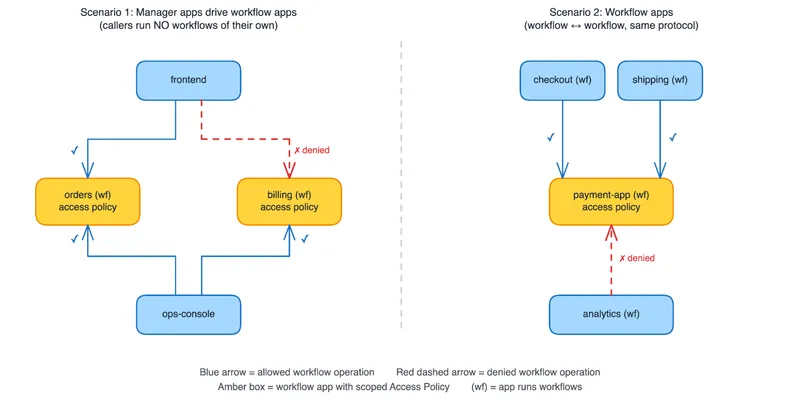
- Manager apps driving workflow apps. In the first example, the calling apps have no workflows of their own. They exist to start, query, and manage workflows that live elsewhere. In the diagram, frontend and ops-console both manage the orders and billing workflow apps, and each target allow-lists its own callers: frontend may invoke orders but is denied billing, while ops-console may invoke both.
- Workflow apps sharing a pool. Here the callers themselves are workflow apps invoking another app's workflows, workflow-to-workflow. The checkout and shipping apps running workflows may invoke the shared payment-app, while the analytics app is denied.
In both patterns the policy lives on the target app being protected, and anything not on its allow-list is denied.
The policy authorizes by workflow and activity name and workflow operation, using each caller's SPIFFE identity, so you can express rules like "frontend may schedule OrderWF, but only ops-console may terminate it." Here is an example workflow access policy called orders-policy for the first example above showing how you can be very explicit on both the workflow operations (start, terminate, schedule etc.) as well as the specific activities.
apiVersion: dapr.io/v1alpha1
kind: WorkflowAccessPolicy
metadata:
  name: orders-policy
  namespace: production
scopes:
  - orders
spec:
  rules:
    - callers:
        - appID: frontend
        - appID: ops-console
      workflows:
        - name: OrderWF
          operations: [schedule]
    - callers:
        - appID: frontend
      activities:
        - name: ChargePayment
        - name: "RefundEvent*"
Reading the policy above from top to bottom:
scopes: [orders]: the policy applies to the app with ID orders. That app is the target whose workflows and activities are being protected; the rules below decide who may call into it.- First rule: both frontend and ops-console are allowed to schedule the OrderWF workflow type. Because operations are restricted to
[schedule], these callers can start the workflow but are not granted other workflow operations on it, for example the ability to terminate. - Second rule: only frontend may invoke the ChargePayment activity and any activity matching
RefundEvent*(so RefundEventIssued, RefundEventCleared, and so on). ops-console is absent from this rule, so it cannot call those activities.
Everything not listed is denied. Since these are the only rules loaded for orders, no other app can schedule OrderWF or invoke those activities, and ops-console in particular has no path to the payment and refund activities even though it can schedule the workflow. orders calling itself is always permitted without a rule. Glob patterns are supported in the rules, as shown by the RefundEvent* activity match above.
The workflow access policy now brings security and authentication of who can do what deep into workflows.
Workflow Concurrency Limits. Controlling how many?
Access policies decide who may invoke a workflow; concurrency limits decide how many run at once.
Dapr could already cap the concurrent workflow and activity invocations, but that was enforced per sidecar, across all workflows and activities on that sidecar. If you scaled the sidecar for high availability or other reasons, that limit scaled with it, which made concurrency harder to control independent of scaling.
In 1.18, the Scheduler enforces these limits globally across all replicas, and you can set them per workflow name and per activity name, not just globally. A cap of 5 means 5 across the whole deployment, however many replicas are running.
Here is a sample configuration:
spec:
  workflow:
    globalMaxConcurrentWorkflowInvocations: 50
    globalMaxConcurrentActivityInvocations: 200
    activityConcurrencyLimits:
      - name: SendEmail
        maxConcurrent: 5
    workflowConcurrencyLimits:
      - name: OrderProcess
        maxConcurrent: 20
The global caps apply across the whole deployment (50 concurrent workflows, 200 activities), and the per-name limits restrict individual ones. Here, at most 5 SendEmail activities and 20 OrderProcess workflows run at a time.
With these, you can control concurrency at different levels, from the whole workflow down to a single activity:
- Load leveling: cap a whole workflow's concurrency so that even when a spike starts many instances at once, only a bounded number run at a time and downstream load stays steady.
- Protect a downstream system: limit the specific activity that calls it, so no more than N SendEmail activities (or payment calls) run at once, however many workflows are in flight.
- Process sequentially: set a workflow's limit to 1 so its instances run strictly one at a time, when ordering or exclusivity matters.
Together, these controls give you coarse- to fine-grained control over workflow concurrency, so you can scale your workflow apps for reliability without overwhelming the downstream systems they depend on.
Making MCP Secure and Reliable
As agents start calling external tools through the Model Context Protocol (MCP), the MCP server becomes part of your attack surface and your audit trail. There are two options. You can secure existing MCP servers transparently, or, if you interact with them from a workflow application, make those interactions durable and auditable. The difference comes down to app topology: Option 1 keeps the agent and MCP server as two apps and secures the hop between them; Option 2 folds the MCP server into the agent's own app as a durable workflow resource.
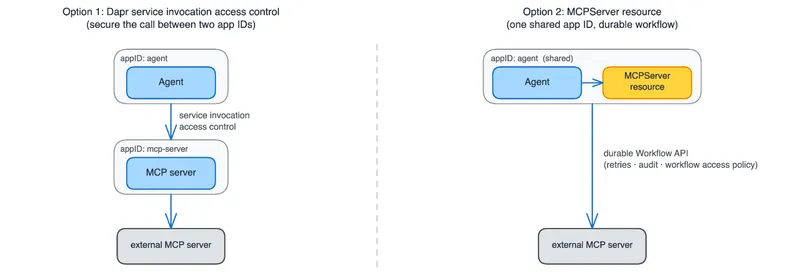
Option 1: Secure existing MCP servers, transparently. Without changing the server, the same access policies you use for service invocation can control which apps may reach which MCP endpoints, enforced on each caller's SPIFFE identity, so an MCP server isn't an open door just because an agent knows its address.
Option 2: Make MCP interactions durable and auditable. If you want to interact with an MCP server from a workflow app, such as a durable Dapr agent or any other workflow app, you can register the server as an MCPServer resource and call it through a client. Dapr then exposes the server through the standard Dapr Workflow API, creating built-in workflow orchestrations, dapr.internal.mcp.<server>.ListTools and dapr.internal.mcp.<server>.CallTool.<toolName>, that execute as durable activities. The MCP client for orchestrating these tool calls is available in the Python SDK.
Key characteristics:
- Transports:
streamable_http,sse, andstdio. - Auth modes: static header injection, OAuth2 client credentials, and SPIFFE JWT SVID injection.
- Spec compliance: 100% MCP spec-compliant, preserving the full CallToolResult shape including the content union (text, image, audio, resource_link, embedded resource), the isError flag, and metadata.
- Zero overhead when the resource is unused.
Because the MCPServer resource is backed by a workflow, the workflow capabilities covered above apply to it directly:
- Reliability: tool calls run as durable activities, with retries, persistence, and recovery.
- Auditing and tamper-evidence: every tool call becomes part of a verifiable, tamper-evident execution history.
- Access control: WorkflowAccessPolicy governs which apps may invoke the MCP workflows and activities, by name and operation.
The MCPServer resource is still alpha, so its API and behavior may change in future releases.
APIs
Beyond the workflow and agent security theme, 1.18 includes a set of broader platform improvements.
Actor APIs: app-initiated gRPC streams
Actor apps no longer need to expose an inbound HTTP or gRPC server port to receive callbacks, which means simpler networking and a smaller attack surface. This makes actors much easier to deploy in locked-down or egress-only environments.
Actor applications can now open a single bidirectional gRPC stream to the sidecar via SubscribeActorEventsAlpha1 and receive all four callback types: invoke, reminder, timer, and deactivate. Because the app initiates the stream, there is no need to expose an HTTP or gRPC server port to receive actor callbacks, which simplifies networking and tightens security. This closes the long-standing issue #927.
Jobs API (stable)
Scheduling future and recurring work, such as batch runs, cleanups, and ETL, is now production-ready, so you can rely on it for critical scheduled work rather than treating it as experimental.
The Jobs API, which provides an orchestrator for scheduling future jobs at a specific time or on a recurring interval, graduates to stable in 1.18, backed by performance regression tests. The alpha Jobs APIs remain functional but are now deprecated.
Example scenarios include:
- Schedule batch processing jobs to run every business day
- Schedule maintenance scripts to perform cleanups
- Schedule ETL jobs to run at specific times to fetch, process, and load data
The HTTP API to start a job is:
POST http://localhost:3500/v1.0/jobs/<name>For more details, read the Jobs API reference in the Dapr docs.
Runtime
Component & Configuration Hot-Reloading (now GA, on by default)
Configuration and component changes now apply without restarting your app, out of the box, giving you zero-downtime updates with no extra setup.
Configuration and component hot-reloading is now GA and enabled by default for seven resource types: Components, Subscriptions, MCPServers, Configurations, HTTPEndpoints, Resiliencies, and WorkflowAccessPolicies. The subscription reconciler now skips the close-and-reopen cycle for functionally identical incoming events, which fixes startup race conditions.
MCP, Actors, and Service Invocation networking
Dapr now runs correctly in modern network environments and closes a security gap in the process. Several runtime improvements harden service invocation:
- IPv6 and dual-stack support: host resolution now handles IPv6 and dual-stack environments via an enhanced
GetHostAddress(). - Hop-by-hop header stripping: standard hop-by-hop HTTP headers (Connection, Keep-Alive, Proxy-Authenticate, Transfer-Encoding, etc.) are now stripped per RFC 7230 during service invocation.
- Path traversal ACL bypass fix: a path traversal vulnerability in service invocation ACL checking has been addressed.
Control plane: Placement & Scheduler
Operators of large or highly available clusters get more stable, predictable control-plane behavior in 1.18, along with new tuning knobs for high-churn and HA deployments:
- Stable scheduler reload: the actor-type list is now deterministically ordered, preventing spurious reconnects.
- Post-round coalesce window (opt-in): a new
--disseminate-coalesce-windowflag arms a one-shot timer after dissemination rounds complete, accumulating queued events into a single follow-up round. Recommended values are 100 to 250 ms for clusters with frequent churn; the default of 0 preserves existing behavior. - Hard anti-affinity: placement and scheduler StatefulSets support configurable HA pod anti-affinity via
global.ha.podAntiAffinityPolicyandglobal.ha.topologyKey. The defaultpreferredDuringSchedulingIgnoredDuringExecutionis soft anti-affinity, whilerequiredDuringSchedulingIgnoredDuringExecutionenforces hard anti-affinity.
Installing the 1.18 release
Try it with Catalyst
The easiest way to try the new Dapr 1.18 features is to run with Diagrid Catalyst. Dapr 1.18 is already part of Catalyst, so there's nothing to install or upgrade. Just point your app at Catalyst and start using the new features.
Follow the Catalyst quickstarts to get up and running in minutes.
Locally with the Dapr CLI
When you're using the Dapr CLI on your local dev machine, perform the following steps to upgrade to the new Dapr version:
- Uninstall Dapr:
dapr uninstall --all - Install Dapr:
dapr init
To upgrade the Dapr CLI itself:
- Linux:
wget -q https://raw.githubusercontent.com/dapr/cli/master/install/install.sh -O - | /bin/bash - macOS:
brew upgrade dapr-cli - Windows:
winget upgrade Dapr.CLI
Verify the installation by running dapr -v.
On Kubernetes with Diagrid Conductor
The easiest way to upgrade Dapr on your Kubernetes clusters is via Diagrid Conductor, which helps Dapr developers visualize, troubleshoot, and optimize their Dapr applications running on Kubernetes.
You can sign up for Conductor here, and try it for your Dapr apps on Kubernetes.
What's next?
Dapr 1.18 focuses on what production workflows and agents need most: security, reliability, and operational control.
This post is not a complete list of features and changes released in version 1.18. Read the official Dapr release notes for more information, including a full list of new features, fixes, and breaking changes, as well as upgrade guidance.
Want to see these workflow and agent security features in action? Join us at our Dapr 1.18 celebration webinar, where the team will walk through workflow history and tamper detection, access policies, concurrency, human-in-the-loop, and securing MCP with live demos.
Are you new to Dapr or workflows? Try out the free courses at Dapr University. Want to talk about the new features with other Dapr developers? Join the Dapr Discord to connect with thousands of Dapr users.