Your LangGraph Agent Survived the Demo. Here's the 12-Point Production Checklist
Prepare LangGraph agents for production with 12 checks covering failure handling, recovery, retries, identity, observability, deployment, and more.

Haziqa Sajid
Technical Writer
68% of production agents execute at most 10 steps before requiring human intervention. This is not because agents cannot do more. It is because production introduces failures, timeouts, and unexpected behavior that demos rarely expose.
A team builds a LangGraph agent that calls tools, processes information, and handles requests. The demo works, stakeholders are impressed, and the agent looks ready to ship. But when it reaches real users, real data, and unexpected situations, things start to break.
Making an agent production-ready requires more than ensuring it just works. It requires reliability and controls for when things go wrong.
So what does it take to make a LangGraph agent reliable and production-ready? This piece covers a 12-point checklist that most teams skip.
Why a working LangGraph agent can still fail in production
LangGraph saves the state at each superstep boundary, providing the graph with a known state from which execution can resume. However, a checkpoint alone does not guarantee durable execution.
A checkpoint preserves state but does not detect whether the process running the next node is still active, restart the run if that process terminates, or coordinate recovery across multiple instances. Without these capabilities, a checkpoint can still be safely stored, but nothing will notice if the workflow has stopped or trigger it to continue.
This becomes a production problem when a process crashes. A deployment can restart a process mid-run, an out-of-memory (OOM) kill can terminate the process, or a transient network error can interrupt a tool call. When the process fails, nothing automatically detects or resumes the stalled workflow. An external mechanism must first identify the failure and trigger execution again.
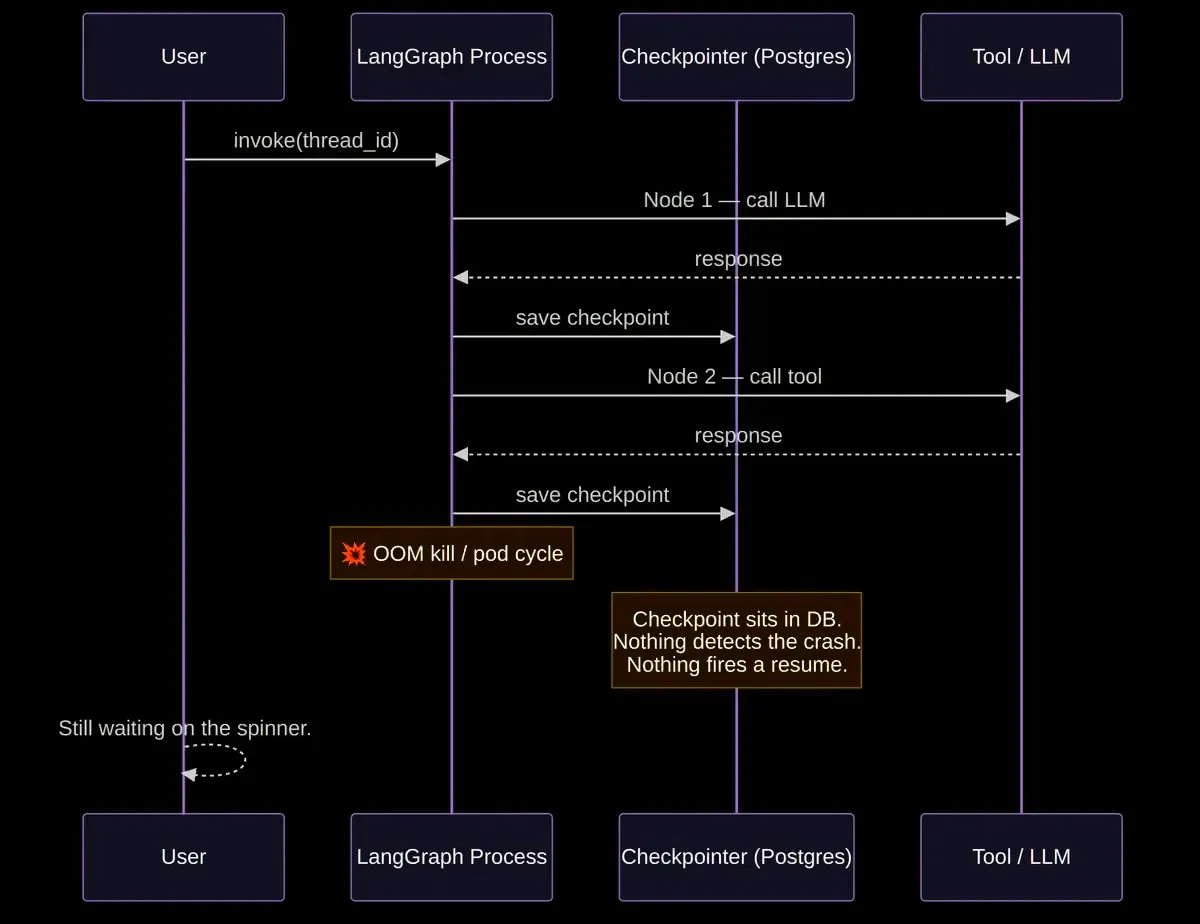 A standard LangGraph process crashes during an OOM kill, leaving checkpoints stranded without an automated resume mechanism. See how Diagrid Catalyst integrates with LangGraph.
For open-source LangGraph, teams must build the recovery layer themselves. This includes failure detection, retries, and distributed locking to prevent multiple workers from processing the same thread_id. The managed Agent Server provides automatic retries but still lacks failure detection and coordination.
Observability introduces an additional challenge. LangGraph lacks a built-in observability layer for per-step tracing, input and output inspection, or full execution history. Teams need to bolt on a separate tool and then select, configure, instrument, and manage it themselves.
Security requires another layer of infrastructure. LangGraph has no cryptographic identity or mutual TLS (mTLS) between agents, tools, and downstream services. Nodes rely on whatever authentication code developers add to the application. In production environments, every agent and tool call must carry a verifiable identity that is both authenticated and authorized at the data plane.
These gaps become harder to manage as the number of agents grows. More agents and workers mean more failures to detect, runs to recover, and more execution history to review.
The 12-point LangGraph production checklist
The checklist below covers the essential controls required to close these production gaps. Some involve engineering practices, others pertain to architectural decisions, and several address security, observability, and operational readiness.
Here are the 12 checks that provide a practical pathway from a working LangGraph agent to one that is ready for production.
1. Define what happens when an agent fails
Agents can fail, APIs may time out, tools might return unexpected formats, and models can produce invalid tool calls. It is essential to define how each type of failure should be handled by classifying them as transient, permanent, retryable, or fatal.
Each tool call should be wrapped in a structured error handler that returns a structured error message instead of a raw stack trace. Route failures to an appropriate fallback, such as a simpler tool, a cached response, or human escalation. It is preferable for the agent to stop safely rather than continue retrying and make the problem worse.
2. Make agent state recoverable
Use checkpointers to persist a thread's graph state for conversation continuity, human-in-the-loop workflows, and fault tolerance.
For production environments, use a persistent checkpointer to ensure that checkpoints survive process restarts. When a failure interrupts execution, recover from the persisted state instead of losing the thread's progress. If you use the Agent Server, it manages the persistence infrastructure automatically.
3. Make retries safe
Retry transient failures using exponential backoff rather than repeatedly retrying the same failure immediately. Set a retry limit to prevent failed operations from continuing indefinitely.
Design retried operations to be idempotent so that re-execution does not produce duplicate side effects. Use idempotency keys or verify existing results when a task may run again after a failure.
4. Put limits around autonomous execution
Set hard limits on execution steps and token usage to prevent an agent from running indefinitely. Implement timeouts for model calls, tool executions, and the overall process to stop executions that run too long or fail to make progress.
Use these limits to stop runaway loops from consuming excessive resources. LangGraph also provides a recursion_limit that sets the maximum number of super-steps a graph can execute during a single run.
5. Give every agent a defined identity
Assign each agent a dedicated service identity that is separate from human identities. Limit this identity's permissions strictly to those necessary for its tasks, including access to the required tools and data.
Use verifiable identities when agents communicate with other agents or services. This can include certificate-based mTLS, signed tokens, or platform-managed workload identities, rather than relying on shared credentials.
6. Control which tools the agent can access
Define which tools each agent is authorized to invoke, and grant access only to the tools required for its tasks. Enforce these permissions through an external authorization policy instead of relying on the agent to decide which tools it should use.
Block unauthorized tool calls before execution and log these attempts. This creates an independent access boundary around the agent's tool usage, even if the agent receives manipulated or unexpected instructions.
7. Trace the entire agent execution
Enable tracing for your LangGraph application to inspect the agent's execution. When using LangChain modules within LangGraph, LangSmith can automatically infer the tracing configuration and trace both model calls and tool calls.
Use the Details view to inspect individual runs, while the Messages view shows the conversation history, including the user's requests, tool calls, and the agent's final responses. For custom functions or other SDKs, wrap or decorate them so that LangSmith can include them in the trace.
8. Make production failures diagnosable
When a run fails, use the recorded execution data to identify where and why it went wrong. Focus on the failed step, its error, timing, and surrounding execution context. For state-level investigation, inspect the exact state held at the relevant checkpoint.
Review the model responses, tool calls, and returned tool results related to the failure. For a state-level investigation, inspect the exact state held at the relevant checkpoint.
9. Test failure recovery before production
Before production, test how the agent behaves when individual components fail. Test small, deterministic pieces in isolation, and use integration tests to verify that components work together with real model APIs and external services.
For failure scenarios, test individual nodes and edges and verify how the agent handles failures. LangGraph supports retries, timeouts, and error handlers for failed nodes.
10. Make agent execution verifiable
Record agent actions in an immutable, tamper-evident execution history for audit and investigation. Capture the agent's identity, workflow or session, tool calls, relevant inputs and outputs, and the result of each action.
Keep that history available so teams can verify what happened, which identity acted, and how the execution progressed.
11. Define human escalation and operational boundaries
Define when the agent must stop trying and ask for help. Use explicit escalation triggers such as confidence falling below a specified threshold, risk above threshold, budget exhaustion, and an explicit user request to speak with a human.
Make the handoff seamless by providing the human with the full execution trace, the user's original query, and the agent's partial work. This allows the human to take over with the context and work already produced by the agent.
12. Plan for production deployment and scale
Use progressive rollouts instead of directing 100% of traffic immediately. Start with a small percentage of traffic, then gradually increase it while monitoring cost, latency, error rates, and user satisfaction.
Maintain a kill switch and a rollback path at all times. If a new version causes a decline in key metrics, revert to the previous version or redirect traffic to a human fallback.
How Diagrid Catalyst makes LangGraph agents production-ready
Diagrid Catalyst is built on the open-source Dapr runtime and adds durable execution to LangGraph agents through Dapr Workflows. Each LangGraph node runs as a durable workflow activity, with automatic failure detection and recovery.
Dapr Workflows save state to a remote store after every activity, ensuring state persistence through process crashes, OOM kills, deployments, and infrastructure failures. Additionally, Dapr's actor placement service guarantees that each workflow is processed by exactly one instance, preventing duplicate executions.
Diagrid Catalyst also provides verifiable execution. Its execution model supports cryptographic signing and tamper-proof execution history, enabling teams to verify an agent's actions. Every step can be cryptographically signed and traced, with history signing, execution lineage, and workflow attestation. Security and compliance teams can prove what an agent did, who authorized it, and confirm that no alterations were made.
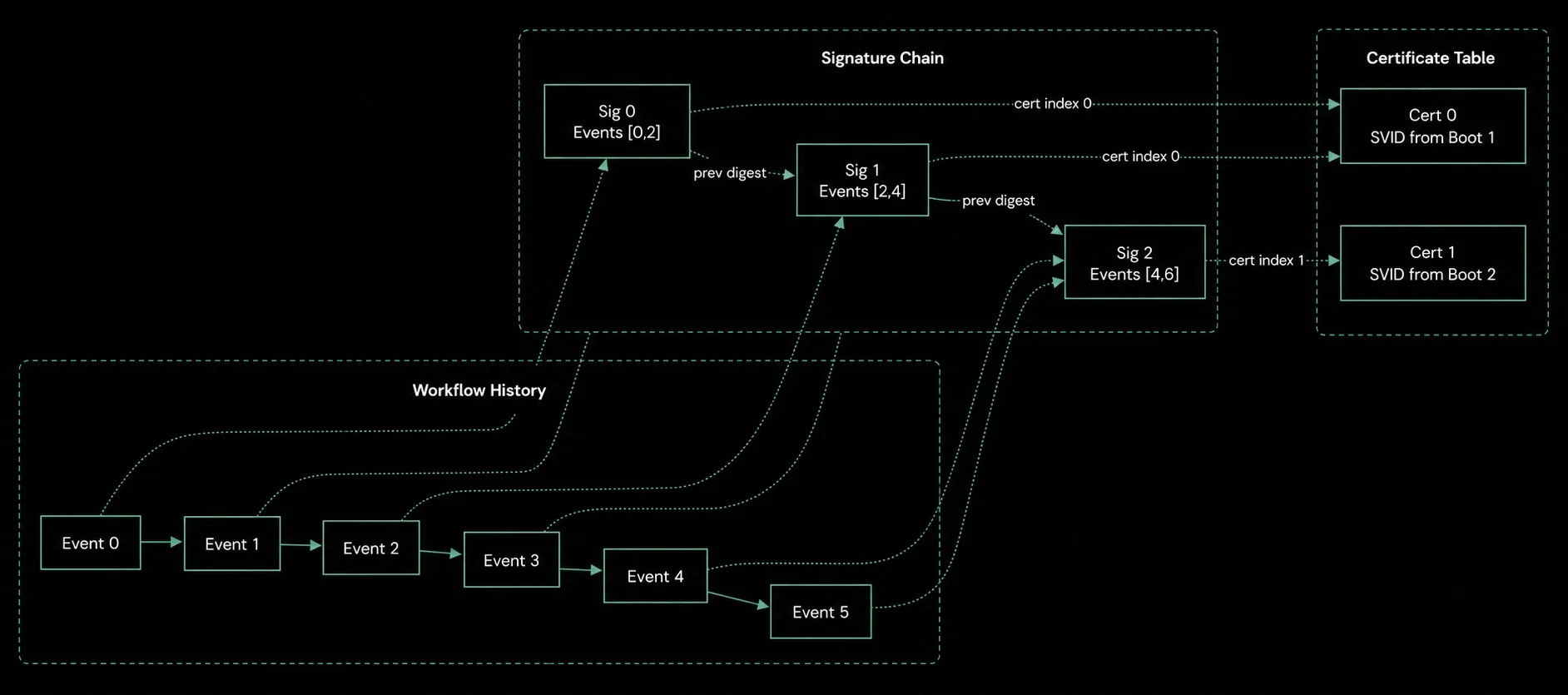 A cryptographic signature chain and execution lineage. Learn more about verifiable execution.
The integration remains lightweight. Developers define their agents, tools, and logic using LangGraph exactly as they normally would, then add a Diagrid Catalyst package and wrap the existing LangGraph code. There is no re-architecting or switching to a new framework required. This integration adds durable execution without requiring teams to rewrite their existing workflows.
Every agent receives a SPIFFE-based cryptographic identity through Dapr's built-in security model. Communication is secured using automatic mTLS. Fine-grained policies control which caller applications can access specific workflows and activities, with access-control rules enforced at the data plane.
Diagrid Catalyst supports deployment from a fully managed cloud service to a fully air-gapped deployment. This provides teams with a shared infrastructure for reliability and governance across different deployment environments.
The bottom line
The biggest mistake is making an agent too complex before deploying it into production. Adding more capabilities, tools, and edge-case handling can increase the number of things that can fail without addressing the underlying reliability and security issues.
A better approach is to establish durable and verifiable execution early on. Diagrid Catalyst adds true durable and verifiable execution to your LangGraph graphs, with automatic failure detection and recovery built on Dapr. This provides teams with a production-ready foundation before expanding the agent's capabilities.
This 12-point checklist then provides controls built upon that foundation. It helps teams define failure handling, secure tool access, trace executions, test recovery processes, and establish human escalation paths. Together, these controls enable teams to resolve issues before they undermine user trust.