
Single Agent vs Multi-Agent Systems
A task that looks too broad for one agent is not automatically a multi-agent problem. This article explains how the two designs assign decision-making, manage context, and coordinate work, and when the added coordination cost is worth paying for.
A common mistake when building AI applications is to default to a multi-agent design because a task looks too broad for one agent. The system may need research, tool calls, state updates, approvals, and follow-up actions, but those responsibilities do not automatically belong in separate agents. If they depend on the same context, state, and decisions, splitting them can create coordination problems that are harder to debug than the original task.
This raises an architectural question: When do you keep one agent in control, and when do you divide responsibility across multiple agents?
This article explains what single-agent and multi-agent systems are, how to choose between them, and how multi-agent orchestration works. It also shows how Dapr helps you build and coordinate agent systems, and how Diagrid Catalyst helps run them reliably in production.
What is a single-agent system
A single-agent system is organized around one model-controlled reasoning loop that owns the task. It reads the current instructions, user request, conversation, memory, and tool results, then decides what to do next. The application executes the selected action outside the model, such as calling an API, retrieving data, updating state, or pausing for approval, then returns the result to the same working context.
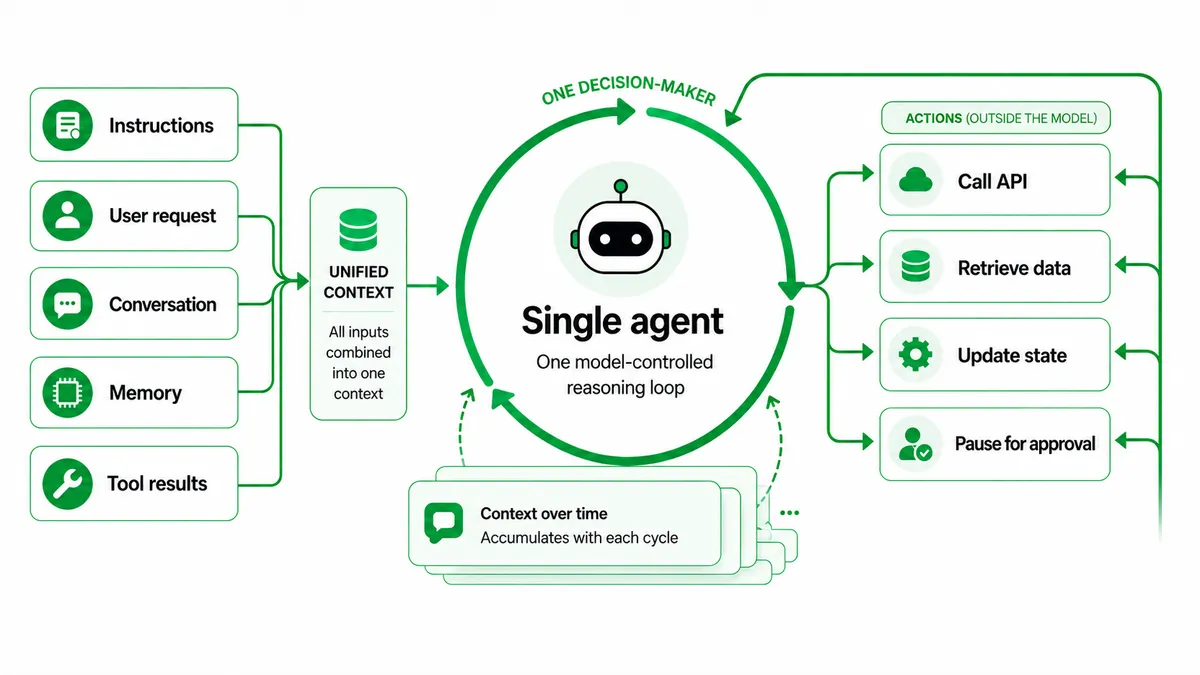
A single agent can plan before acting, make repeated model calls, use retrieval, write to long-term memory, and revise its approach after feedback. The real constraint is context quality. As messages, tool outputs, retrieved documents, and state accumulate, the model has more competing information to interpret. A single-agent design works best when the task benefits from one coherent context and one clear owner for action.
What is a multi-agent system
A multi-agent system coordinates multiple agents working toward a shared goal. Each agent has its own context, instructions, and decision authority within a defined part of the task. One orchestrator may delegate work to specialist agents, or control may move between agents through handoffs. In both cases, more than one agent can decide how to proceed within its own scope.
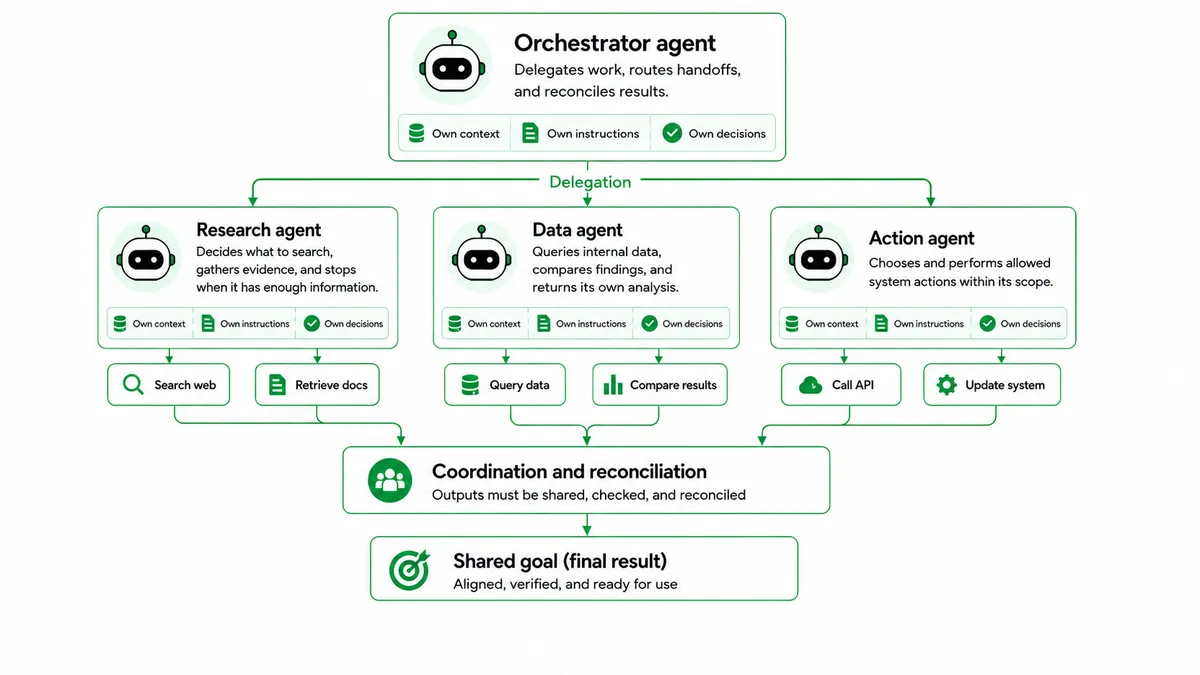
This is what separates an agent from a tool, a model call, or a pipeline stage. A tool executes a predefined operation and returns a value. A pipeline stage follows a designed step. An agent receives an objective, reasons through the work, may call its own tools, and returns a result after its own internal steps. Multi-agent systems are useful when work needs separate context, specialized responsibilities, different permissions, or independent execution, but they also add coordination costs because outputs must be shared, checked, and reconciled.
How single-agent and multi-agent systems differ
Single-agent and multi-agent systems differ in how they assign responsibility for a task. A single-agent design keeps responsibility centralized. A multi-agent design distributes it across agent boundaries, which changes what the application must manage.
The table below compares them in terms of the technical factors that change when responsibility is centralized or distributed.
| Technical factor | Single-agent system | Multi-agent system |
|---|---|---|
| Decision ownership | Single-agent systemOne reasoning loop decides the next action across the task. | Multi-agent systemDecision ownership is distributed according to the orchestration pattern. |
| Context | Single-agent systemTask history, retrieved content, tool results, and state stay in one working context. | Multi-agent systemEach agent uses a scoped context for its part of the task. |
| Tool access | Single-agent systemOne agent uses the tools required for the task. | Multi-agent systemTool access is partitioned by agent, role, or permission boundary. |
| State and memory | Single-agent systemPersistent memory and external state have one owner. | Multi-agent systemShared state needs explicit read, write, and synchronization rules. |
| Communication | Single-agent systemInformation stays inside the agent's working context. | Multi-agent systemAgents exchange information through delegation, handoffs, shared state, or messages. |
| Parallel work | Single-agent systemIndependent tool calls run in parallel and return to one context. | Multi-agent systemMultiple agents reason in parallel, then the system synthesizes their outputs. |
| Failure handling | Single-agent systemFailures stay within one reasoning loop and one main failure domain. | Multi-agent systemThe system handles partial results, duplicated work, and conflicting outputs. |
| Observability | Single-agent systemTracing follows one reasoning loop and its tool calls. | Multi-agent systemTracing shows delegation, context exchange, and output synthesis across agents. |
The trade-off is context isolation versus coordination cost. Smaller contexts reduce what each agent must interpret, but the system also needs clear routing, shared-state rules, and reconciliation logic.
Choosing the right agent architecture
To choose the right agent architecture, you need to identify the constraint the system needs to solve. The architecture should give the system cleaner context, clearer permissions, safer state ownership, or useful parallel execution.
Here is what to consider when choosing between the two.
- Keep one agent when the task needs one consistent context. A single-agent design fits workflows where each step depends on the same history, state, and decisions. Splitting the work would only force the system to pass the same information between agents.
- Use multiple agents when subtasks can run independently. Multi-agent design fits work that separates into bounded tasks. Each agent can reason through its part without constant awareness of the others.
- Use multiple agents when context isolation improves reliability. A separate agent helps when it needs a smaller or different context than the main agent. This is useful for research, review, verification, or focused analysis.
- Use multiple agents when tools or permissions need separation. Separate agents can have different APIs, data access, or action permissions. That keeps sensitive or specialized capabilities away from agents that do not need them.
- Keep write authority narrow when agents share state. Multi-agent systems become fragile when several agents change the same artifact, database record, or workflow state at the same time. A safer pattern is to keep write authority with one agent and use other agents for research, review, or bounded support work.
- Account for cost and latency. Multi-agent systems spend more tokens because each agent has its own context and reasoning loop. They are easier to justify when parallel work reduces wall-clock time or improves quality enough to justify that cost.
Use the fewest agents that solve the real constraint.
Multi-agent orchestration strategies
Once a system uses more than one agent, orchestration determines how those agents coordinate. It defines which agent owns the task, when control moves, how much context is shared, and how results are combined. The strategies below show the main ways to manage that coordination.
Agents as tools
In the agents-as-tools strategy, a primary agent keeps control of the task and calls specialist agents when it needs help. The specialist receives a bounded request, reasons through that part of the work, and returns a result. Control then returns to the primary agent, which decides how to use the result.
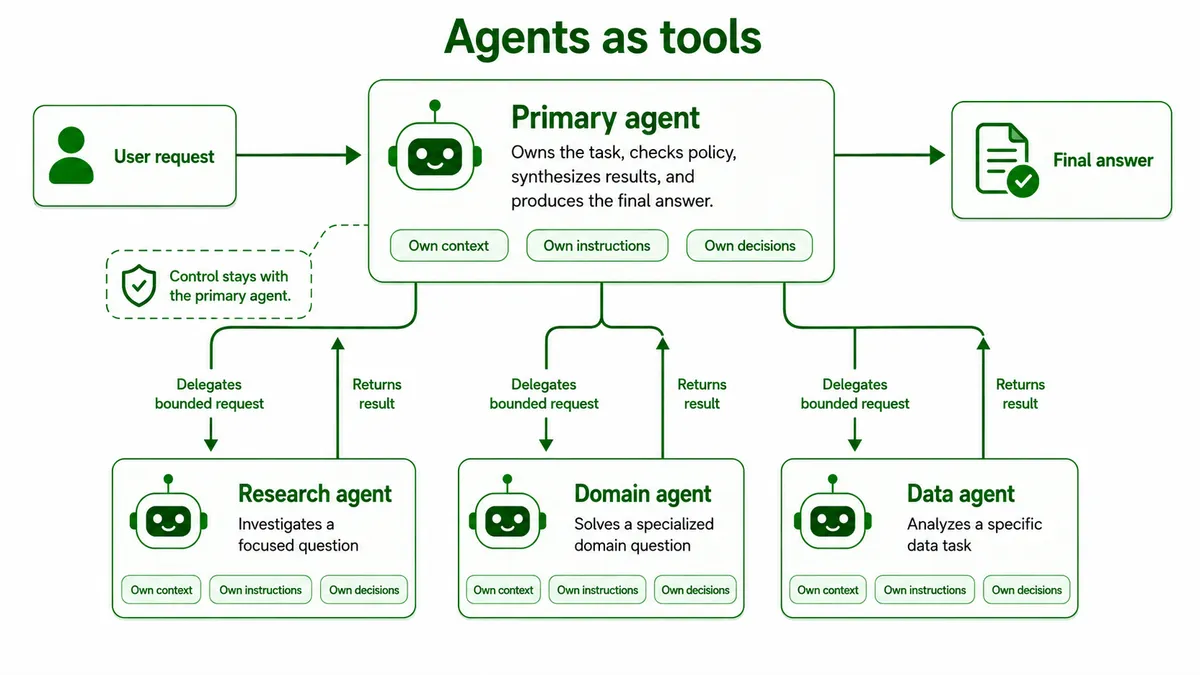
This strategy works when one agent should own the final answer. It lets the system use specialists for focused work while keeping synthesis, policy checks, and user-facing output in one place. The main risk is poor delegation. If the primary agent gives unclear instructions or passes too little context, the specialist may solve the wrong problem.
Handoffs
In a handoff, responsibility moves from one agent to another. The receiving agent becomes the active decision-maker for the next stage instead of returning a narrow result to a primary agent. This fits workflows where different agents should own different stages, such as triage followed by a domain specialist.
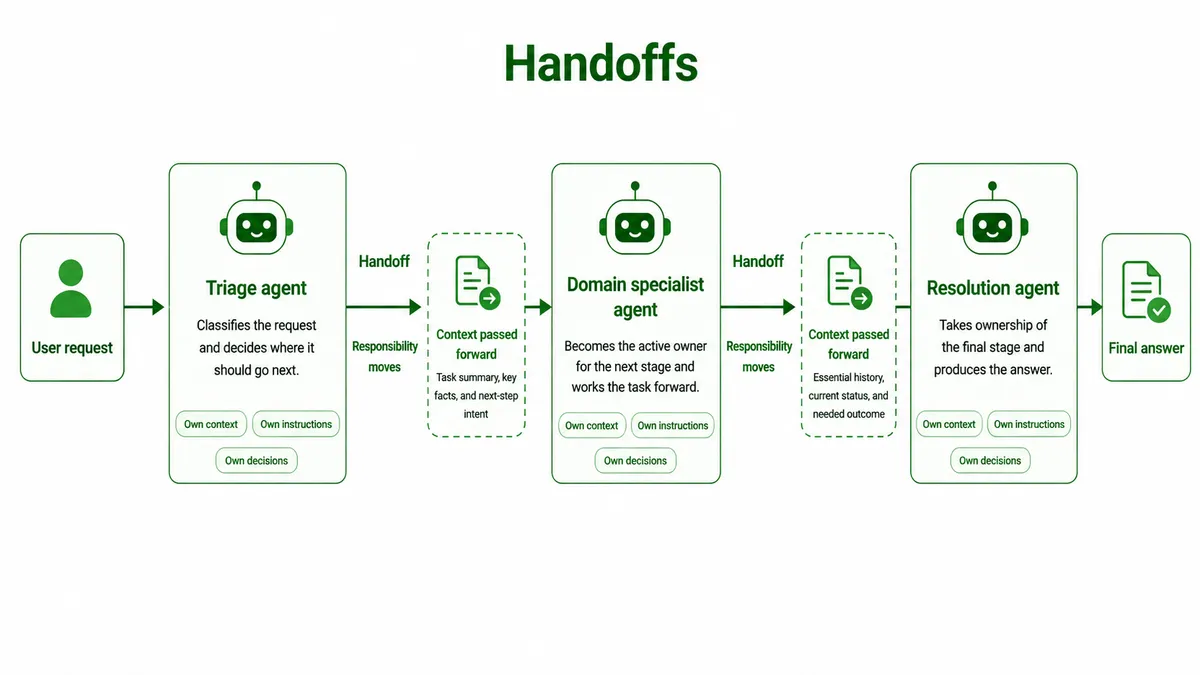
Handoffs need careful context management. The receiving agent needs enough information to continue the task, but not every internal step from the previous agent. Passing raw history can add noise and token cost, while passing too little context can break continuity.
Orchestrator-worker
The orchestrator-worker strategy uses a lead agent to plan the work, divide it into subtasks, assign those subtasks to workers, and synthesize the results. It is useful when the work can be split into independent parts that run in parallel.
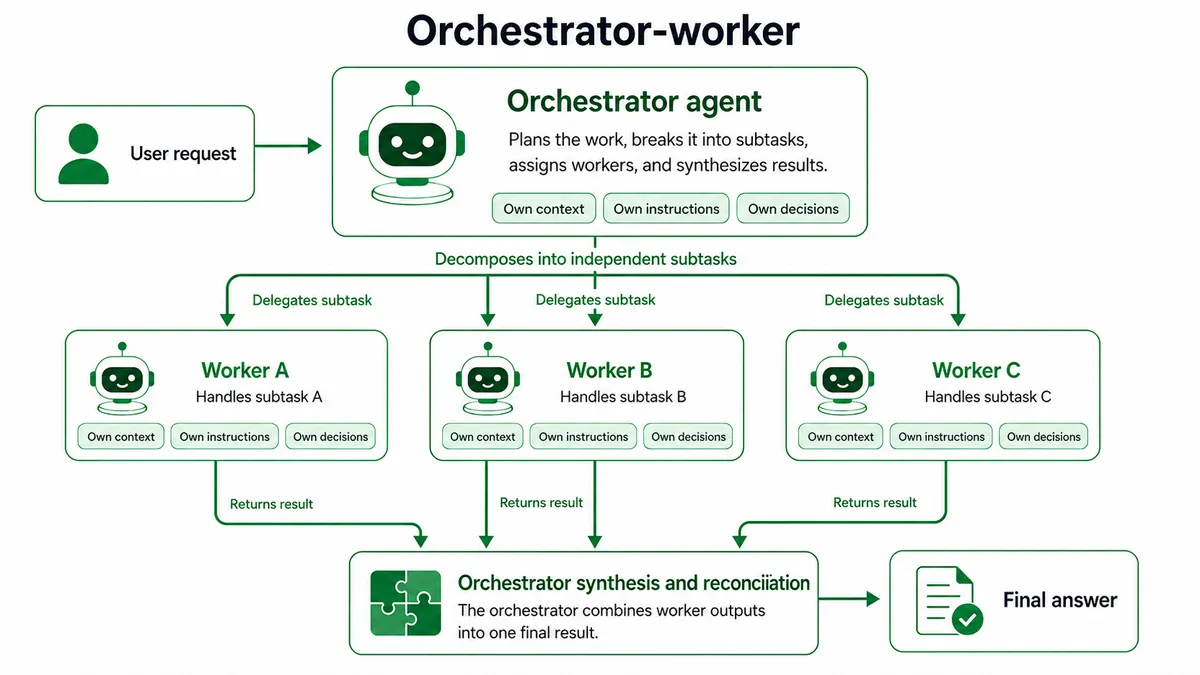
This strategy adds value when decomposition is real. Each worker should have a clear scope, its own context, and a result the orchestrator can combine. If the subtasks depend heavily on one another, the orchestrator can spend more effort coordinating the workers than solving the original problem.
Event-driven orchestration
Event-driven orchestration coordinates agents through events or messages instead of direct request and response calls. One agent can publish an event, another agent can react to it, and the original agent does not need to wait for a response before continuing.
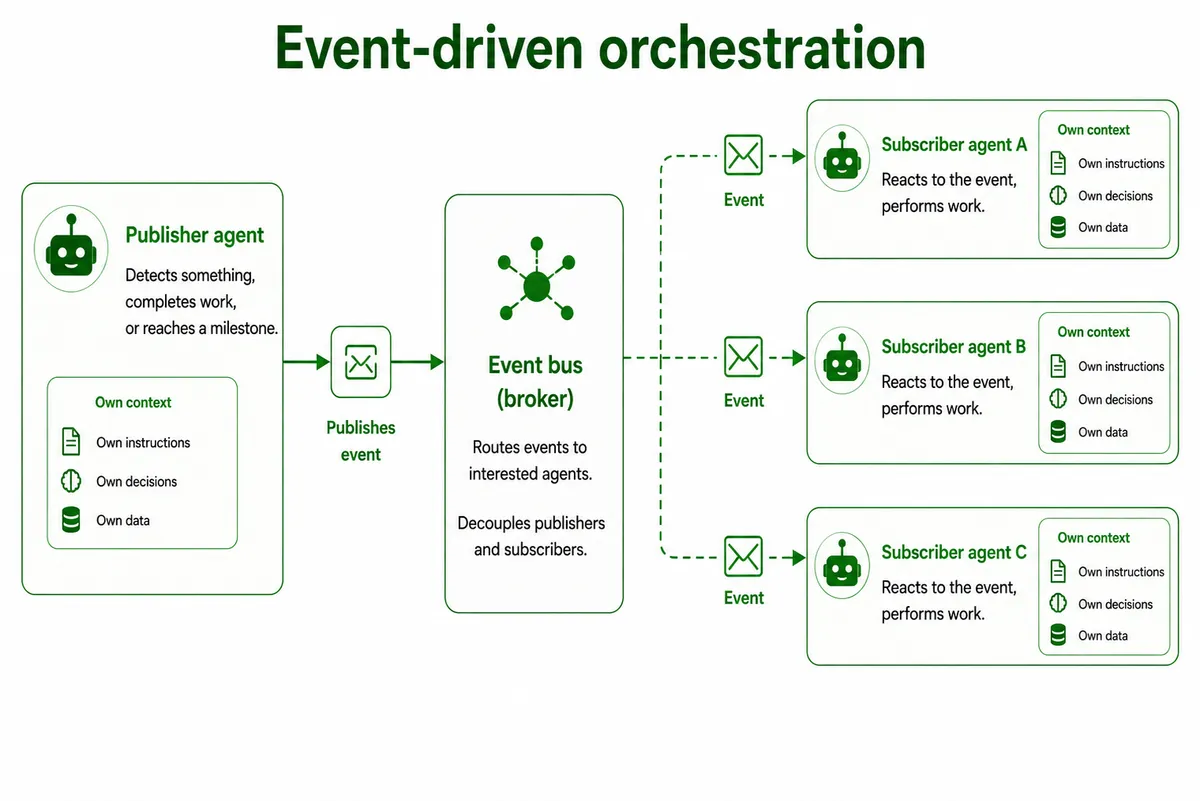
This strategy fits background work, long-running tasks, and systems where agents operate independently. It also raises the bar for state management. Results may arrive later, fail independently, or arrive out of order, so the system needs durable state, retries, and clear rules for how events change the task.
MCP and A2A
MCP and A2A support coordination at the communication layer. MCP helps an agent connect to tools, resources, and external systems, while A2A helps one agent communicate with another agent, especially across different frameworks, vendors, or runtime environments. One agent might use MCP to call a database, diagnostic tool, or internal API, then use A2A to coordinate with another autonomous agent.
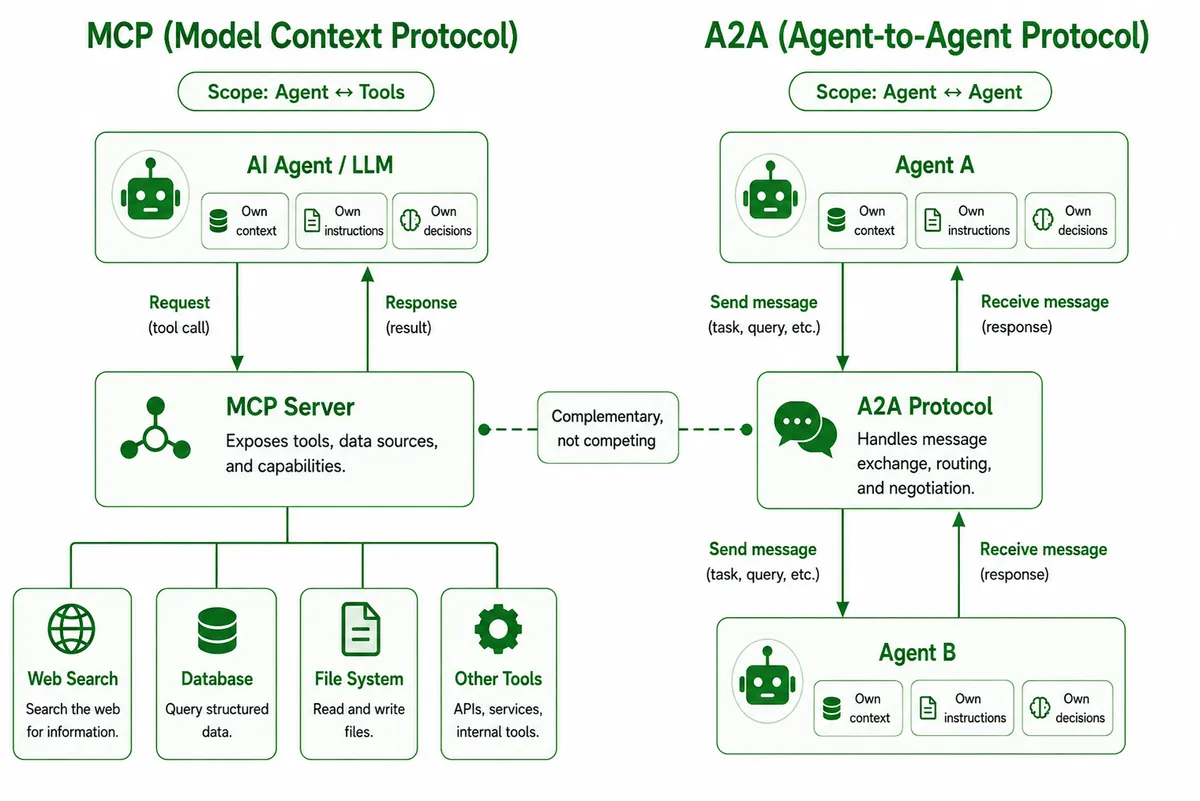
The difference is what the agent is talking to. MCP is for tools and resources. A2A is for agent-to-agent communication. These protocols do not choose the orchestration strategy for the application. The orchestration strategy still decides control, ownership, context sharing, and synthesis.
Multi-agent orchestration should match the coordination the system actually needs. Use agents as tools when one agent should stay in control, handoffs when responsibility should move, orchestrator-worker when work can be decomposed and synthesized, and event-driven orchestration when agents need to run independently.
Best practices for running single-agent and multi-agent systems
Production agent systems need limits, recovery paths, and visibility into each decision. Follow these best practices when building and running them.
- Design tools with clear responsibilities. Each tool should perform one clear operation and have a precise description, input shape, and output shape. Overloaded tools make the agent choose an internal mode before it can act, which increases reasoning overhead and error risk.
- Keep context focused. Context should include the information needed for the next decision, not every detail the system has collected. Summarize completed work, keep retrieved content relevant, and avoid passing raw internal history when a smaller summary gives the next agent enough information.
- Define delegation clearly. Multi-agent systems need explicit task boundaries before agents start working. Each delegated task should include the objective, expected output, relevant tools or sources, and what the agent should not cover. Clear delegation reduces duplicate work and makes the final synthesis easier.
- Keep write authority enforceable. When agents share state, the system should define which agent or workflow step can write to each artifact, database record, or output. Do not rely only on prompt instructions. Use workflow ownership, permissions, or access policies to prevent cross-boundary writes.
- Make execution durable. Agent tasks often involve several model calls, tool calls, approvals, and state updates. The system should checkpoint progress and resume from the last safe point instead of restarting the full task after a crash or timeout.
- Set execution limits. Agents need limits on iterations, tool calls, worker count, timeouts, and retries. Prompt guidance can help the agent allocate effort, while infrastructure limits enforce hard caps when the agent runs too long or a dependency fails.
- Evaluate with automated and human checks. LLM-as-judge evaluations can score outputs against criteria such as accuracy, completeness, source quality, and tool efficiency. Human review still matters because automated evaluations can miss systematic issues, especially when the model chooses weak sources or produces plausible but incomplete answers.
- Trace decisions end-to-end. Single-agent systems need visibility into model calls, tool calls, state updates, and final output. Multi-agent systems also need traces for delegation, handoffs, context exchange, retries, worker outputs, and synthesis.
Building single-agent and multi-agent systems with Dapr
Agent architecture choices eventually create runtime requirements. A single agent has to keep progress across tool calls and failures. A multi-agent system also has to coordinate work across services. Here is how Dapr gives agent systems a way to handle that outside the model call.
Keep single-agent work durable
In Dapr Agents, a single-agent design runs through DurableAgent. The agent still reads context, calls tools, uses memory, and decides the next step through its model-controlled loop.
Dapr then makes that work durable by running the agent through workflow execution. The agent can persist state, checkpoint progress, retry failed steps, and resume after interruptions. It can also run multiple tool calls in parallel or sequentially, depending on whether those tools are independent or depend on earlier results.
Delegate bounded work to specialists
The same durable agent can later become a specialist in a larger system. A parent agent can call another agent as a tool, pass it a focused request, wait for the result, and continue reasoning from that result.
In Dapr Agents, this delegation can run through a child workflow. That gives the specialist its own execution history while keeping it connected to the parent run. It also means a standalone agent does not have to be redesigned from scratch before it can join a multi-agent system.
Keep coordination predictable
Some multi-agent systems should follow a known process. A support workflow, for example, may always need triage before expert review. In that case, Dapr Workflows lets the developer define the coordination in code and call each agent in the required order.
This keeps the structure predictable. The workflow can pass one agent's output to another, wait for approval, branch on a result, and preserve progress across failures. The agents still reason inside their assigned steps, but the workflow controls the sequence.
Use dynamic orchestration for runtime selection
Other systems cannot know the full path before work starts. The right next agent may depend on what the first agent discovers, what data is missing, or which part of the task needs attention.
Dapr Agents support this through orchestrators that choose among registered agents during the run. This gives the system more flexibility than a fixed workflow, but the choice still runs through the Pub/Sub and registry infrastructure.
Run agents as independent services
A larger multi-agent system may need agents to run as separate services. In that design, agents do not have to call each other directly. They can publish and subscribe to messages, react to events, and continue work without blocking the original caller.
Dapr Agents use a registry so agents and orchestrators can discover available specialists. Each agent can also have its own role, topics, state configuration, and service boundary. This makes it easier to scale agents separately and isolate failures, but it also makes message design and state ownership more important.
Making single-agent and multi-agent systems production-ready with Diagrid Catalyst
After you choose an agent design, the focus shifts to running it reliably in production. You need recovery, security, governance, and visibility around the agent code. Diagrid Catalyst adds those controls around the agent system, whether you built the agent with Dapr Agents or use another supported framework, such as LangGraph or CrewAI, by:
Keeping agent progress recoverable
Catalyst records an agent run as a workflow. Each LLM call and tool call becomes a recorded activity. If the process crashes, deploys, or times out, the system can recover from workflow history. It does not have to start over or repeat completed work.
Verifying delegated work
Catalyst's verifiable execution signs the workflow history and checks it before the run continues. When one agent hands work to another agent or tool, Catalyst can attach an attestation to the delegated result. That gives your system a way to verify that the result came from the expected workload.
Isolating sessions and state
Catalyst treats each agent invocation as a workflow instance. A chat session, triage request, scheduled run, or delegated task gets its own instance ID and saved state. That keeps concurrent work separate across single-agent and multi-agent systems.
Connecting agents through a registry and Pub/Sub
Catalyst supports agent communication through a shared registry and Pub/Sub. Agents register as available specialists, so an orchestrator can discover them at runtime. The same agent can run alone first, then join a larger multi-agent system through different registration and messaging. Its internal logic does not have to change.
Enforcing identity and access policies
Catalyst gives each agent an identity and enforces access policies outside the model's instructions. You can define which agents, services, workflows, MCP servers, or Pub/Sub topics a workload can access. Denied calls are blocked before they reach the target.
Tracing each run end to end
Catalyst exposes metrics, traces, API logs, topology views, and workflow visualizations. You can use them to see why an agent produced a result, not just what it returned. For single agents, that helps you catch loops, wrong tool choices, failed calls, and token-heavy steps. For multi-agent systems, it helps you trace delegation decisions, retries, handoffs, policy denials, and final synthesis across agents.
Where to go next
This article compared single-agent and multi-agent systems by showing how each design assigns decision-making, manages context, and coordinates work. It explained when one agent is enough and when multiple agents are worth the added coordination cost. It also showed how Dapr gives agent systems durable, coordinated execution, and how Diagrid Catalyst adds security, governance, and observability on top of that.
If you are ready to put this into practice, these resources cover building agents on Catalyst, coordinating them across services, and verifying delegated work in production.
