
Model Context Protocol (MCP) Explained
MCP is an open standard that provides AI applications with a consistent way to connect to external tools, data, and services. This article explains what MCP is, its architecture, and how it enables AI applications to interact with external systems.
Agents are impressive in isolation but are limited without real world data to act upon. They become more capable by integrating with external tools, data sources, and services such as files, databases, APIs, browsers, and business applications.
Traditionally, each new data source required a custom integration, creating a growing network of connectors that became difficult to maintain. MCP replaces this approach with a standard way for AI applications to connect to external systems across different platforms.
So, what does MCP actually do, and why is it becoming the de facto standard for connecting AI applications to external systems?
By the end of this piece, you'll understand what MCP is, how its architecture works, common use cases, the challenges of running it in production, and how Diagrid Catalyst helps secure, govern, and manage MCP deployments.
What is MCP
Model Context Protocol (MCP) is an open standard that enables AI applications to connect with external tools, data sources, and services through a common protocol. Developers can use MCP as a standardized interface for communication, rather than creating separate integrations for each application and service.
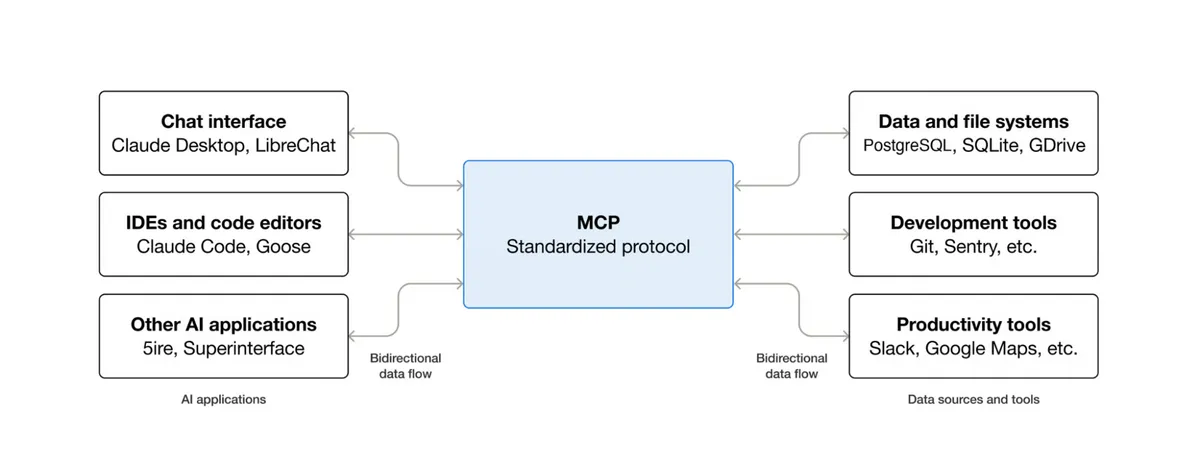
MCP uses JSON-RPC 2.0 to structure messages exchanged between clients and servers, including requests, responses, and notifications. A single MCP server can expose tools or data to multiple MCP-compatible AI applications. This reduces the need to build and maintain separate integrations for each client.
MCP is model and framework agnostic. It is not tied to any specific LLM, AI application, or framework, allowing different AI systems to connect with external capabilities through the same protocol.
Why MCP matters
Imagine an AI assistant that retrieves customer records from a CRM, creates tasks in Jira, searches internal documentation, and sends updates to Slack. Each of these systems has its own API, authentication method, and data format. When more tools are added, the number of integrations increases. This makes the application difficult to build and maintain.
Even a small change to a single API can require developers to update integration code, validate authentication, and ensure that downstream tools continue to work as expected. There is also the ongoing effort of maintaining these integrations as external services evolve and new tools are introduced. A single integration issue can disrupt an entire workflow when multiple services depend on one another.
This is precisely why adopting MCP as a standardized middle layer is essential. In this layer, AI applications interact with external systems through a uniform interface instead of implementing separate integrations for each tool or service. This approach simplifies integration, reduces maintenance overhead, and makes AI applications easier to extend as new capabilities are added.
Key benefits of MCP include:
- Reduced development complexity. MCP minimizes the need for custom integrations and glue code by providing a standardized interface for connecting AI applications with external tools and services.
- Improved scalability. New tools and services can be integrated without rewriting existing integrations, making it easier to expand AI applications as requirements evolve.
- Simplified maintenance. Changes to external tools or services require fewer updates to integration code, reducing maintenance effort and improving long-term reliability.
MCP architecture and components
The MCP follows a client server architecture consisting of three core components that work together to enable structured communication between AI models and external systems. These components, the host, client, and server, each have well-defined roles and responsibilities.
Let's explore each component and its responsibilities in more detail:
1. MCP host
The MCP host is the AI application itself. It contains the large language model (LLM), serves as the user's point of interaction, and coordinates one or more MCP clients. Examples include AI-powered IDEs and conversational AI applications. The host uses these clients to process user requests that require access to external tools or data.
2. MCP client
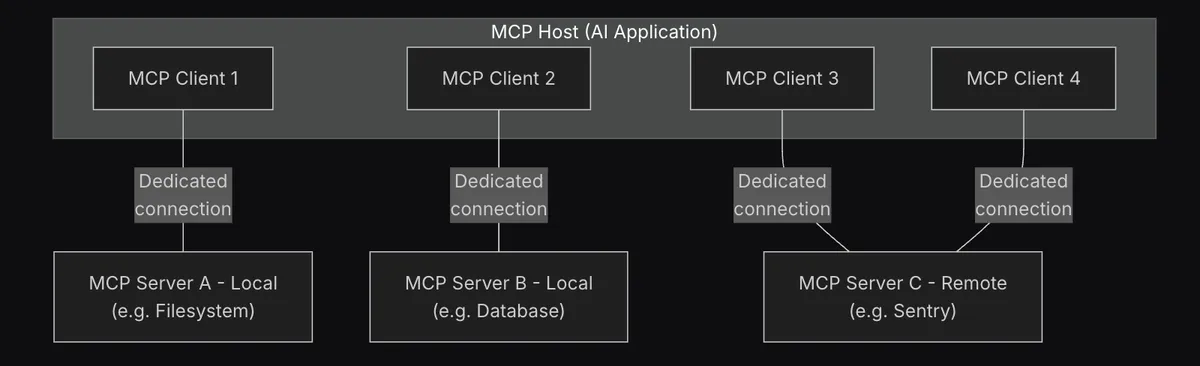
The MCP client is a component within the MCP host that manages communication with an MCP server. Each MCP client lives inside the host and maintains a one-to-one connection with a single MCP server. When a host connects to multiple MCP servers, it uses a separate MCP client for each server. The client handles MCP protocol communication, including sending requests to and receiving responses from the connected server. It also queries the connected MCP server to discover the capabilities it exposes. The host then processes the returned information and makes it available to the LLM as part of its context.
3. MCP server
An MCP server is a program that provides context and capabilities to AI applications. It acts as a lightweight wrapper around external systems such as databases, file systems, APIs, and web services, exposing their capabilities through the MCP protocol. These capabilities may include tools for performing actions, resources for providing context, and prompts for structuring interactions with LLMs. MCP servers can run locally on the same machine as the host or remotely over a network.
Transport layer
The transport layer defines how MCP clients and servers exchange messages. It abstracts the underlying communication mechanisms, enabling the same protocol to work across different environments. MCP supports STDIO for communication between local processes on the same machine and Streamable HTTP for communication with remote MCP servers.
How MCP solves integration challenges
Before MCP, AI applications relied on custom integrations to connect with external tools. For example, an AI assistant needing to check the weather would first define the weather API as a function and describe it to the LLM using a schema. This schema would then be passed with the LLM request.
If the LLM decides to use the function, the application will receive the function call. The backend will execute the weather API request and send the result back to the LLM. Therefore, the application needs its own logic to connect the LLM with the external tool.
The problem became more complex when the same tool needed to work with different LLMs. OpenAI, Anthropic, and Gemini each used different schemas and approaches for function calling. As a result, developers might need separate integration logic for each model, even when connecting to the same external service.
As the number of AI applications and external tools increased, this led to what is known as the M × N integration problem. Connecting M AI applications to N external tools could require M × N custom integrations. Adding an additional AI application could require another set of custom integrations.
MCP abstracts the complexity of this process by providing a standardized interface between AI applications and external systems. Instead of creating a separate integration for each application and service, developers can expose a service through an MCP server. MCP-compatible applications can then connect to that server using the same protocol.
An MCP server manages communication with the underlying external service, while the AI application communicates through the MCP interface. This allows API specific logic to remain behind the server and gives AI applications a consistent way to access external capabilities.
It also separates AI applications from the systems to which they connect. An MCP server can be built around an external service once and reused by multiple MCP-compatible clients. Adding another client does not require rebuilding the underlying service integration.
Real world use cases for MCP
MCP simplifies a wide range of integrations between AI assistants and real-world systems. It supports everything from retrieving contextual information to performing actions across multiple services.
Here are some of the most common MCP use cases:
Connecting workplace applications
MCP connectors enable AI applications to integrate with tools such as Slack, Google Drive, and Notion. An AI assistant can retrieve messages, search for documents, and use information from these tools within a conversation or workflow.
For example, an AI assistant can search Google Drive for files related to a query and retrieve the content of a specific document. It can also fetch recent Slack messages or draft a reply to a post.
Working with live business data
MCP servers can expose both SQL and NoSQL databases to AI applications. This allows users to make natural language requests, which the AI can translate into database queries and return as conversational responses.
MCP can also aggregate information from various knowledge sources. For example, an AI-powered news application can retrieve data from news APIs or private databases to provide personalized news and information.
Giving AI access to code and files
MCP can connect AI coding assistants to code repositories and local file systems. MCP servers for Git and GitHub can list files, retrieve code content, search repositories, and manage changes.
A filesystem MCP server can also enable an AI application to read local files within allowed directories. This can help an AI assistant retrieve relevant files when answering questions or working on a task.
Powering travel and location assistants
MCP can connect AI applications with services such as Google Maps, weather APIs, and hotel booking APIs. An AI application can select the appropriate tool based on the user's request.
For example, a travel assistant can use these services to check weather conditions, obtain directions, or search for hotels.
Orchestrating multi step tasks
MCP clients can connect to multiple servers at the same time, allowing AI agents to combine tools within a single workflow. For example, an enterprise support assistant could use one MCP server to retrieve customer information from a CRM and another to create a ticket in Jira.
MCP also supports workflows in which the output from one tool is passed to another. This enables AI applications to coordinate multiple tools across different systems as part of a single task.
Managing MCP servers in production
MCP standardizes how agents connect to tools. However, running MCP servers in production raises concerns that the protocol does not fully address on its own.
When the number of MCP servers increases, teams must authenticate callers, protect upstream credentials, control tool access, and keep MCP calls reliable. They also need retries, timeouts, and circuit breakers for MCP calls, along with comprehensive logs, metrics, and distributed traces across agents, servers, and tools.
Challenges of managing MCP servers at scale
Below are the challenges that teams face as MCP deployments scale:
- Authentication becomes more complex as agents connect to more MCP servers. Each upstream server may require its own credentials, while teams must still verify which callers are allowed to connect.
- MCP does not provide a universal model for determining which clients are authorized to use which tools. Without additional controls, any client that can access a server can invoke every tool it exposes.
- LLMs can be manipulated through prompt injection to misuse tools, so critical tool authorization should be enforced using deterministic controls outside the model.
- API keys and other upstream credentials can end up in agent code, environment variables, or prompts. These credentials can be difficult to rotate and are prone to accidental exposure.
- Retries, timeouts, and circuit breaking for tool calls generally need to be implemented at the application or platform layer.
- Observability also requires additional infrastructure. Teams need logs, metrics, and distributed traces that encompass MCP requests across agents, servers, and tools.
- The operational burden increases as the number of MCP servers increases. Transport security, secret storage, and service discovery become harder to manage consistently across a growing MCP deployment.
How Diagrid Catalyst manages MCP connections
Diagrid Catalyst addresses these concerns at the platform layer by implementing managed controls around MCP server connections.
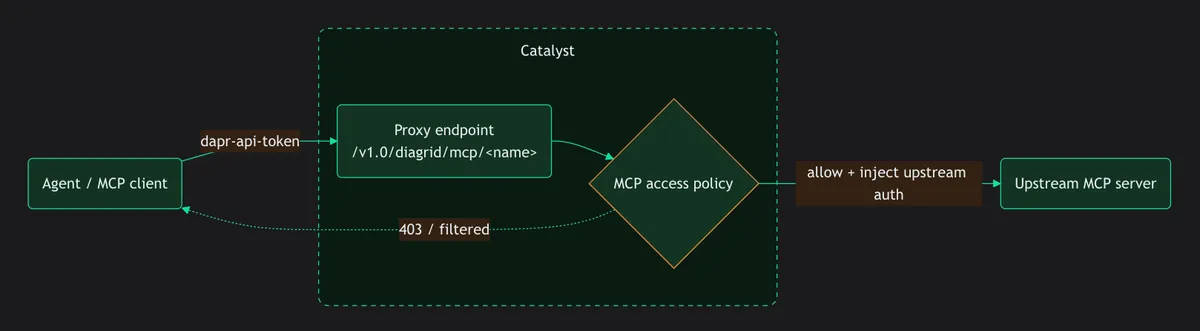
Here is how Diagrid Catalyst provides several controls for managing these connections:
- Managed proxy endpoints. Diagrid Catalyst fronts upstream MCP servers with proxy endpoints. The proxy communicates with MCP using Streamable HTTP, allowing off-the-shelf MCP clients and agent frameworks to operate without modification.
- Authentication and credential injection. The caller authenticates to Diagrid Catalyst, while Diagrid Catalyst authenticates to the upstream server using the credentials configured for the connection. Upstream credentials remain outside the agent code and are injected at request time.
- Deny-by-default access control. Teams can define which callers can access which tools on an MCP server. Unauthorized calls are rejected with a 403 error, and tool discovery is filtered based on the configured access policy.
- Resiliency controls. Diagrid Catalyst applies standard resiliency policies to MCP calls, including timeouts, retries, and circuit breakers.
- MCP observability. Logs, metrics, and distributed traces that automatically cover MCP requests and are accessible through the Diagrid Catalyst console.
- Centralized operations. Diagrid Catalyst centrally manages transport security, secret storage, and service discovery.
There is a clear difference between what the MCP standardizes and what a production platform must manage. MCP provides the common protocol for connecting agents to tools. Diagrid Catalyst adds the security, resiliency, observability, and operational controls necessary to run those connections reliably at scale.
Where to go next
MCP provides AI applications with a common interface for connecting LLMs with external tools and data sources. Diagrid Catalyst builds on this foundation by providing the controls necessary to connect, manage, and secure MCP servers.
If you're ready to put MCP into practice, these resources guide you through connecting MCP servers with Diagrid Catalyst, managing server connections and access policies, and securing MCP deployments in production.
