Run reliable agents and apps without giving up control
Run Diagrid Catalyst in our cloud, on dedicated infrastructure, in your own AWS or Azure account, or fully air-gapped. Compare all five deployment models.

Joni Collinge
Founding Software Engineer
Some app and agent reliability providers give you one way to use their services: their cloud, on their terms. That means trusting those vendors with your application traffic and data, whether or not it meets your security, compliance, or operational requirements.
Diagrid Catalyst gives you a choice.
Catalyst is a platform for governing, securing, and running agents and applications reliably in production. It gives every workload durable execution, verifiable identity, and policy-driven access controls out of the box.
You can run Catalyst in our shared cloud, on dedicated infrastructure, inside your own cloud account, or entirely within an air-gapped environment. You decide where the platform runs, where your data flows, and who operates it.
How Catalyst works
Catalyst separates management from runtime execution.
The control plane is the management surface. You interact with it through the web console, CLI, or API to define projects, applications, agents, policies, and other resources.
The data plane processes runtime requests, executes workflows, and manages application state.
Your workloads connect directly to the data plane. Application traffic and workload data never pass through the control plane.
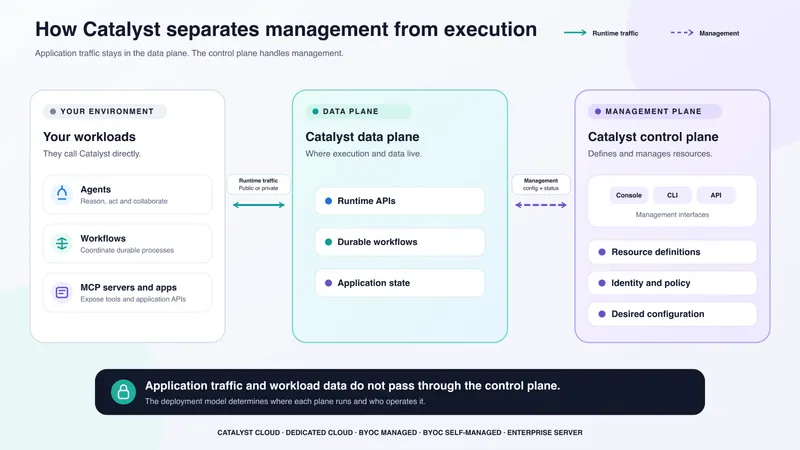
In Catalyst a data plane deployment is called a region. One control plane can manage multiple regions, and a region can host multiple projects. You choose where to deploy each project based on its isolation, location, networking, and operational requirements.
This separation allows a region to run anywhere, on our infrastructure or yours, while remaining manageable through the shared Diagrid control plane.
The region's primary job is to synchronize configuration data from the control plane and then manage and expose the data plane services to your workloads. However, to enable some features in the web console it does upload some telemetry data such as metrics, API logs, and health checks. You can opt out of this telemetry upload if you do not want these features enabled.
Deploy Catalyst on your terms
Catalyst supports five deployment models, from a shared cloud service to a fully self-managed, air-gapped installation.
Cloud
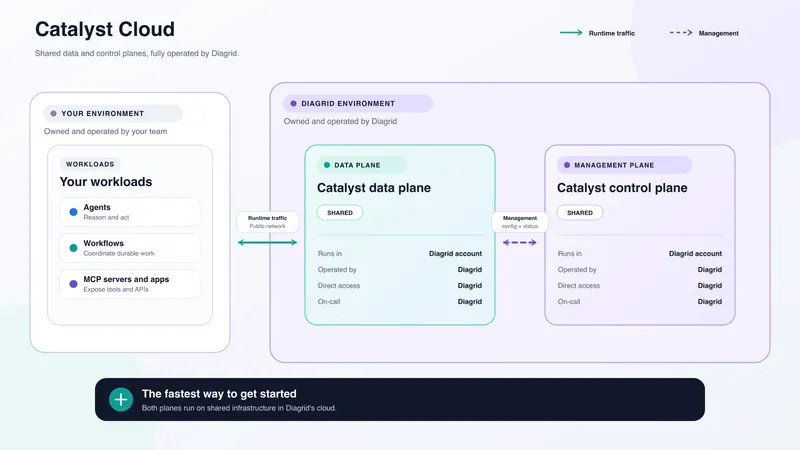
Cloud is the fastest way to get started. Diagrid operates the control plane and a single shared region on Diagrid's infrastructure, so there is nothing for you to provision or manage.
Every Catalyst organization gets FREE access to a Cloud subscription. Cloud is suited to evaluation, development, and workloads that can run on shared infrastructure.
Get started with Catalyst Cloud.
Dedicated Cloud
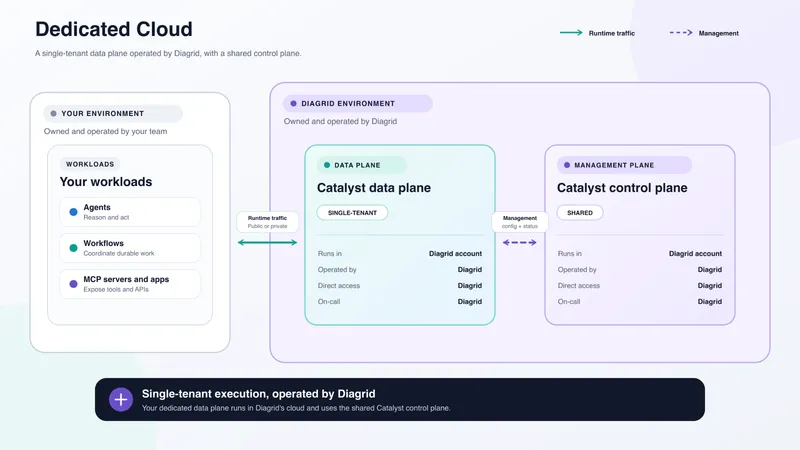
Dedicated Cloud provides a single-tenant Catalyst region owned and operated by Diagrid.
Dedicated Cloud currently supports AWS and Azure. You can select the deployment size and use public networking or private connectivity through cloud integrations.
This model is designed for production workloads that need dedicated capacity, infrastructure isolation, or private connectivity without adding platform operations to your team.
Bring Your Own Cloud
Bring your own cloud (BYOC) places a single-tenant Catalyst region inside your AWS or Azure account. This keeps the Catalyst data plane within your infrastructure and gives you control over the surrounding cloud environment.
The region connects to the shared Diagrid control plane, giving you the same web console, CLI, and management experience as the Cloud offering.
BYOC also supports public networking and private connectivity through cloud integrations.
Catalyst offers two BYOC models. The difference is how your team and Diagrid divide operational responsibility.
BYOC Managed
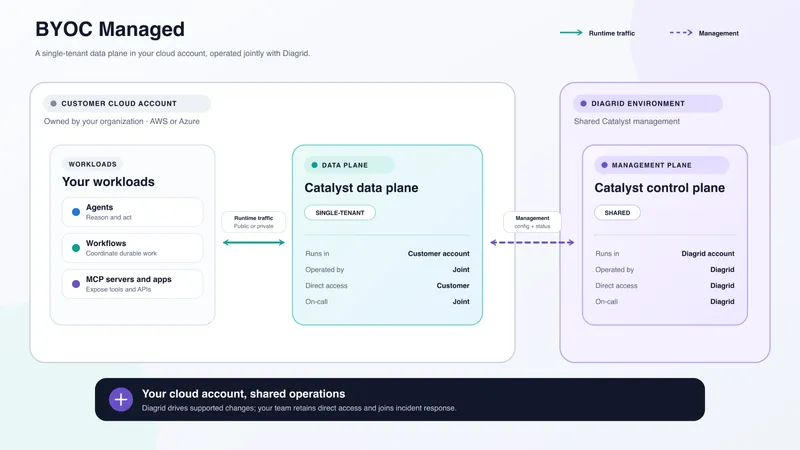
BYOC Managed uses a joint operating model.
Catalyst deploys the region and manages the infrastructure and service configuration. If you enable telemetry, Diagrid can monitor the deployment and help identify problems.
However, Diagrid does not have direct access to your cloud account. We cannot log in to investigate or fix an issue inside your environment. When a problem involves your network, permissions, quotas, cloud account, or underlying infrastructure, your operations team must work with us to resolve it.
BYOC Managed is designed for organizations that want Catalyst inside their cloud account while sharing platform operations with Diagrid.
BYOC Self-Managed
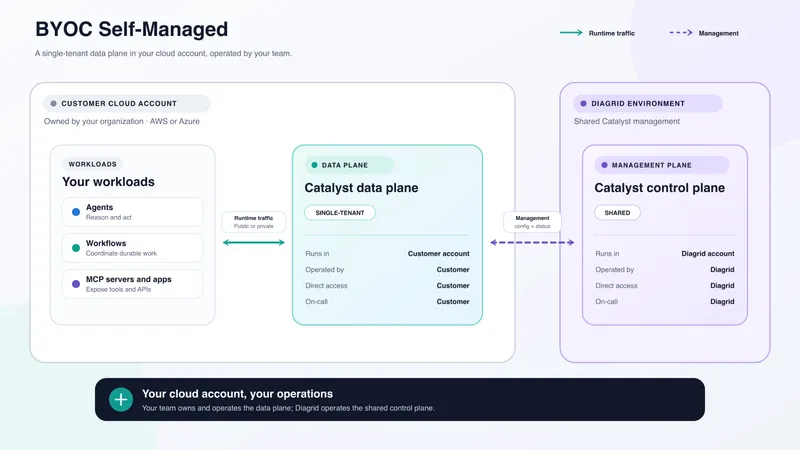
BYOC Self-Managed gives your team responsibility for the Catalyst region.
You provision the required infrastructure, install the Catalyst services, and manage the deployment. The region runs inside your cloud account and connects securely to the shared Diagrid control plane.
Diagrid documents the infrastructure and installation requirements and provides product support. Your team is responsible for the availability, maintenance, monitoring, and operation of the region and its supporting infrastructure.
This model is suited to organizations with established platform operations or requirements that demand direct control over the installation.
Enterprise Server
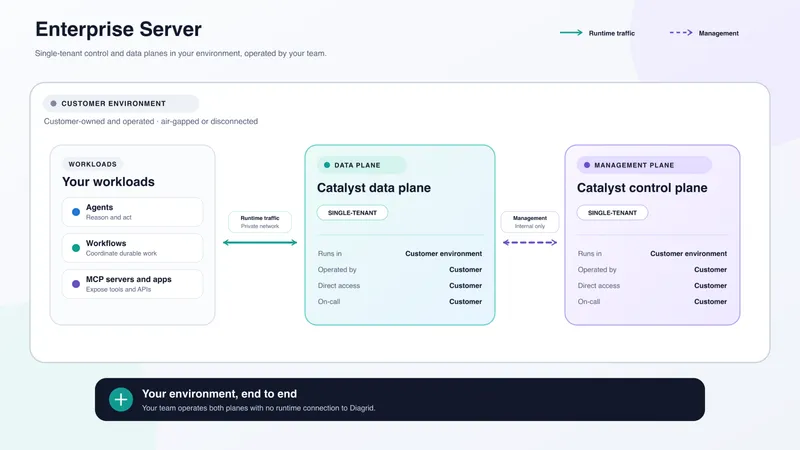
Enterprise Server is designed for air-gapped and disconnected environments.
You install and operate both the Catalyst control plane and data plane on infrastructure you control. Unlike the other deployment models, Enterprise Server provides a single-tenant control plane and requires no runtime connection to Diagrid.
Your organization is responsible for the complete platform, from infrastructure and installation to monitoring and operations. Diagrid provides product guidance and support but does not operate the deployment.
Enterprise Server is intended for highly regulated, defense, critical infrastructure, and other environments where external connectivity is restricted or prohibited.
Set boundaries
Each deployment model changes three boundaries:
- Tenant boundary: Is the control plane or region shared or single-tenant?
- Infrastructure boundary: Does it run in a Diagrid or customer environment?
- Operating boundary: Who has access, makes changes, and responds to incidents?
Where each plane runs
| Deployment model | Control-plane tenancy | Control-plane location | Region tenancy | Region location |
|---|---|---|---|---|
| Cloud | Control-plane tenancyShared | Control-plane locationDiagrid environment | Region tenancyShared | Region locationDiagrid environment |
| Dedicated Cloud | Control-plane tenancyShared | Control-plane locationDiagrid environment | Region tenancySingle-tenant | Region locationDiagrid environment |
| BYOC Managed | Control-plane tenancyShared | Control-plane locationDiagrid environment | Region tenancySingle-tenant | Region locationCustomer environment |
| BYOC Self-Managed | Control-plane tenancyShared | Control-plane locationDiagrid environment | Region tenancySingle-tenant | Region locationCustomer environment |
| Enterprise Server | Control-plane tenancySingle-tenant | Control-plane locationCustomer environment | Region tenancySingle-tenant | Region locationCustomer environment |
Only Enterprise Server includes a single-tenant control plane. Other deployment models such as Dedicated Cloud and BYOC provide a single-tenant region while continuing to use the shared Diagrid control plane.
Who operates each plane
| Deployment model | Control-plane operator | Region operator | Direct infrastructure access | Primary on-call |
|---|---|---|---|---|
| Cloud | Control-plane operatorDiagrid | Region operatorDiagrid | Direct infrastructure accessDiagrid | Primary on-callDiagrid |
| Dedicated Cloud | Control-plane operatorDiagrid | Region operatorDiagrid | Direct infrastructure accessDiagrid | Primary on-callDiagrid |
| BYOC Managed | Control-plane operatorDiagrid | Region operatorJoint | Direct infrastructure accessCustomer | Primary on-callJoint |
| BYOC Self-Managed | Control-plane operatorDiagrid | Region operatorCustomer | Direct infrastructure accessCustomer | Primary on-callCustomer |
| Enterprise Server | Control-plane operatorCustomer | Region operatorCustomer | Direct infrastructure accessCustomer | Primary on-callCustomer |
With BYOC Managed, Diagrid drives infrastructure and service configuration changes through Catalyst and can monitor telemetry when you enable it. Diagrid support does not have direct access to your cloud account, so your team must remain available to investigate and resolve issues inside the environment. Operations and incident response are therefore a shared responsibility.
With BYOC Self-Managed, your team provisions and operates the region. Diagrid operates the shared control plane and provides product support, but your team owns the operational response for your region.
With Enterprise Server, you get maximum control but with maximum responsibility. You manage the infrastructure and services as well as the operations.
Choose the right boundary for you
The right model depends on where Catalyst must run and who should operate it:
- Use Catalyst Cloud when speed and simplicity are the priority.
- Use Dedicated Cloud when you need a single-tenant region operated by Diagrid.
- Use BYOC Managed when Catalyst must run in your cloud account and you want to share operations with Diagrid.
- Use BYOC Self-Managed when Catalyst must run in your cloud account under your team's full control.
- Use Enterprise Server when the entire platform must run in your environment without external connectivity.
Your deployment requirements should not force you to choose between reliable execution and control over your environment. Catalyst gives you both, with an operating model that fits your infrastructure, security, and compliance needs.
Ready to plan your deployment? Review our pricing page to get started today.