
Understanding AI Agent Patterns
AI agent patterns trade predictability for autonomy as you move from developer-controlled workflows to LLM-driven orchestration. This piece is a guide to the four core patterns, the tradeoffs each one makes, and how to pick the right one for the task in front of you.
If you want the mechanics rather than the pattern, how the agent loop actually works breaks the observe-reason-act cycle down a step at a time.
You know what an agent is. You've probably read the definition a dozen times by now. An LLM in a loop, calling tools, working toward a goal. That part is settled. What isn't settled is what you do the moment you sit down to build one.
Because there isn't one way to build an agent. There's a spectrum. On one end, you write the loop yourself, where every step, every branch, every decision is pinned down in code. On the other end, you hand the loop to the model and let it figure things out. Both work. Both fail in different ways. And the gap between them is where most of the hard architectural decisions live.
More autonomy sounds appealing. It almost always does. But more autonomy also means less predictability, and less predictability means harder debugging, more variable cost, and more ways for a system to surprise you in production. The question isn't “how do I build an agent?” It's “how much control should I give up, and where?”
This article walks through the four patterns that show up over and over in real systems, what each one buys you, and what each one costs.
Workflows and agents are not the same thing
Before we get into the patterns, there's one piece of terminology that confuses a lot of people. A workflow and an agent are not the same thing, even when they look similar.
A workflow is a sequence of steps defined by the developer. You write the branches. You decide what runs and when. The workflow might call an LLM at one step or at several steps, but it is still a workflow. The control flow stays in your code.
An agent is different. An agent is a reasoning loop that the LLM controls. You give it a goal and a set of tools, and the model decides which tool to call, in what order, and when the job is done. The control flow lives in the model.
Another way to think about it is that workflows execute a plan and agents improvise one. A workflow is like a script. The steps are defined ahead of time and the system follows them. An agent is closer to a policy. It is given a goal and decides what to do next as it runs. The key difference is who decides what happens at runtime. If the developer makes that decision at design time, it is a workflow. If the model makes that decision in the moment, it is an agent.
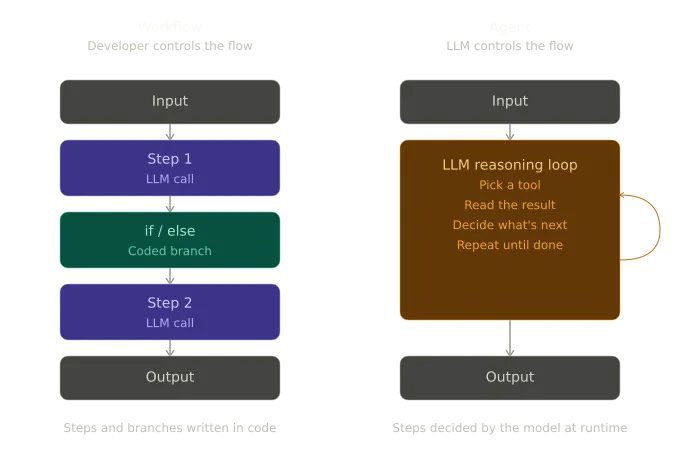
Fig: Difference between Workflows and Agents
The overlap is what makes this confusing. Both call LLMs. Both use tools. Both can run for a long time and produce useful output. The difference is who is holding the steering wheel. You or the LLM.
That single distinction shapes everything else. It affects how the system fails, how you debug it, how much it costs to run, and how consistent it is when you run it twice.
Neither is better. They're points on a spectrum, and the right choice depends on whether the task you're trying to solve has a known shape or not.
The building block every pattern starts with
Every pattern in this article is built from the same primitive: an LLM with memory and tools attached. This is sometimes called an augmented LLM, which is a fine name for it. A raw LLM can only respond. Add memory so it remembers the conversation and tools so it can act on the world, and you now have something that can do real work.
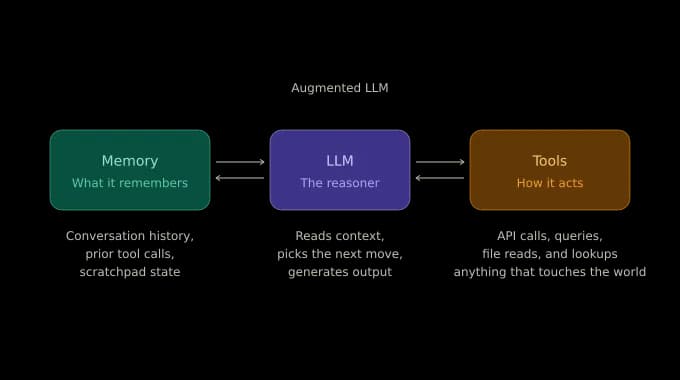
Fig: The Components of the Augmented LLM
That's it. That's the unit. Everything that follows, like workflows, single agents, and multi-agent systems, is a different way of wiring these units together. When you find yourself overwhelmed by the pattern landscape, come back to this. You're not learning four unrelated things. You're learning four ways of organizing the same thing.
A note on the term. The term “augmented LLM” comes from Anthropic's “Building effective agents” essay. Their version adds a third component, retrieval, which we're folding into “tools” here, since that's how it's usually implemented in practice.
Pattern 1: Deterministic AI workflow
The simplest pattern, and the one most teams start with, isn't really an agent at all. It's a durable workflow that makes direct LLM calls. Durable execution means the workflow persists its state at every step, so a crash mid-run doesn't lose work and resumes exactly where it stopped.
You write the loop and the branches. The LLM gets called at specific points, but the decisions about what runs next are made in code with plain if statements.
Picture an invoice processing pipeline. Invoices arrive from vendors, get checked, and either flow straight through to payment or get held for human review. The first LLM call extracts and categorizes the invoice as vendor, amount, line items, and expense category. Then a plain conditional decides where it goes.
If the total is under the auto-approval threshold and the vendor is on file, a second LLM drafts the payment confirmation. Anything else gets flagged for a human.
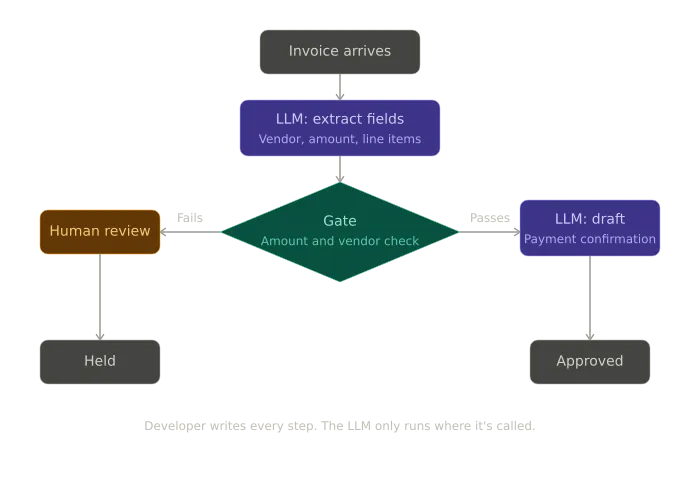
Fig: The Workflow diagram for the Invoice Processing Pipeline for Pattern 1
This produces predictable behavior. The number of LLM calls is determined by the branch taken. Every decision point is visible in code. Cost is bounded. Debugging is straightforward because execution is explicit and replayable step by step.
The limitation is rigidity. The sequence is fixed in code, and any change requires a deployment. The rules are narrow. For example, an invoice for $4900 from a known vendor with a duplicate invoice number from last month still passes through because nothing in the logic checks for that kind of pattern. The system only evaluates what is explicitly encoded. It cannot adapt or introduce new decision paths beyond what is defined.
This pattern works when the process is stable, and the steps are well defined. When edge cases increase, the system becomes restrictive and harder to extend without modifying core logic.
Pattern 2: Autonomous agent
Now we hand the loop to the model. This is what most people mean when they say “agent”. The developer stops writing the steps and starts writing the goal.
You give the model a role, a goal, a set of instructions, and the tools it needs. The LLM reads the input, decides which tool to call, interprets the result, decides what to do next, and keeps going until it thinks the job is done.
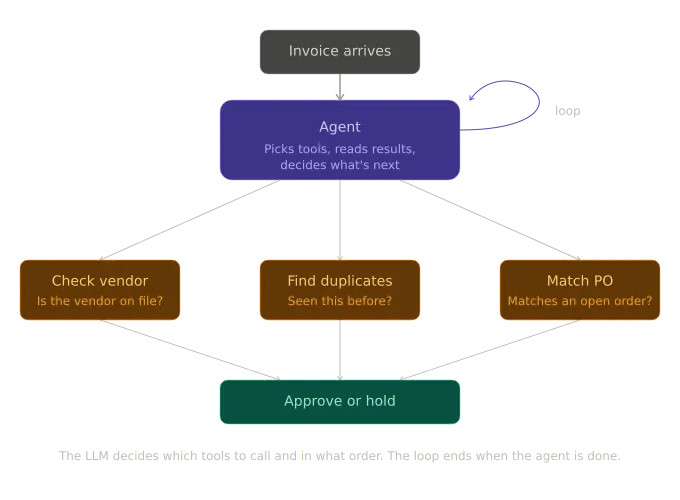
Fig: The diagram for the Invoice Processing Pipeline for Pattern 2
Same invoice scenario. Now the agent gets the raw invoice and three tools, such as vendor lookup, duplicate search, and PO matching. You don't tell it which to call first. If the invoice has a PO number, the agent will probably go straight to PO matching. If it doesn't, it'll start with the vendor check.
If duplicate search comes back with a suspicious hit from six weeks ago, the agent can re-run the check with slightly different parameters before deciding. The reasoning history persists across turns, so each step has access to what came before without your wiring state manually.
The capability jump is real. The agent handles invoices that the deterministic workflow couldn't have anticipated, such as odd vendor names, missing fields, and partial matches against POs. It adapts. It reasons.
But here's the tradeoff you're now signing up for. The workflow gave you a tight bound on LLM calls. The agent might make three on one invoice and seven on the next, on inputs that look almost identical. The behavior is now a function of the model, the prompt, the tool descriptions, and a fair amount of luck.
When something goes wrong, and it might, the developer is required to “trace through the code,” which isn't a debugging strategy anymore. You're inspecting reasoning chains, not control flow. This is where observability stops being a nice-to-have and starts being the thing that decides whether the agent is operable in production at all. We'll come back to what that looks like at the end of the article.
This is also the point where durability stops being a nice-to-have. An in-memory agent that crashes mid-reasoning loses everything the tool calls it, already made the duplicates it already ruled out, and the partial conclusion it was forming. A durable agent persists at each step to a state store and resumes from where it stopped. It is the difference between a system that can pick up a task where it left off and one that has to start over every time it restarts. The first works in production. The second does not.
This pattern is the right call when the task has structure, but the path isn't fixed. When you want the model to reason about which steps to take, but the scope is still bounded.
Pattern 3: Deterministic multi-agent orchestration
Pattern 2 has a failure mode that shows up as you scale it. You give the agent a few more tools. Then a few more responsibilities. Soon, it's juggling vendor checks, PO matching, fraud heuristics, and email tone, and quality drops in hard-to-pin-down ways. The agent is trying to be too many things.
The fix is to split it. Give each agent one job and a small toolset, then coordinate them.
In Pattern 3, you keep the orchestration deterministic, where a parent workflow calls each agent in a fixed sequence, but each agent reasons autonomously within its own scope. The coordination layer doing that calling is the subject of AI orchestration, which covers how these systems stay durable once several agents depend on each other.
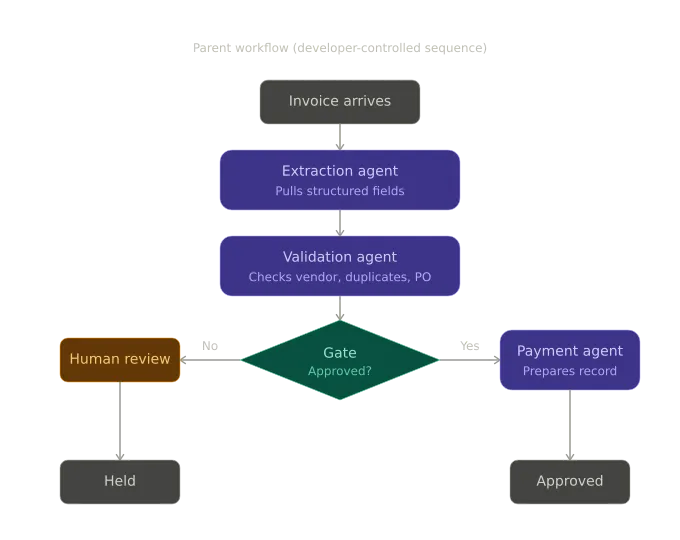
Fig: The diagram for the Invoice Processing Pipeline for Pattern 3
Now there are three agents:
- An extraction agent that only knows how to read invoices and pull fields out of them.
- A validation agent that only knows how to check those fields against the vendor and PO systems.
- A payment agent that only knows how to prepare disbursement records.
A parent workflow runs them in order, with a gate after validation that decides whether the third agent runs at all.
This pattern gives you something the single-agent approach doesn't: separation. Each agent is its own Dapr app, with its own state, its own logs, its own deployment. Different teams can own them. The team that owns vendor data can iterate on the validation agent's prompt without anyone touching the extraction agent's code.
When something goes wrong, the failure is scoped. You know which agent produced the bad output because they ran in sequence and only one of them was on the hook at any given moment.
The cost is that the orchestration is still hardcoded. Adding a tax-compliance agent, or a currency-conversion agent, or any new specialist means editing the parent workflow. The system is more modular than Pattern 2, but the shape of how the agents work together is still fixed by the developer.
This is the right call when you have a multi-step process with stable phases, but each phase needs real reasoning. Most production agent systems live here, and most of them probably should.
Pattern 4: Autonomous multi-agent orchestration
The last step is to remove the workflow coordinator and let an LLM do the coordinating.
The orchestrator becomes an agent itself. It has no tools of its own. It doesn't try to solve the problem directly. Instead, it discovers specialist agents from a shared registry, makes a plan, delegates work, evaluates what comes back, and decides what to do next.
The specialists are extraction, validation, payment, plus anything else you add later. Register themselves on startup. When a new invoice arrives, the orchestrator looks at what's available, builds a plan, and routes work to whichever agents make sense.
A simple invoice from a known vendor might only touch extraction and payment. A foreign-currency invoice with VAT obligations might pull in a tax-compliance agent and a currency-conversion agent that didn't exist when the system was first deployed. Add a new specialist tomorrow, and the orchestrator can pick it up at runtime, no code changes required.
This is the pattern that gets the most attention online, and it's also the one most teams reach for too early.
Be honest about what you're signing up for. You no longer know in advance how the orchestrator will handle a given invoice. The flow can vary on inputs that look identical to you. Latency goes up because the orchestrator itself is making LLM calls to decide what to do. The cost goes up for the same reason. Debugging requires tracing not just one reasoning loop but a tree of them: the orchestrator's reasoning plus each specialist's reasoning underneath it.
This isn't a more advanced version of the other patterns. It's a different category with a different risk profile. Teams that succeed with it treat it that way. They invest in observability before they need it, they accept that runs will vary, and they reserve this pattern for cases where the coordination path genuinely can't be known ahead of time. Open-ended research tasks. Multi-domain investigations. Workflows where the input space is too varied to enumerate.
If your process has a known shape, Pattern 3 will serve you better. Use Pattern 4 when the shape itself is what you need the system to discover.
Choosing the right pattern
There is a useful default that goes against most engineering instincts: start with the most constrained pattern that can do the job.
If the path is known and stable, use the deterministic workflow. If the path has structure but the model needs room to reason about specifics, use a single autonomous agent. If the process has multiple distinct phases that each need their own expertise, use deterministic multi-agent orchestration. Only when the coordination path itself has to adapt at runtime should you use autonomous orchestration.
The mistake teams make, and you can spot it in a lot of agent projects right now, is reaching for Pattern 4 because it sounds the most powerful. It is the most powerful. It's also the hardest to run reliably, the most expensive, and the one where small changes to a prompt can ripple through behavior in ways nobody predicted. Power without constraint is a liability in production.
Patterns are not a ladder you climb but a toolkit you choose from. The deterministic workflow is not a beginner pattern you move past but the right choice for tasks with a known shape and it stays the right choice regardless of team experience. The autonomous orchestrator is not an advanced pattern reserved for elite engineers but a specific tool for a specific problem and using it for the wrong problem causes issues regardless of team seniority.
The goal is not more autonomy but the right amount of autonomy for what the task actually requires.
Where to go next
You now have the map. Four patterns, each with a clear tradeoff between predictability and adaptability, and a default rule for picking between them, start constrained, move toward autonomy only when the task demands it.
The natural next question is what happens when these patterns run together in a real system. How do you coordinate them reliably? How do you give the autonomous ones the same durability guarantees as the deterministic ones, so a crash doesn't mean starting from scratch? That's where durable execution and multi-agent orchestration become the focus, and it's the next article in this series.
Dapr Agents implements all four of these patterns with durable execution built in, so the system can recover from failures without losing work. Diagrid Catalyst is a reliable and secure platform for running agentic workloads in production, with the Dapr runtime, state stores, and message brokers managed for you. When you're ready to move from understanding the patterns to operating them, Diagrid Catalyst is the path that makes them observable and production-ready.
If you want to go deeper into the concepts, the Dapr University lesson on Dapr Agents walks through them.
