
Durable Agents: Surviving Crashes, Restarts, and Long-Running Tasks
Agentic workflows rarely run uninterrupted. Processes crash, containers restart, and workflows may run for hours or days. This piece is about making sure that doesn't matter.
For the longer arc behind this, the evolution of agentic execution traces the loop from the procedural program through to the durable agent loop.
You're three minutes into an agent run. It has called the LLM twice, hit four tools, fetched data from two APIs, and is halfway through reasoning about what to do next. Then the process dies. Maybe the container restarts. Maybe a new version gets deployed and your pod restarts.
Everything is gone. Not just the answer, but the work that produced it, the tool results, and the state the agent had carefully built up. The next run starts from zero.
This is the failure the last thirty years of loop design has been circling:when the agent loop outlives its process, the crash stops being an event the agent has to survive in memory.
This is the gap every agent developer eventually walks into. The demo on your laptop works fine. Production is a different challenge altogether. Real systems crash, restart, and run for a long time. An agent that only exists in process memory has no way to survive any of that.
So the question this article is going to answer is simple. What does it actually take for an AI agent to reliably operate in unpredictable, real-world production environments?
The problem with agents that only live in memory
By default, an agent is just a Python process running a loop. It calls the LLM, gets a response, maybe calls a tool, feeds the result back into the conversation, and loops again. All of that happens inside a single process. The conversation history, the tool outputs, the partial reasoning, all of it lives in variables in memory.
This isn't a bug in any particular framework. It's the natural behavior of any in-memory system. If the process goes away, so does its memory. There's nowhere else for the state to be.
You barely notice for short interactions. A user asks a question, the agent answers, and the run ends. If something fails, the user just retries.
The cracks show up when the work takes longer or costs more. An agent that processes a hundred items in sequence. A workflow with five tool calls, where each call costs real money or takes actual time. A monitoring agent that's supposed to keep running for hours. A research task where the LLM has been building up context for ten minutes.
In all those cases, “retry from scratch” now comes at a cost. It's slow, expensive, and sometimes just wrong, because the side effects of the first run already happened.
That raises the real question. If a crash-safe agent is going to behave differently, where does the difference have to live? Not in the agent code. What happens to its state between steps?
What durable execution actually means
Durable execution is the idea that every completed step of a workflow is written to external storage before the next step begins. It's neither held in memory nor buffered. It's persisted in a place that survives the process.
The implication is the part that matters. When the agent restarts after a crash, it doesn't start over. It reads the persisted history, sees which steps have already been completed, and resumes from the next one. The work that was already done stays done. So if your agent already called the weather API for New York and got back 56°F, on restart, it sees that result in the history and moves on.
Notice that this isn't a property you can add to an agent by writing more careful code. There's no try/except clever enough to make the in-memory state survive a killed process. Durability has to come from somewhere outside the agent, a system that catches every completed step and writes it down before the next one runs. That system is what the next section is about.
The workflow engine underneath
For durability to work, something has to track which steps ran, in what order, and with what results. That's the job of a workflow engine. In Dapr Agents, the engine sits underneath your agent code. Each tool call, each LLM call, and each decision point gets recorded as an activity in a workflow history.
Before going further, it's worth slowing down on what's actually underneath a durable agent.
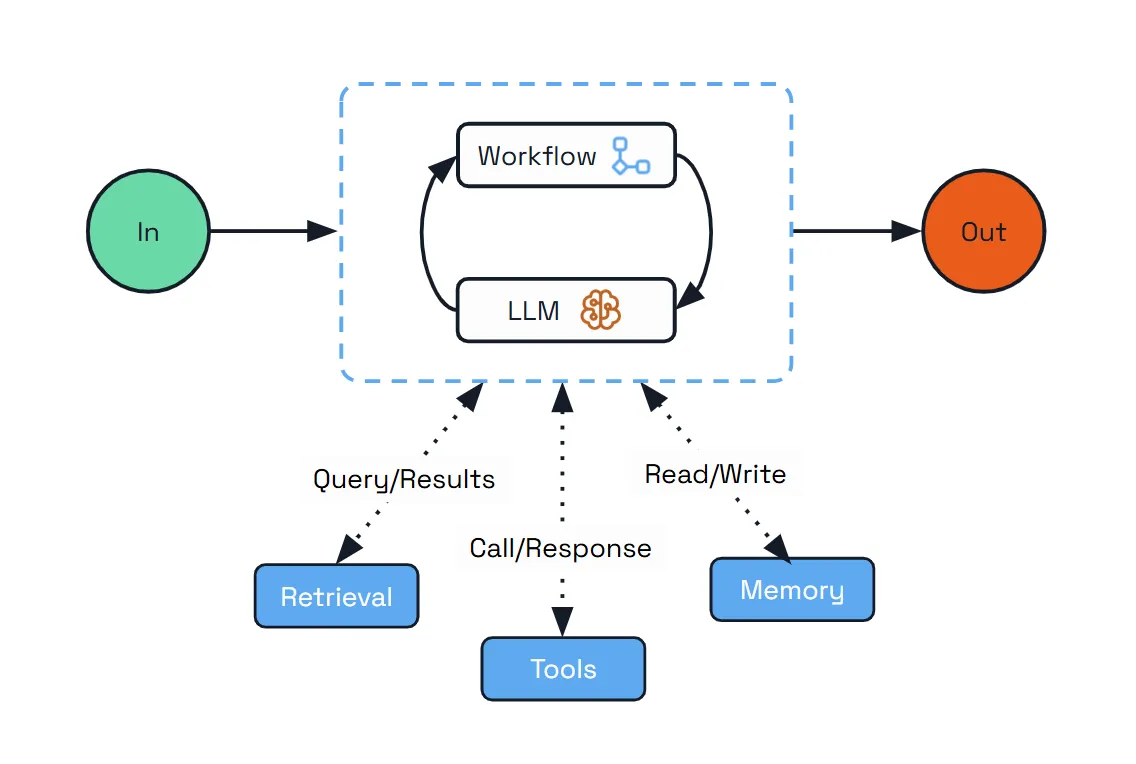
Fig: The Architecture of the Durable Agent
A durable agent is built around four concepts; workflow, activity, history, replay. The behavior becomes much easier to reason about once you understand the four pieces involved.
Workflow
A workflow is the overall plan. For an agent, that plan is the loop you already know where the LLM is called, the agent checks what it wants to do, runs a tool, feeds the result back, and repeats. The workflow is the orchestrator, which decides what happens next. If the orchestration layer itself is what you want to understand, start with AI orchestration.
Activity
An activity is a single unit of work that the workflow schedules. A tool call is an activity. An LLM call is an activity. Anything that touches the outside world, an API, a database, or a model provider, lives inside an activity. Activities are where the actual side effects happen.
The difference between workflows and activities matters because the engine treats them differently. Workflow code has to be deterministic. Given the same inputs, it must make the same decisions every time, because the engine replays it from the top after every step. Anything non-deterministic, an API call, a random number, or a timestamp, has to live inside an activity. Activities run once, their results get recorded in the log, and on replay, the engine returns the recorded result instead of running them again.
History
That log is the history. It's an append-only record of everything that has happened in this workflow run. An activity gets scheduled. It completes and returns a result. Then another activity is scheduled, completed, and recorded. The process continues step by step. The history records how the agent got to its current state.
Replay
This is what makes replay possible, and replay is the part that does the real work. When the workflow needs to advance, the engine runs the workflow code again from the top. Every time it hits a scheduled activity, it checks the history first. If the activity has already been completed, the engine doesn't rerun it. It returns the recorded result and moves on. Only when the engine catches up to a step that hasn't been completed yet does it actually schedule new work. Now the durability story falls out naturally. If the process dies mid-workflow, the history is still in the state store.
What the developer actually writes
The interesting part of using a durable agent is how little of this you write yourself. You don't define a workflow. You don't write activity functions. You configure a DurableAgent, and Dapr Agents build the workflow for you, treating every LLM call and tool call as a checkpointed activity automatically. What you do provide is where the state lives:
agent = DurableAgent(
    name="WeatherAgent",
    role="Weather Reporter",
    instructions=["Report the current weather for every city the user requests."],
    tools=[get_city_weather],
    llm=DaprChatClient(component_name="llm-provider"),
    memory=AgentMemoryConfig(
        store=ConversationDaprStateMemory(store_name="agent-memory")
    ),
    state=AgentStateConfig(
        store=StateStoreService(store_name="agent-workflow")
    ),
)
The system uses two separate state stores, each with a distinct responsibility. agent-memory holds the conversation history, the messages flowing between the user, the LLM, and the tools. agent-workflow holds the workflow history, the record of which activities have run, what they returned, and where the agent is in its execution. The durable agent writes to both on every step, which is what makes a resume possible.
Notice what the Python code doesn't say. It doesn't say Redis. It doesn't say Postgres. It just references two names, agent-memory and agent-workflow. Those names point to Dapr components, defined in YAML files in your resources folder.
Here is the agent-workflow.yaml:
apiVersion: dapr.io/v1alpha1
kind: Component
metadata:
  name: agent-workflow
spec:
  type: state.redis
  version: v1
  metadata:
    - name: redisHost
      value: localhost:6379
    - name: actorStateStore
      value: "true"
The YAML is what your Dapr runtime reads to decide where state actually goes. You can run that runtime yourself, or you can let Diagrid Catalyst run it for you. Diagrid Catalyst is a reliable and secure platform for running agentic workloads in production, with the Dapr runtime, state stores, and message brokers managed for you. That's why the demo doesn't require a local Redis. When the agent runs on Diagrid Catalyst, it sees the agent-memory and agent-workflow references and resolves them to its managed key-value store on first run. Same Python, same YAML names, different infrastructure underneath.
Crashes vs. transient errors
Process crashes are a dramatic failure. The container dies, the workflow stops, and the engine resumes it on restart. But most of what goes wrong in production isn't dramatic. It's an LLM call that times out. A tool API that returns a 503. A network blip that fails one request out of fifty.
These aren't crashes. The agent is still running. One activity inside it just didn't work. Without durability, your only option is to bake retry logic into the tool itself and hope you remembered to do it everywhere.
Durable execution gives you a cleaner answer. Because every activity is already mediated by the workflow engine, the engine can retry the activity for you. Dapr Agents expose this through WorkflowRetryPolicy, which you attach to a DurableAgent at construction time:
agent = DurableAgent(
    name="WeatherAgent",
    ...
    retry_policy=WorkflowRetryPolicy(
        max_attempts=5,
        initial_backoff_seconds=10,
        max_backoff_seconds=60,
        backoff_multiplier=2.0,
        retry_timeout=300,
    ),
)
The defaults are conservative. One attempt, no retries. That's deliberate. Retrying a tool call that costs money or has side effects is a decision, not something a framework should do silently for you. When you opt in, you get exponential backoff where each retry waits longer than the last, a cap on how long any single retry can wait, and a total timeout that bounds the whole operation.
Retry and resume are the same machinery seen from two angles. Resume handles the case where the workflow died and needs to be picked back up. Retry handles the case where an activity failed and needs to be tried again. Both work because the engine knows what ran, what didn't, and what the result was. You don't get one without the other.
Same tasks, two outcomes
The clearest way to see what this buys you is to run the same task on a fragile and a durable agent, then kill them mid-run. Here is what the fragile agent looks like.
# agent_fragile.py -- all state lives in the process
app = FastAPI()
client = AsyncOpenAI()

@app.post("/agent/run")
async def run_agent(request: RunRequest):
    messages = [...]
    while True:
        response = await client.chat.completions.create(...)
        # tool calls happen here, results go back into messages
        # if the process dies, all of this is gone
It is the same tool, the same trigger, the same input:
Get the weather for NYC, London, Tokyo, Sydney, and Paris.
The only thing that changed between them is the persistence layer. Kill each one after the NYC fetch completes. Then restart.
Note: All the code for this comparison is on GitHub. You can clone it and run it however you like.
| Fragile agent | Durable agent |
|---|---|
Fragile agent── First run ────────────────────────────
✅ Connected "weather-fragile"
[fragile] Starting task: Get the weather for
NYC, London, Tokyo, Sydney, Paris
[tool] fetching weather for NYC...
[fragile] Tool result: NYC: 56°F
[tool] fetching weather for London...
^C ← killed here, London never completes
✅ Disconnected "weather-fragile"
── Restart ──────────────────────────────
✅ Connected "weather-fragile"
← curl is required to re-trigger
← no memory of previous run
── Second run ────────────────────────────
[fragile] Starting task: Get the weather for
NYC, London, Tokyo, Sydney, Paris
[tool] fetching weather for NYC...
← starts over from NYC
[fragile] Tool result: NYC: 64°F
[tool] fetching weather for London...
[fragile] Tool result: London: 81°F
[tool] fetching weather for Tokyo...
[fragile] Tool result: Tokyo: 68°F
[tool] fetching weather for Sydney...
[fragile] Tool result: Sydney: 69°F
[tool] fetching weather for Paris...
[fragile] Tool result: Paris: 75°F
[fragile] Done. | Durable agent── First run ────────────────────────────
✅ Connected "weather-durable"
[tool] fetching weather for
New York City...
✅ New York City: 73°F
^C ← killed here
✅ Disconnected "weather-durable"
── Restart ──────────────────────────────
✅ Connected "weather-durable"
← no curl needed
← workflow resumed automatically
from Catalyst
── Second run ────────────────────────────
[tool] fetching weather for London...
← resumes here
✅ London: 63°F |
The agent code didn't get more complicated. What changed is where the state lives. The fragile version keeps it in process memory, where a crash erases it. The durable version writes it to a state store at every step, so that a crash leaves it intact.
If you run both, kill them mid-task, and restart, the difference is immediate. The fragile agent needs you to manually re-trigger it, and when you do, it starts from scratch. It calls the weather API for New York again, even though it already got the answer. The durable agent doesn't need to be re-triggered at all. It picks up the workflow on its own and runs the next step that hasn't been completed yet.
Long-running tasks: when minutes become hours
Crash recovery is the obvious benefit, but it's not the only one. Once steps are persisted, you can also build agents that run for a long time, minutes, hours, or even indefinitely. For instance, a monitoring agent that polls a system every five minutes indefinitely. A background processor that works through a queue that never empties. An agent that watches for a condition and only acts when it sees it.
However, these agents introduce a new problem. Every step they take gets appended to the workflow history. That history is what makes replay work, but it also keeps growing. After ten thousand iterations, the history is enormous. Loading it, replaying it, reasoning about it, all of that gets slower and more expensive.
Continue-as-new Pattern
The pattern that solves this is called continue-as-new. At a chosen point, the workflow tells the engine to take the current state as the starting point, discard the history that led there, and begin a fresh workflow from that state. The new workflow has a clean history. The agent's logical continuity is preserved because the state it cared about was carried forward. But the accumulated record of how it got there is gone.
The use case where this matters most is an agent with no natural endpoint, like a weather monitor that runs forever, a queue worker, or a research agent that keeps building on its own findings. Without continuing as new, these agents eventually slow down under accumulated history. With it, they can run for days without the engine degrading.
You might wonder what happens when history matters. A chat agent that needs to remember earlier turns, or a research agent building on its own findings. Continue-as-new only truncates the workflow history in agent-workflow. It doesn't touch agent-memory, where the conversation lives. The expensive part gets cleared while the part that the agent actually needs to think with is preserved.
Headless Agents
Long-running agents are usually headless agents too. These are autonomous processes triggered by a scheduler, a pub/sub event, or another service instead of a user. Durability is what makes the headless pattern viable. If the agent has no user in the loop, no one is watching to retry it when it fails. It has to retry itself, resume itself, and keep its own state straight.
The same persistence layer that lets a durable agent survive a crash is what lets a headless agent run unattended for hours without anyone babysitting it. The two ideas tend to show up together because they need the same foundation.
You don't reach for continue-as-new on every workflow. Most agent runs have a clear beginning, middle, and end, and their history stays small. It's the long-lived ones, the loops with no natural exit, where the pattern earns its place.
What you get without writing it yourself
The thing to notice about all of this is how little of it you'd want to build yourself. Each piece is an entire problem.
- Resumability. The agent crashes mid-task and picks up exactly where it stopped on restart. No manual re-triggering or starting over. The half-finished work isn't lost, and the already-finished work doesn't repeat.
- Auditability. Every LLM call, tool invocation, and result is recorded as part of the workflow history. When something goes wrong, or just when you want to understand what the agent decided and why, the trace is already there. You don't have to add logging after the fact.
- Redundancy protection. Completed steps don't re-run, which means their side effects don't repeat. If your tool charges a credit card or sends an email, you don't want it firing twice because of a restart. Durable execution makes that the default, not something you have to engineer around.
- Observability in Catalyst. Every workflow run is visible in the Catalyst console. You can see which steps ran, which are pending, what the inputs and outputs were, and where a stuck workflow is stuck. This comes directly from the same persistence that makes resumability work.
The pattern is consistent. The mechanism that makes the agent durable is the same mechanism that makes it observable, auditable, and safe. You are not paying for these features individually. They come from building on a workflow engine instead of a process loop.
Where to go next
What you have now is a single agent that survives crashes, runs sustainably over long periods, and leaves a complete record of what it did. That's the foundation. It's also the point where most production agent systems start asking a different question.
What happens when one agent isn't enough? When you need a planner that hands work to a researcher, which hands work to a writer, which reports back to the planner? When a task involves multiple agents coordinating with each other, sharing state, and recovering from failures together, durability at the level of a single agent is no longer enough. The system also needs a way to coordinate execution across agents reliably.
That's the next layer, and we will be discussing it in an upcoming blog. If you want to put your hands on a durable agent before reading further, the Dapr Agents course on Dapr University is the fastest way in. We've also put together a companion repo with the fragile and durable agents from this article, ready to run side by side. Clone it, kill them mid-task, and watch the difference for yourself.
To do this rather than read about it, the Make AI Agents Durable path is six free, hands-on courses that put LangGraph, DeepAgents, the Microsoft Agent Framework and Dapr Agents on durable execution.
