
Agents vs Workflows vs Chains
Understanding the differences among agents, workflows, and chains. The choice among them should not be based on hype alone. This piece explores the design patterns and the best practices of each approach.
When designing AI systems, teams do not struggle with choosing agent frameworks or LLMs. It is the unclear ownership, poorly defined control boundaries, and uncertainty about what should be automated and what should remain under human oversight.
The challenge is finding the right level of control, flexibility, and autonomy. It must be achieved without adding complexity or operational costs.
This raises a question: when to use chains, workflows, and agents? These terms are often used interchangeably, but they are different approaches to coordinating models, tools, and decision-making.
By the end of this piece, you will understand what agents, workflows, and chains are, how they differ, and the design patterns of each approach.
What agents, workflows, and chains actually mean
On the surface, agents, workflows, and chains may seem similar because they all use generative AI to automate tasks. However, they are different approaches to designing AI systems, each providing different levels of autonomy, control, and adaptability.
Understanding how these concepts interrelate helps clarify when each approach is most appropriate and which types of problems they are best suited to solve.
Here is how agents, workflows, and chains can be described:
Agents
Agents are systems that use LLMs to autonomously determine how to accomplish tasks. They independently manage their processes and tool usage, executing end-to-end processes without following a predefined sequence of steps.
Agents interpret the task, determine the next steps, and adapt their approaches. This enables them to handle both straightforward and complex tasks. It includes taking actions, resolving issues, or escalating issues to humans when necessary.
Below are the key characteristics of agents:
- Dynamic decision-making. Agents have the adaptability to change their decisions in response to changing conditions. They determine their next action at runtime rather than following a fixed path.
- Autonomous tool selection and usage. Agents can choose from multiple available tools depending on the task context. This may include calling APIs, searching information, or running code.
- Reasoning and reflection capabilities. Outputs are evaluated and the approach is adjusted accordingly. This involves reviewing current results, identifying mistakes or gaps, and revising the next actions accordingly.
- Self-directed task execution. Agents independently plan and complete multi-step tasks without predefined sequences. They work with an internal loop of planning, acting, and updating progress until the task is completed.
Workflows
Workflows are systems that follow a predefined sequence of steps. They use LLMs to only handle specific tasks such as summarizing text, classifying data, or drafting responses within a larger process.
The distinction has a precedent worth knowing: control loops versus workflow orchestration is the same split Kubernetes made between reconciling toward a desired state and running a fixed sequence of steps.
Tools are orchestrated through predefined code paths, following a structured sequence of operations with explicit control flow. AI only enhances specific steps within the workflow, while the workflow itself is scripted by a human. For a closer look at the layer that coordinates those steps, see what AI orchestration is and why it matters.
Characteristics of workflows include:
- Predefined steps and execution paths. Steps are defined before execution and do not change at runtime. Humans determine the order of operations before the system runs, usually following a fixed sequence such as a flowchart or a directed acyclic graph (DAG).
- Predictable and controlled behavior. Workflows produce consistent outputs when given similar inputs. The overall process behaves deterministically with triggers, conditionals, and retries defined upfront.
- Clear task boundaries. Each step has a specific responsibility within the overall process. The AI is assigned an objective and operates within explicit task boundaries.
- Explicit orchestration logic. Workflows constrain tasks to a fixed structure defined by code or configuration files. This explicitly specifies the sequence of steps, conditions, and rules prior to execution.
Chains
Chains are a specific type of workflow in which steps are ordered in a strict linear sequence. Each step represents a task, and these tasks are connected to achieve a very specific goal. These steps can involve LLMs, data processing, or even user input.
Unlike more complex workflows that may involve branching, routing, or conditional logic, chains follow one uninterrupted path from start to finish.
Chains have the following characteristics:
- Linear sequence of steps. The output of one step becomes the direct input for the next. This creates a tightly coupled chain of processes.
- No branching or dynamic routing during execution. The process remains unchanged regardless of current results or conditions. Every input follows the same path through the system.
- Structurally deterministic behavior. Given the same input, the chain will always follow the same sequence of operations and produce the same outputs.
The design patterns of three approaches
Today, most teams are bolting agents together and hoping they do not fail in production. When these agents seem to work, it feels like magic. The LLM dynamically evaluates input, selects the right tools, loops through reasoning steps, and self-corrects on the fly.
But when the outputs miss expectations, teams unknowingly add more complexity. They create networks of LLMs reasoning in loops. They write logic to correct the agent's logic, or develop supervisor agents to oversee other agents. Before long, they find themselves managing a distributed system of agents without adequately considering costs.
When you let an LLM figure out everything, high operational complexity is inevitable. So, why not design a clean pipeline that hardcodes predictable, deterministic paths where flexibility isn't required?
We need to stop pretending that either agents, workflows, or chains should be the absolute default choice. Instead, teams must evaluate their system requirements against specific design patterns of each approach to determine when it actually makes sense to use which one.
Here is how the design patterns of agents, workflows, and chains differ from one another:
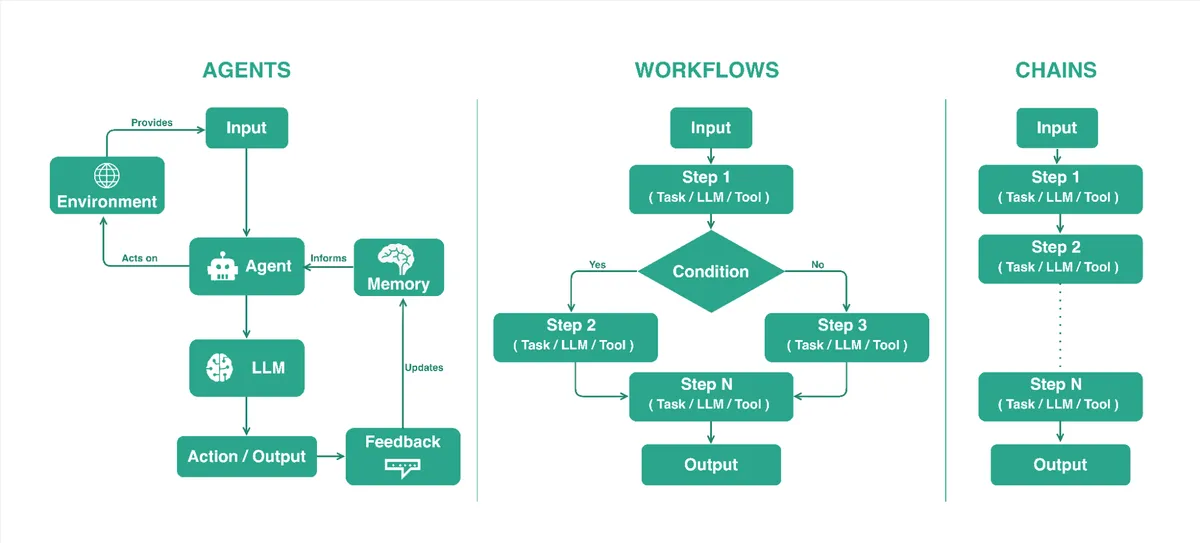
When to use each
In general, agents provide the highest degree of adaptability, but they also add more uncertainty, operational complexity, and cost. Workflows add structure and branching while remaining deterministic. Chains sit at one end of the spectrum, providing maximum predictability with minimal complexity.
The key is to use the simplest design pattern that meets your requirements.
Use agents when:
- Tasks require flexibility and adaptability.
- Handling customer queries or real-time market data analysis.
- Providing real-time updates and suggesting improvements.
Use workflows when:
- Tasks require consistency and compliance.
- Automating routine processes, such as inventory management and email campaigns.
- Ensuring the efficient execution of structured tasks.
Use chains when:
- Tasks involve fixed pipelines.
- Workflow can be fully defined in advance without runtime changes.
- Text summarization, data extraction, and formatted Q&A systems.
The differences between agents, workflows, and chains become clearer when comparing them in terms of control, flexibility, and use cases.
| Aspect | Agents | Workflows | Chains |
|---|---|---|---|
| Control flow | Dynamic at runtime | Predefined with branching | Linear sequence |
| Decision making | LLM driven | Rule based | Fixed |
| Tool usage | Selected autonomously | Orchestrated by code | Explicitly defined |
| Adaptability | Flexible execution with runtime decision making | Semi flexible execution within predefined paths | Fixed execution path with no deviation |
| Complexity | Highest | Moderate | Lowest |
| Best for | Open ended tasks requiring reasoning, planning, and tool use | Multi-step tasks with defined logic and conditions | Sequential transformation tasks with fixed steps |
| Examples | Research assistants, customer support | Approval flows, email campaigns | Summarization, extraction |
Best practices for building agents, workflows, and chains
Understanding the design patterns of agents, workflows, and chains is really about how much autonomy, control, and adaptability your system should have in production. Once deployed, these choices impact everything from reliability to cost. Therefore, it is essential to establish a set of practical rules to guide how you build them.
Here are the best practices for building agents, workflows, and chains:
For agents
Agent systems are powerful, but they are also the easiest to overbuild and the hardest to stabilize. The goal is not to maximize autonomy but to constrain it just enough so that agent reasoning is useful rather than chaotic.
- Clear and well-documented tools. Provide tools around a single, well-documented responsibility so each tool performs one clear operation. Tools that are overloaded with multiple functions require the LLM to first choose an internal mode, which increases reasoning overhead and error rates.
- Memory and context. Implement context retention strategies that preserve only relevant state across interactions. Effective agent systems typically separate short-term working context from long-term memory.
- Explicit guardrails. Set boundaries for agent behavior, including allowed actions and tool permissions. Production systems require well-defined constraints to prevent unintended or unsafe actions during autonomous execution.
- Observability. Log reasoning traces, tool calls, and decisions to make execution transparent and debuggable. Without this, diagnosing the failures becomes difficult, especially when multiple tools and reasoning steps are involved.
- Evaluation. Continuously evaluate agent performance across diverse and adversarial scenarios to ensure robustness. Agent behavior can be sensitive to context variations, so testing across edge cases is essential to achieve reliability.
For workflows
When building workflows, the emphasis should be on making their execution predictable, traceable, and easy to reason about when scaled across many steps and services.
- Clearly defined steps. Document every stage of the workflow, including triggers, actors, and decision rules. This removes ambiguity about what happens at each step, who is responsible for execution, and the conditions under which decisions are made.
- Fallback paths. System failures are inevitable, but workflow interruptions are preventable. Plan for failures by implementing fallback paths, such as retry logic, alternative routes, or default behaviors for steps that may fail.
- Checks between steps. Add checkpoints between critical steps to validate outputs before moving to the next step to prevent error propagation. This provides clear points to pause or resume the process without restarting it entirely.
- Performance tracking. Track latency, error rates, and success metrics for individual components rather than only the end result. This is essential for rapid debugging, minimizing system downtime, and optimizing overall efficiency.
For chains
Chains are the most constrained workflow pattern and require the following practices:
- Input and output compatibility. Ensure each step produces the output that matches the next step's expected input.
- Single goal. Avoid mixing multiple responsibilities within one chain to preserve clarity and predictability. Each chain should represent a clear processing pipeline.
- Consistent data formatting. Use a shared schema and standardized data types across all steps. This approach guarantees that every step follows the same data format, simplifying integration with downstream systems.
- Modularity. Build chains as modular units that can be combined into larger systems when needed. This allows simple pipelines to scale into more complex workflows without requiring a redesign and increases reusability.
How Diagrid Catalyst helps you build reliable agents and workflows
Most modern frameworks have made it easier to build agents and workflows. However, these workflows are inherently unstable in production environments. They often run for minutes or hours, and when failures occur such as network interruptions, infrastructure issues, or tool errors, they have to be stopped and must be restarted.
Some frameworks offer basic checkpointing. However, they still require custom logic for failure detection, large scale recovery, and coordination across multiple running instances to prevent duplicate execution.
Diagrid Catalyst addresses these gaps by serving as a central runtime layer. It provides durable workflows, access control, and governance for your workloads, including agents, MCP servers, and external tools. Developers can focus on building agents while Diagrid Catalyst ensures they are production-ready.
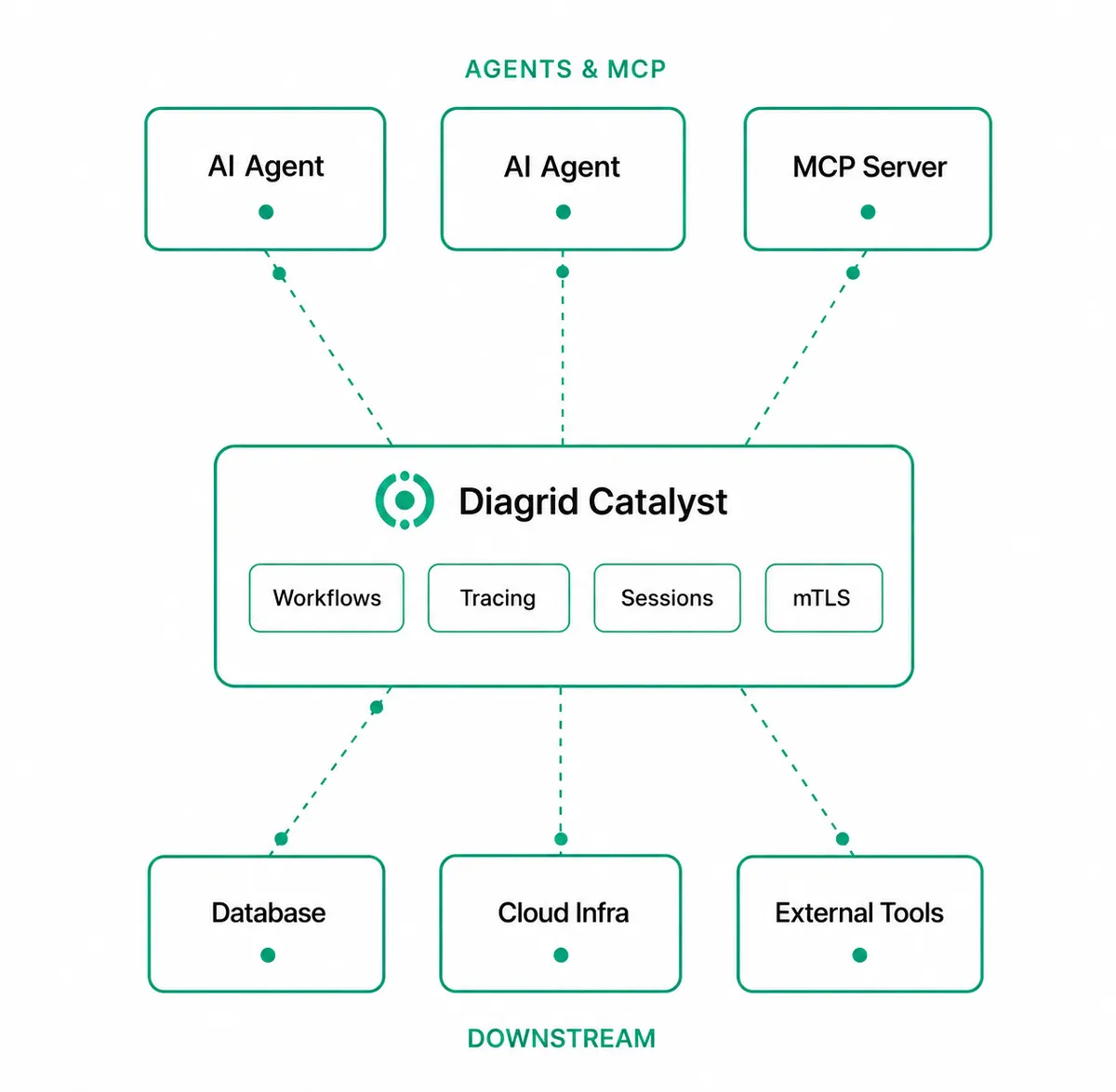
Below is how Diagrid Catalyst adds capabilities across key areas:
Framework flexibility
Diagrid Catalyst supports a wide range of agent frameworks, including CrewAI, LangGraph, OpenAI Agents, and more. Each framework has its own strengths depending on the use case. However, most do not account for failures in production environments.
Diagrid Catalyst provides the missing runtime layer with automatic failure detection, automatic recovery, multi-instance agent coordination, and resilient operation at scale. It accomplishes this without requiring any changes to your code.
Secure MCP
Diagrid Catalyst allows teams to enable MCP servers from an MCP catalog containing predefined entries or to publish their own custom entries for internal services.
Each catalog entry includes preconfigured connection metadata, such as the server URL, transport protocol, and authentication method. Teams enable these entries per project and provide any required credentials, allowing consistent reuse of MCP server definitions across the organization.
MCP servers can be run as Diagrid Catalyst apps with their own App IDs, allowing access policies and authentication to be applied at the App ID level.
Operational resilience
Diagrid Catalyst runs workflows and agents as fault-tolerant, persistent processes by checkpointing each step and preserving state throughout execution.
If a process crashes or restarts, execution resumes from the last successful step instead of starting over. This enables teams to build reliable, long-running, asynchronous workflows without needing to implement custom state management or recovery mechanisms.
Observability
Diagrid Catalyst offers built-in observability for workflows, agents, and applications without requiring additional instrumentation. This includes metrics, API logs with LLM token usage, workflow replay, agent execution views, and inspection tools available in the Diagrid Catalyst console.
It provides full trace across workflows, tools, messages, and services for end-to-end visibility. Teams can see exactly what each agent did, when, and why, with deterministic replay for debugging and audits, as well as built-in correlation across agents and workflows.
Enterprise-grade security
Diagrid Catalyst implements a zero-trust security model in which every workload, including agents and MCP servers, is assigned a cryptographic identity. App IDs use SPIFFE-based, verifiable identities with mutual TLS enabled by default. This ensures secure authentication between all services without relying on shared secrets.
It also supports cryptographic identity propagation across workflows and agents, featuring tamper-evident execution history and detection to ensure verifiable runtime behavior.
Diagrid Catalyst enforces strict boundaries between workloads using a project-level isolation model. It applies role-based access control and policy-driven permissions across resources, components, and execution flows.
Flexible deployment
Diagrid Catalyst offers multiple hosting options, ranging from fully managed cloud to fully air-gapped deployments.
- Catalyst Cloud. A shared, Diagrid Catalyst hosted environment where both the control plane and data plane are managed in the cloud. It is designed for rapid onboarding and development use cases.
- Catalyst Enterprise Dedicated. It is a single-tenant environment managed by Diagrid Catalyst, offering isolated infrastructure optimized for production workloads.
- Catalyst Enterprise Self-hosted. A model in which Diagrid Catalyst manages the control plane, while the data plane runs within the customer's own infrastructure to enable private network connectivity.
- Catalyst Enterprise Air-gapped. It is a fully isolated enterprise deployment in which both the control and data planes operate entirely within the customer's infrastructure, with no external network access.
Where to go next
This piece covered what agents, workflows, and chains are, how they differ, and when each approach is best suited for building AI systems. It also outlined how Diagrid Catalyst provides the underlying runtime layer necessary for durability, security, and observability.
The next parts of this series will look at how Diagrid Catalyst can be used with LangGraph agents to make them production-ready.
If you would like to explore further, see the resources below:
