
Deep Dive into Agents: Beyond Chatbots and Copilots
When people say “agent,” they mean different things. Here's how to place any AI system along the spectrum from chatbot to full autonomy — and understand what really sets agents apart.
The cycle underneath that autonomy is observe, reason, act — and it is a direct descendant of loops that predate AI by decades.
The word “agent” has become inescapable in AI conversations. It shows up in product announcements, keynotes, investor decks, and engineering blog posts. But when you ask three people what an agent is, you'll often get three different answers. Some use “agent” to mean any AI that can use tools. Others mean something that can plan multi-step workflows. Still others reserve the term for systems that run largely on their own, making decisions and taking actions without a human in the loop.
The confusion isn't just semantic. It leads to mismatched expectations, misallocated budgets, and misplaced risk assessments. If you think you're deploying a chatbot but you've actually built an agent, you'll be surprised (and probably not pleasantly) by what it does. If you think you need an agent but a copilot would do, you'll overengineer the solution and ship late.
So let's get precise. The right way to think about these systems isn't as discrete categories but as points on a spectrum: from purely reactive systems that answer questions, through embedded assistants that augment human workflows, to autonomous actors that pursue goals on their own.
A spectrum, not a binary
The shift from chatbot to agent isn't a single leap. It's a gradual progression along several axes: how much memory the system has, what tools it can call, how much it can plan ahead, how autonomously it operates, and how much it can coordinate with other systems.
Think of it as four rough zones on a continuum: chatbot, copilot, agent, and multi-agent system. Each zone represents a different balance of capability, autonomy, and risk.
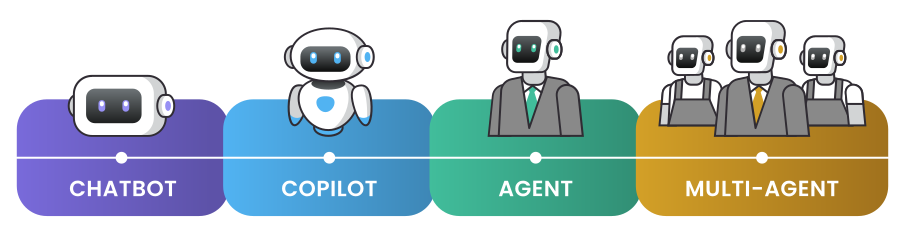
Chatbot: the reactive question-answerer
At one end of the spectrum sits the plain chatbot. You send it a message, it sends one back. It doesn't remember previous conversations beyond the current session. It can't look anything up. It can't do anything except generate text. Its entire world is the context window you give it.
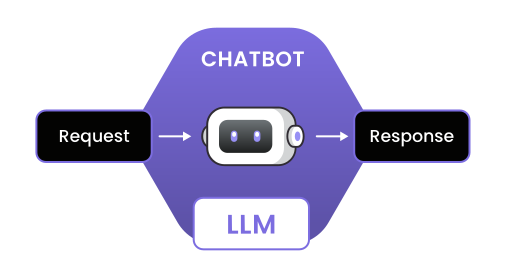
Chatbots are useful for plenty of tasks: answering FAQs, drafting emails, explaining concepts, generating creative content. But they hit a wall the moment you need them to interact with the outside world or persist information across sessions.
The technical signature of a chatbot is straightforward: an LLM with a system prompt, taking user input and producing output. No tool calls. No persistent memory beyond the conversation. No ability to take actions in external systems.
From a risk standpoint, chatbots are relatively safe. The worst they can do is generate bad text — misinformation, offensive content, confidential data leakage if it was in the training set. Those risks are real, but they're bounded. A chatbot can't delete your database or send emails on your behalf (unless you explicitly wire it up to do so, at which point it's no longer just a chatbot).
Copilot: the embedded assistant
A step along the spectrum sits the copilot. This is an AI assistant embedded inside another application — a code editor, a document tool, a design app, a customer service platform. The copilot can see what you're working on, suggest completions or edits, and sometimes take small actions within the host application.
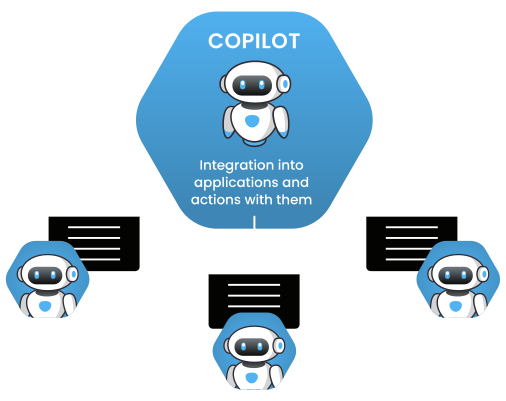
GitHub Copilot is the canonical example, but the pattern has spread everywhere: writing assistants in Google Docs, AI helpers in Figma, code review bots in pull requests. What they share is deep integration with a specific workflow and a human who remains firmly in control.
The copilot typically has access to tools — it can read files, search documentation, suggest code changes — but the human approves every action. The copilot proposes; the human disposes. This keeps the human in the loop and limits the blast radius of mistakes.
The technical signature of a copilot includes tool use, context from the host application (the file you're editing, the document you're writing), and usually some form of retrieval to ground its suggestions. But the execution authority stays with the human. The copilot can't merge its own pull request or publish your document without your say-so.
Copilots add productivity but don't change the fundamental responsibility model. If the copilot suggests bad code and you accept it, that's on you. The human retains both the approval authority and the accountability.
Agent: the autonomous actor
Further along sits the agent. An agent is given a goal and left to figure out how to achieve it. It can call tools, read results, reason about what to do next, and repeat — all without waiting for human approval at each step. The human says “book me a flight to Chicago next Tuesday,” and the agent searches for options, picks one, fills out the form, and confirms the booking.
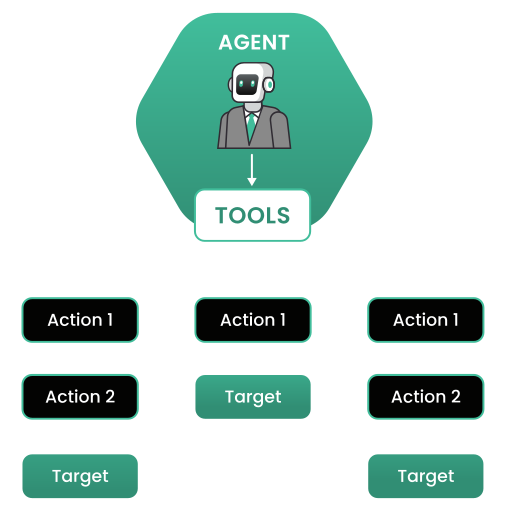
The defining characteristic is autonomy: the agent makes decisions and takes actions on its own. It doesn't just suggest; it executes. It doesn't wait for you to approve each step; it chains them together toward the goal.
This autonomy is what makes agents powerful and also what makes them risky. A well-built agent can accomplish in minutes what would take a human hours of clicking through interfaces. A poorly-built or poorly-constrained agent can cause a lot of damage in those same minutes.
The technical architecture of an agent typically includes:
- A model that does the reasoning and planning
- A set of tools the agent can call (APIs, databases, file systems, other services)
- Memory that persists across steps and sometimes across sessions
- A control loop that keeps the agent running until the goal is met or a limit is reached
- Guardrails that constrain what the agent can do
The last point is crucial. Production agents need hard limits: budget caps, action whitelists, confirmation requirements for high-stakes operations, circuit breakers that stop execution if something looks wrong. Without these, you're one bad inference away from a very expensive mistake.
Multi-agent systems: delegation at scale
At the far end of the spectrum are multi-agent systems: multiple agents working together, each with its own specialty, coordinating to accomplish complex tasks. One agent might handle research, another handles writing, a third handles fact-checking, and a coordinator decides when the work is done.
Multi-agent systems are appealing because they map well to how humans organize complex work: divide and conquer, specialize, delegate. But they also multiply the complexity. Now you have coordination problems, communication overhead, and the possibility of agents working at cross purposes.
The technical challenges scale more than linearly. Each agent has its own failure modes. Agents can misinterpret each other. The coordinator has to track state across multiple threads of execution. Testing becomes combinatorially harder. Debugging becomes an exercise in distributed systems archaeology.
For most production use cases today, a single well-designed agent outperforms a swarm of poorly-coordinated specialists. Multi-agent architectures make sense when the task genuinely requires different capabilities that can't be combined in one model, or when parallelism offers a significant speedup. Otherwise, they're usually premature optimization.
Practical implications
Understanding where a system sits on this spectrum has practical consequences for how you build, deploy, and govern it.
Cost structure. Chatbots are cheap to run: one inference per response. Agents are expensive: they might make dozens or hundreds of inference calls to complete a single task, plus all the tool calls. Multi-agent systems are more expensive still. Budget accordingly.
Latency. Chatbots respond in seconds. Agents might take minutes. If your user expects instant feedback, an agent architecture might be the wrong fit.
Reliability. More autonomy means more ways to fail. Chatbots fail by generating bad text. Agents fail by taking bad actions, getting stuck in loops, or running up huge bills. Multi-agent systems fail in all those ways plus coordination failures. Your error handling and monitoring need to match the complexity.
Governance. Who's accountable when the AI does something wrong? With a chatbot, the human who acted on bad advice. With a copilot, the human who approved the action. With an agent, it gets murky: the agent acted autonomously, but someone designed it, deployed it, and gave it permissions. The accountability model needs to be clear before you put agents into production.
Security. Each step along the spectrum increases the attack surface. A chatbot can be jailbroken into saying bad things. An agent can be manipulated into doing bad things — prompt injection becomes action injection. The security posture needs to match the capability.
When to use each pattern
The right choice depends on the task, not on what's technically impressive.
Use a chatbot when the task is fundamentally about generating or transforming text: answering questions, summarizing documents, drafting content, explaining concepts. If the human can act on the output directly, a chatbot is often all you need.
Use a copilot when the task requires deep integration with a specific workflow and benefits from AI assistance, but the human should remain in control. Code completion, writing assistance, design suggestions — anywhere the AI makes humans faster but doesn't replace their judgment.
Use an agent when the task involves multiple steps, requires tool use, and benefits from autonomous execution. Book travel, process invoices, handle customer service inquiries end-to-end — tasks where you want to hand off the work entirely and get back a result.
Use multi-agent systems when you've proven a single agent isn't sufficient and you need specialized capabilities or parallelism. Start simple, add complexity only when it demonstrably helps, and invest heavily in coordination and observability.
Where to go next
This article has mapped the terrain. You should now be able to place any AI system you encounter along the chatbot-to-agent spectrum and understand what that position implies for how it works, what it costs, and what risks it carries.
The next step is to look at what it actually takes to build a production-ready agent: the architecture, the failure modes, the operational concerns that separate a demo from something you can actually deploy. That's what the next article in this series covers.
