
Using CrewAI with Catalyst's Durable Execution
CrewAI supports task replay and flow persistence to save execution progress, but these features do not enable automatic recovery from production failures. See how Diagrid Catalyst adds a durable execution layer that runs CrewAI agents reliably at scale.
Imagine a CrewAI agent is halfway through a long-running task when it suddenly crashes. CrewAI provides mechanisms like @persist and task replay to save workflow state, but these features do not ensure production-grade durability.
The developer is still responsible for detecting the outage, triggering the replay, and coordinating state alignment to prevent duplicate execution.
So what does it take to run CrewAI agents reliably in production? It requires a runtime that ensures workflows run to completion while automatically recovering from failures and never losing progress.
In this piece, we will look at what CrewAI provides today, where it falls short, and how Diagrid Catalyst adds the durable execution layer to run CrewAI agents reliably at scale.
What CrewAI provides today
Before looking at the production challenges, let's examine the reliability features that CrewAI provides today.
Flow persistence
CrewAI Flows enable structured, event-driven AI workflows by combining tasks, Crews, and code into multi-step processes. They give developers control over execution logic, state management, and persistence across workflow steps.
Within these workflows, CrewAI provides flow persistence through the @persist decorator. It is used to save flow state to SQLite after each successful method execution, allowing developers to store workflow states. This helps maintain context across steps and preserve information as the workflow progresses.
Persisted state can be retrieved in later executions. It is useful for workflows that need to pause, resume, maintain continuity across interactions, or be inspected later. Long-running workflows and human-in-the-loop applications particularly need execution context to be preserved for clarity and reproducibility.
Task replay
CrewAI provides task replay, which is the ability to rerun specific tasks from a previous crew execution. This feature is useful when a workflow has already completed, but certain tasks need to be executed again without refetching the data.
Task replay enables teams to iterate on specific parts of a crew workflow while preserving the agents' context and outputs during the original execution. This is especially useful when the last step fails and rerunning the entire crew would be expensive or unnecessary.
Built-in retries
CrewAI provides built-in controls to manage agent execution through parameters such as retry limits, iteration limits, and execution time limits. These settings allow developers to define how agents behave when they encounter errors or run for extended periods.
The max_retry_limit parameter controls how many times an agent can retry after an error, while max_iter and max_execution_time help limit the number of execution cycles and the total runtime of an agent.
These mechanisms help handle errors and control execution behavior within an active agent run. They provide safeguards around agent execution, but they do not manage recovery of the overall workflow after a process-level failure.
The production gap in CrewAI
Frameworks like CrewAI make it easy to build AI agents and provide useful checkpointing features for workflows. However, moving from a demo to a production deployment presents a completely different set of challenges.
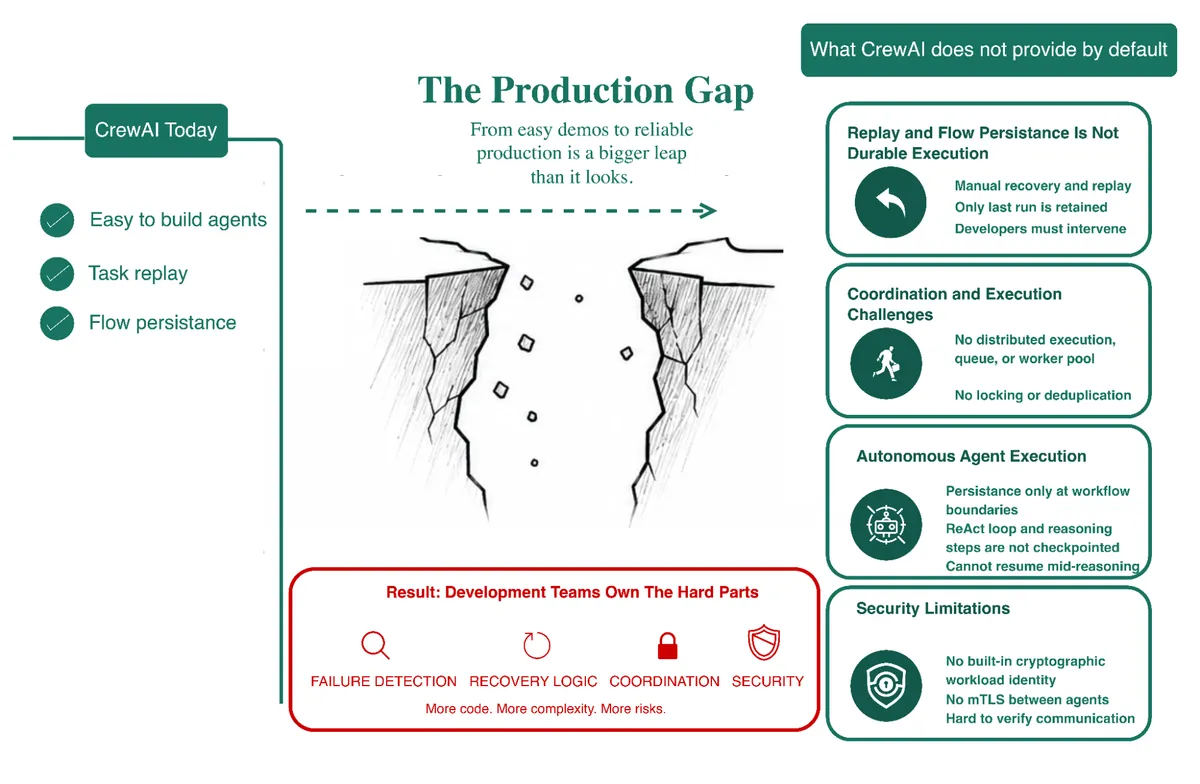
Fig 1: The production capabilities CrewAI does not provide by default.
Below are the production capabilities that CrewAI does not provide by default, as well as the operational responsibilities that remain with development teams.
Replay and flow persistence are not durable execution
CrewAI provides task replay and the @persist decorator for saving workflow state. These are useful development features, but they are still far from production-grade durability.
Recovery remains a manual process. Teams must first detect that a workflow has failed and then trigger the replay themselves. If the failure goes unnoticed, the workflow can remain stalled indefinitely. Replay also retains only the most recent crew execution, making it difficult to recover or investigate failures across multiple workflow runs.
Flow persistence saves state after successful workflow steps, but saving state alone does not resume execution. If the process crashes, developers must restore the persisted state, recreate the workflow, and implement the logic needed to continue from the correct point. The framework does not automatically restart the workflow or skip the completed steps. It requires the developer to write this complex logic in the application code.
Durable execution requires the runtime to coordinate these recovery operations automatically rather than relying on application code.
Coordination and execution challenges
Production workloads rarely run in a single process. They are distributed across multiple workers, replicas, and deployments, where coordinating execution becomes just as important as executing the workflow itself.
CrewAI does not provide distributed execution across worker instances. Without a task queue, worker pool, or placement logic, a single process crash takes down every in-flight crew running in that process.
Recovery is only part of the problem. The harder challenge is ensuring recovery is safe. Production systems need to coordinate retries, prevent duplicate execution, and guarantee that the same operation is not applied twice when the outcome of a previous attempt is uncertain.
CrewAI provides no distributed locking or deduplication to coordinate concurrent recovery attempts. If multiple processes or developers attempt to resume the same workflow, they can easily end up performing the same work twice or, even worse, corrupting the shared state. As a result, teams are stranded to build and maintain these coordination mechanisms themselves.
Autonomous agent execution
CrewAI persistence operates at workflow boundaries by saving the state of Flow methods and Crew tasks, and not the internal reasoning processes of an agent. This approach is effective for explicit workflow steps, but the autonomous reason and act (ReAct) loop itself is not persisted.
As an agent reasons through a problem, selects tools, and iteratively decides what to do next, its intermediate reasoning steps are not persisted as durable checkpoints. If the process crashes during this inner execution loop, the agent cannot resume from the point where it stopped. Instead, execution must restart from the surrounding workflow boundary.
Recovering individual reasoning or tool invocation steps requires developers to explicitly model them as separate, persisted workflow steps. So CrewAI has no built-in durability for the internal ReAct loop of a fully autonomous agent. Instead, the entire reasoning loop is treated as a single, uninterrupted operation.
Security limitations
As AI systems become increasingly autonomous and agentic, ensuring their identity and trustworthiness presents a critical challenge in production.
Agents scaling across multiple processes, worker instances, services, container orchestrators, and cloud environments have led to production deployments that are increasingly dynamic and heterogeneous. Modern distributed systems rely on cryptographic workload identities and mutual TLS (mTLS) to ensure that every service can verify the identity of the workload it communicates with before exchanging data or performing privileged operations.
CrewAI does not provide built-in cryptographic workload identity for agents or mTLS between agents. This capability is increasingly important as agent workflows interact with internal services, external APIs, and sensitive enterprise resources. Verifying the identity of every communicating workload helps ensure that only trusted agents can access protected systems and exchange data securely.
How Diagrid Catalyst adds durable execution
Dapr is a Cloud Native Computing Foundation (CNCF) project used in production by thousands of organizations. Its workflow runtime is designed to support long-running business processes where reliability and resilience are non-negotiable.
Diagrid Catalyst builds on the battle-tested Dapr Workflows runtime rather than creating another proprietary runtime. It extends this foundation with the capabilities required to run AI agents in production. Teams benefit from a mature, open-source runtime while avoiding vendor lock-in. They also benefit from a platform that harnesses the innovation of the Dapr open-source community.
Let's examine the key capabilities that Diagrid Catalyst adds to CrewAI agents.
Automatic crash recovery
Diagrid Catalyst ensures durable execution of long-running business processes using the Dapr Workflows runtime.
CrewAI provides basic checkpointing that saves workflow state, leaving the remaining workflow execution responsibilities to the developer. Diagrid Catalyst provides a durable execution layer where it ensures that the agent workflows will run to completion. It manages everything from there without the developer's intervention. Workflows checkpoint every step, so your code can survive process restarts. It coordinates external events and durable timers while managing parallel execution.
Developers do not need to manually track progress, retries, or task completion. Nor do they have to implement these capabilities by writing complex code. Instead, they can write their workflows as straightforward, linear code. Common workflow plumbing is handled automatically for them. There is no need for try/catch/resume patterns or conditional skip logic within the application code.
Overall, the runtime fundamentally provides the following guarantees for automatic crash recovery:
- Automatic checkpointing. Every await is automatically checkpointed, ensuring that the workflow state is continuously persisted. You never need to add save calls, configure decorators, or decide which steps to persist.
- Automatic recovery. Before each workflow step, the runtime records enough information to enable execution recovery. If a process or even an entire cluster crashes, the workflow is automatically reactivated and retried without manual intervention.
- Replay-based resumption. When a workflow resumes after a failure, it replays from the beginning, but previously completed activities return their stored results instead of running again. This allows the workflow to continue precisely from the point where it stopped, with local variables restored.
Production infrastructure
Durable execution is only one aspect of running CrewAI in production. Once agents move beyond local development, teams require more than just durable execution.
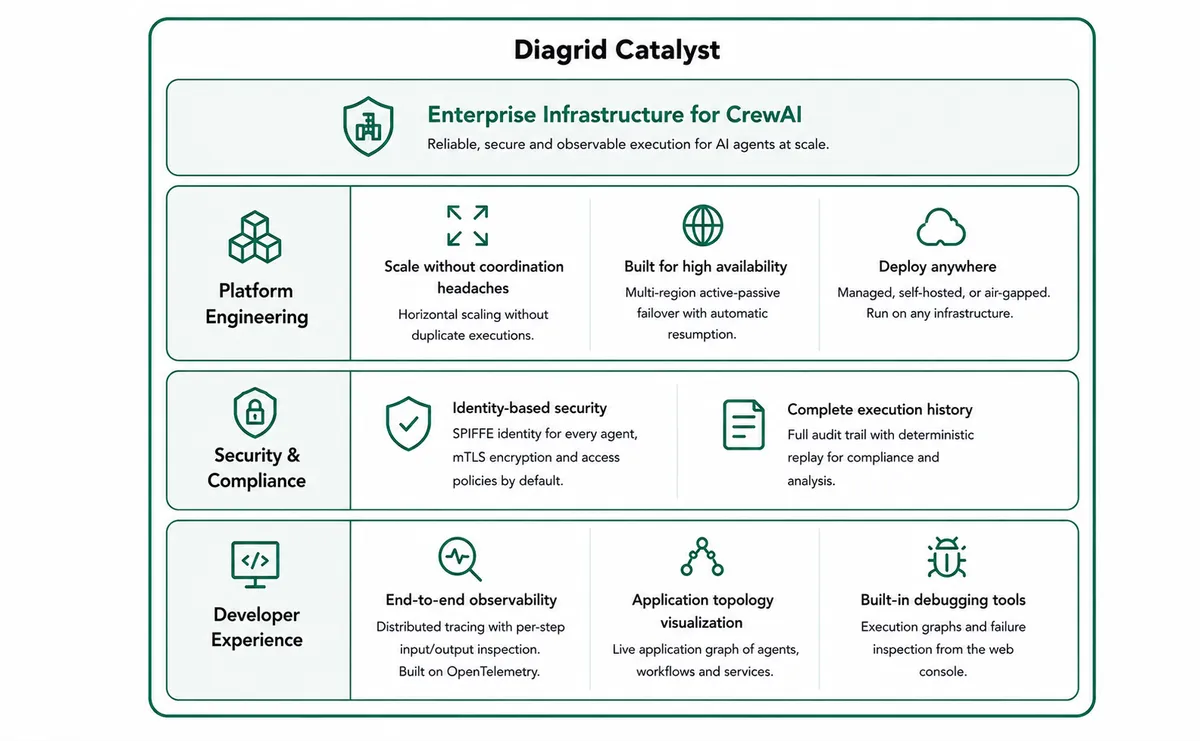
Fig 2: The infrastructure CrewAI gets with Diagrid Catalyst.
Agents also require infrastructure that can securely connect services, scale reliably, offer operational visibility, and comply with enterprise security standards. Diagrid Catalyst provides the production infrastructure needed to operate CrewAI agents reliably at scale.
Platform engineering
- Scale without coordination headaches. Diagrid Catalyst is designed to support horizontal scaling without duplicate executions or race conditions. Under the hood, the Dapr Workflows runtime ensures that each workflow is processed by only one instance at a time.
- Built for high availability. Workflows run across regions using active-passive failover. If an entire region becomes unavailable, execution automatically resumes in the standby region from the last durable checkpoint, rather than starting over. This helps keep long-running workflows resilient even during regional outages.
- Deploy wherever your business requires. Every organization has unique infrastructure needs. Some prefer a fully managed cloud service, while others need to maintain everything within their own environment. Diagrid Catalyst supports both options. You can run it as a managed service, on your own infrastructure, or even in completely air-gapped deployments. Your CrewAI agents continue running wherever you deploy them, whether that's containers, virtual machines, physical machines, or serverless platforms.
Security & compliance
- Identity-based security by default. Every CrewAI agent running on Diagrid Catalyst is assigned a cryptographic SPIFFE identity. Communication between agents and services is automatically secured using mTLS. Diagrid Catalyst also includes built-in access policies that allow you to control which agents and applications are permitted to communicate with one another.
- Complete execution history. Every workflow maintains a complete audit trail with deterministic replay. This allows you to review past executions, rerun workflows for analysis, and meet compliance or auditing requirements.
Developer experience
- End-to-end observability. Developers get a web console with end-to-end distributed tracing for every workflow execution, traced from start to finish with per-step input and output inspection. The distributed tracing is built on OpenTelemetry, so traces integrate with the observability tools your team already uses. This makes it easier to monitor running workflows and troubleshoot issues in production.
- Application topology visualization. Diagrid Catalyst automatically generates a live app graph that visualizes communication among your applications, agents, workflows, and services. This provides developers with a centralized view of how the various components of their distributed application interact.
- Built-in debugging tools. Developers can inspect workflow executions by viewing execution graphs and investigate failures directly from the Diagrid Catalyst console. This provides the necessary context to troubleshoot production workflows more efficiently.
How it works
As you have seen, Diagrid Catalyst adds durable execution without changing how you build CrewAI agents. Your agents, tasks, and tools remain the same.
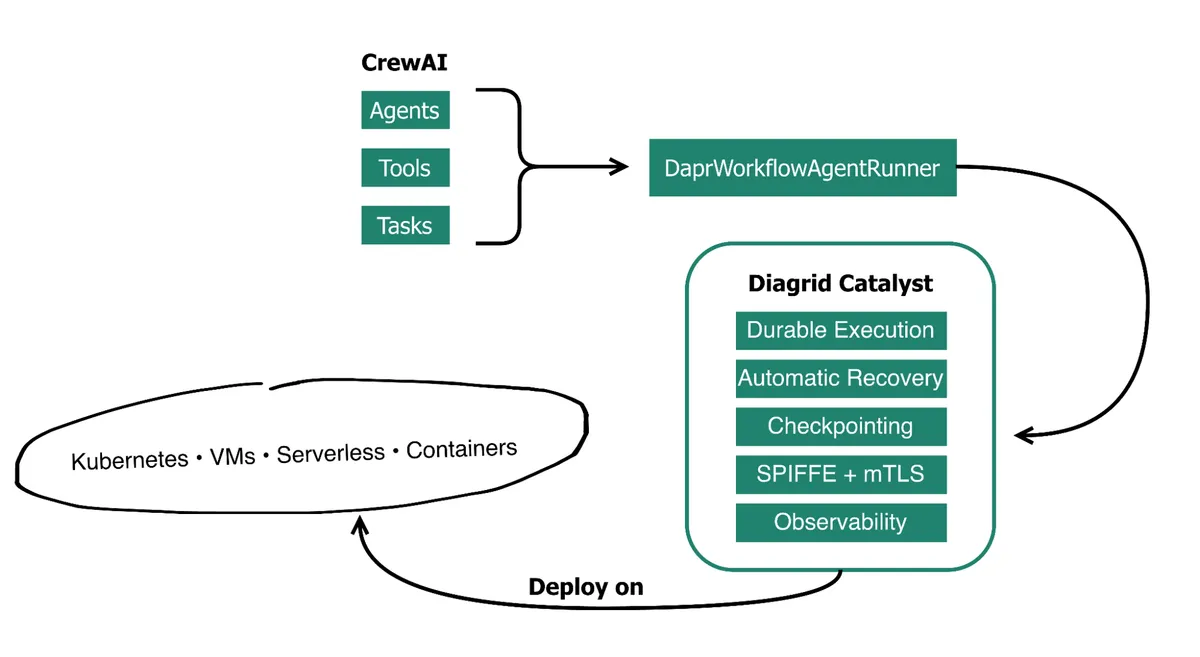
Fig 3: Diagrid Catalyst adds durable execution without changing how you build agents.
You only need to add one import and wrap your agent with DaprWorkflowAgentRunner. Each tool call becomes a durable workflow activity, requiring no special patterns or abstractions. If a process crashes or the infrastructure fails, completed activities are not executed again. Instead, the workflow resumes from the last checkpoint and continues automatically.
CrewAI on its own:
from crewai import Agent, Task, Crew

agent = Agent(
    role="Research Analyst",
    goal="Analyze market trends",
    tools=[search_tool, analysis_tool],
    llm=llm,
)

task = Task(
    description="Research Q4 trends",
    agent=agent,
)

# Supports task replay, but no automatic
# failure detection or recovery
crew = Crew(agents=[agent], tasks=[task])
crew.kickoff()
CrewAI with Diagrid Catalyst:
from crewai import Agent, Task, Crew
from diagrid.agent.crewai import DaprWorkflowAgentRunner

agent = Agent(
    role="Research Analyst",
    goal="Analyze market trends",
    tools=[search_tool, analysis_tool],
    llm=llm,
)

# True durable execution with Dapr Workflows
# Automatic failure detection + recovery
runner = DaprWorkflowAgentRunner(
    name="market-research",
    agent=agent,
    max_iterations=10,
)
With the workflow running, you can open the Diagrid Catalyst web console to inspect each tool call's input, output, and duration without adding custom instrumentation. Developers gain the visibility necessary to monitor, debug, and manage CrewAI agents in production environments.
Building CrewAI for production, not demos
It is never about CrewAI needing a better checkpointer or another retry mechanism. The gap between prototyping and production is architectural.
Production reliability requires a runtime that guarantees workflow execution from start to finish. Frameworks like CrewAI are not simply evolving toward durable execution. Providing these guarantees would require a fundamental redesign of how their runtimes manage workflow execution.
Here is what CrewAI agents gain when running on Diagrid Catalyst:
| Capability | CrewAI alone | CrewAI + Diagrid Catalyst |
|---|---|---|
| Durable execution | CrewAI aloneFlow persistence and task replay save state, but recovery is manual | CrewAI + Diagrid CatalystWorkflows automatically recover and run to completion |
| Crash recovery | CrewAI aloneDevelopers detect failures and restart workflows | CrewAI + Diagrid CatalystAutomatic recovery from process, node, and cluster failures |
| Workflow coordination | CrewAI aloneDevelopers manage retries, progress tracking, and recovery logic | CrewAI + Diagrid CatalystRuntime coordinates retries, checkpoints, timers, and parallel execution |
| Horizontal scaling | CrewAI aloneNo built-in coordination across worker instances | CrewAI + Diagrid CatalystSafe multi-instance execution without duplicate workflows or race conditions |
| Production infrastructure | CrewAI aloneDevelopers assemble operational components themselves | CrewAI + Diagrid CatalystBuilt-in infrastructure for running CrewAI agents in production |
| Security | CrewAI aloneNo built-in workload identity or mTLS | CrewAI + Diagrid CatalystSPIFFE workload identities, automatic mTLS, and access policies |
| Observability | CrewAI aloneBasic logging and replay | CrewAI + Diagrid CatalystDistributed tracing, execution history, application graphs, and debugging tools |
| High availability | CrewAI aloneSingle deployment recovery is application managed | CrewAI + Diagrid CatalystMulti-region failover with checkpoint-based workflow resumption |
| Deployment | CrewAI aloneSelf managed | CrewAI + Diagrid CatalystManaged cloud, self-hosted, or air-gapped deployments |
The goal is not to replace CrewAI. Developers can continue building agents using the frameworks they already know. They just move the production-grade responsibilities to Diagrid Catalyst's runtime, where they belong. This is what moves CrewAI from demos to production. CrewAI simplifies developing agents. Diagrid Catalyst simplifies running them reliably.
Where to go next
This piece has laid out the production limitations of CrewAI's native persistence mechanisms and demonstrated how Diagrid Catalyst bridges the gap with automated, runtime-driven durability.
The next steps involve learning how to set up your environment and securely connect your CrewAI agents to Diagrid Catalyst. From there, you can hand off the hardest production problems to be solved automatically.
You get state persistence in five lines of code or less, a live view of every running agent with zero instrumentation, a dynamically generated living architecture diagram of every agent without manual documentation, and the ability to bulk rerun hundreds of workflows stuck on the same failed dependency in one action.
Below is the best place to begin your journey:
For a deeper reference, see the Dapr workflows documentation.
