The Tiniest Durable Agent
How to go from a 10-line demo to a reliable and secure ops-ready agent.

Bilgin Ibryam
Principal Product Manager
AI agents are easy to demo and still hard to ship to production. You can spin up a chatbot in minutes, but the moment you care about crashes, retries, state, identity, or observability, the code balloons. Suddenly, you're wiring databases, message brokers, auth, tracing, and retry logic around what was supposed to be "just an agent."
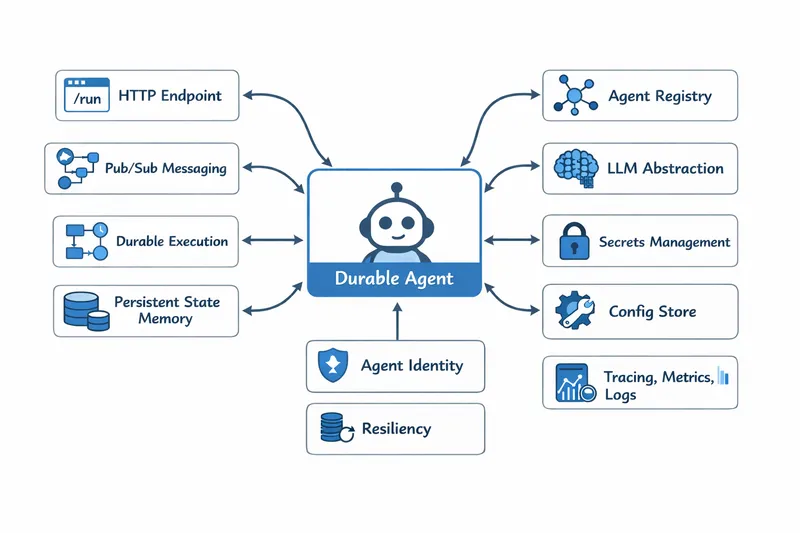
A production ready durable agent with Dapr
In this post, I'll show how to build a durable, secure, operationally ready AI agent using 10 lines of Python and a few YAML files. The entire agent logic fits in a few lines of Python whereas everything else such as state, retries, identity, workflows, observability is handled for you. No magic demo. No skipped code. A fully working examples you can run from here.
Install Dapr
To follow this example end-to-end, you'll need: Python 3.11+, Docker, and an OpenAI API key (or another LLM provider).
First, install Dapr. On macOS it is:
brew install dapr/tap/dapr-cli && dapr initThis sets up everything you need locally: the Dapr runtime, Redis, and Zipkin. For Windows and Linux, see how to install Dapr here.
Create a virtual environment
python -m venv .venv && source .venv/bin/activate && pip install dapr-agentsAt this point, you haven't written any agent code yet, but you already have durability, security, and observability available.
Create the tiniest durable agent
Now for the agent itself. This is the complete implementation of a durable agent exposed as a REST API:
from dapr_agents import Agent, AgentRuntime
import asyncio

agent = Agent(
    name="assistant",
    instructions="You are a helpful assistant."
)

if __name__ == "__main__":
    runtime = AgentRuntime()
    runtime.register(agent)
    asyncio.run(runtime.start())
Ten lines. That's it. No database setup, no message broker config, no retry logic, no auth code. And yet this agent:
- Persists state across requests and restarts
- Resumes mid-conversation after crashes
- Uses mutual TLS for all communication
- Exposes distributed traces out of the box
- Uses durable workflow execution under the hood
Configure the LLM provider
You need to tell Dapr which LLM to use. Create a file called llm-provider.yaml:
apiVersion: dapr.io/v1alpha1
kind: Component
metadata:
  name: llm
spec:
  type: openai
  metadata:
  - name: key
    value: "YOUR_OPENAI_API_KEY"
Configure the state stores
The agent needs two state stores: one for agent memory and one for workflow state. Create agent-statestore.yaml:
apiVersion: dapr.io/v1alpha1
kind: Component
metadata:
  name: agentstatestore
spec:
  type: state.redis
  version: v1
  metadata:
  - name: redisHost
    value: localhost:6379
  - name: actorStateStore
    value: "true"
And agent-wfstatestore.yaml:
apiVersion: dapr.io/v1alpha1
kind: Component
metadata:
  name: workflowstatestore
spec:
  type: state.redis
  version: v1
  metadata:
  - name: redisHost
    value: localhost:6379
Run the agent
Now run the agent with Dapr:
dapr run --app-id assistant --app-port 8001 --dapr-http-port 3500 --resources-path ./components -- python agent.pyYour agent is now running with full durability. Test it with:
curl -X POST http://localhost:8001/chat \\
  -H "Content-Type: application/json" \\
  -d '{"message": "Hello, who are you?"}'
What you get for free
With just 10 lines of Python and a few YAML files, you now have:
- Durability: State persists across restarts. Crash mid-conversation? Resume exactly where you left off.
- Security: All service-to-service communication uses mutual TLS by default.
- Observability: Distributed traces are exported automatically to Zipkin. View them at
http://localhost:9411. - Workflow execution: Under the hood, Dapr Agents uses durable workflows to ensure reliable execution.
View the dashboard
Want to see what's happening? Run:
docker run -d -p 8080:8080 daprio/dashboardThen open http://localhost:8080 to see your agent's state, components, and more.
Conclusion
Building production-ready AI agents doesn't have to mean months of infrastructure work. With Dapr, you write the agent logic and let the runtime handle everything else. The same agent code that runs on your laptop can run in Kubernetes with enterprise-grade reliability.
Check out the full example on GitHub and start building durable agents today.